Tagged 'VRay'

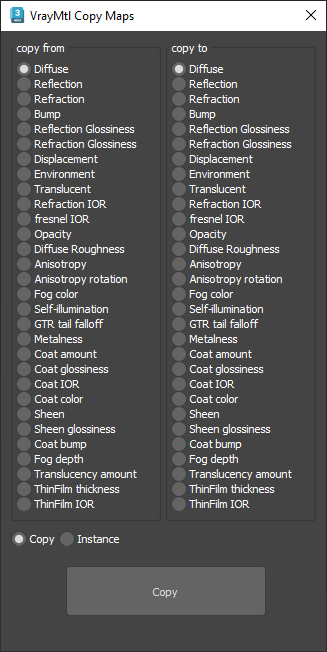
VrayMtl Copy Maps

1 vote

This script is intended to batch copy from slot to slot within the same material.

For example, you can copy the bump map to The displacement map or the diffuse map to the selfillumination map on multiple material at once.

You can copy the diffuse map to the bump or the Glossiness map and use my other script to add color correction with saturation  set to -100 and adjust other settings to fit your needs.

MultiMatte Tamer

1 vote

This script makes it very easy to apply Object ID's and store the MultiMatte Render Elements.

Objects are selected within the grid table. If objects and layers in your scene are not recognized by its name this script will not be much use.

  • Add Button will add another additional numbered ID button.

HQ Proxy Tools

0 votes

HQ Proxy Tools is a free 3dsMax script that helps you to adjust some settings of proxy objects. This script supports Vray render and Corona render.

Highlight features:

MAKE INSTANCES SIMILAR PROXIES: proxies have the same .vrmesh file or .cgeo file will be made instances. It will save memory and render faster.

INSTANCES TO VRAY/CORONA PROXIES: convert objects to vray/corona proxy and maintain their instances (The original proxy export from Vray will convert objects to proxies but also make them unique objects, which will increase your file size and render slower)

Vray Real Light

0 votes

This script allows you to create Vray lights of different type based on watt and calculates the luminous power and temperature of the light to be as close to reality.
This is extremely useful when lighting a scene where real light data need to be used.

The lights available are:
- Incandescent
- CFL
- Halogen
- LED Bulb
- HID Metal Halide
- HID Sodium Vapor
- HID Mercury Vapor
- Fluorescent tube
- LED Tube (warm white)
- Candlelight

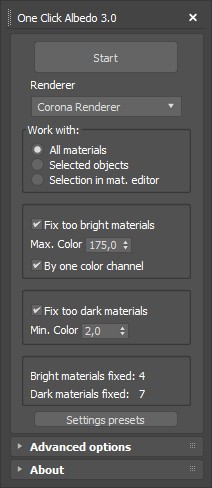
One Click Albedo for Corona render and V-ray

6 votes

Script Description:

This script is made to automatically adjust the albedo of materials in the scene. Too high albedo may slow rendering process down and make the materials look unrealistic. Especially when an object with a high albedo occupies the most part of frame area. Corona Render developers recommend to keep albedo of your materials under RGB 180 (For diffuse color or texture).

ColorsForCGArtists

1 vote

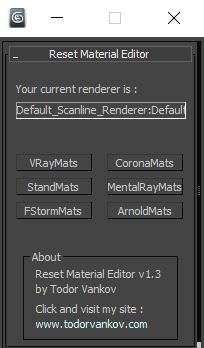
Reset Material Editor

2 votes

With this script you can reset all materials in your marerial editor to the Materials what you using in your workflow. For now you can reset to Standart marerials, Vray materials, Corona materials, Mental Ray, FStorm, or Arnold materials.
This script is tested at 3ds max 2016 and 3ds max 2021.

Version 1.0
- reset to Standart marerials
- reset to Vray materials
- reset to Corona materials
- reset to Mental Ray

Version 1.1
- reset to FStorm marerials

Version 1.2

FS Scene Converter (FStorm)

6 votes

FS Converter is a scene convertor to come back from FStorm renderer or to only convert some objects.

This converter allow to convert all the Fstorm renderer feature to Vray or Corona and Redshift.

It's not a simplicity converter, it's keep all the compatible settings...
Compatible: Fstorm Camera, Fstorm materials, Fstorm proxie, Fstorm Lights (including SunLight), Fstorm Displacement...

Convert all the scene or only selected Object... See how many instance it's necessary to convert...

Real time informations for the convertion state.

Material Texture Loader

7 votes

Description
  The Material Texture Loader loads in textures and instantly creates advanced materials.
  Use pre-defined or customized map and material settings to build re-usable material setups.
  Fully supports Vray, Corona, Redshift, Arnold, FStorm, Physical, Octane, and Standard map and materials.
 
Main Features

  • Automatic texture channel recognition 
  • Parameter linking for all texture mappings
  • Predefined Color-spaces: ACEScg - sRGB - linear-sRGB - Raw - Gamma - Auto
  • Mapping: Tiling - Real-world - Tri-Planar -  Random Rotation - Spherical
  • Live edit settings and disable channels
  • 2-Sided materials
  • MaxScript commands
  • UDIM map loading
  • Drag and Drop
  • Presets

Get it on Gumroad
Latest version: 1.830

Easy Peasy 2

3 votes

Cheetah!