ScriptSpot is a diverse online community of artists and developers who come together to find and share scripts that empower their creativity with 3ds Max. Our users come from all parts of the world and work in everything from visual effects to gaming, architecture, students or hobbyists.
After a long stretch of development, Project Manager 4 is officially out — the biggest release in the product's history, and now with full 3ds Max 2027 support. The headline is AI Asset Classification. Your library gets sorted automatically — by object type, material, and style — no manual tagging.
Project Manager 4 — What's New Since v3
Changelog · 3ds Max 2016–2027
AI-Powered Asset Classification
Automatic categorisation of 3D models and textures by object type, material, form, and style — no manual tagging required
Runs entirely on your machine — no cloud, no subscription, your assets never leave your computer
GPU-accelerated background processing at low priority — won't interfere with rendering or active work
Reclassify specific folders or categories on demand — no need to reprocess the entire library
Scale across a team: multiple workstations share the same database and classify in parallel
Colour Tools
Find assets by colour — pick from a palette and instantly see matching models or textures
Perceptual colour similarity search — finds visually related assets, not just exact hex matches
Find Similar by Colour in the right-click menu for models and textures
Find Similar
Find similar by content — AI matches 3D models by style, shape, and visual look
Find similar by colour palette — matches assets to a reference image or mood board by dominant colour proportions
Smarter Search & Filtering
Multi-keyword search: "Chair, Glass" finds a file named Chair.max described as "glass"
Category filter correctly includes all subcategories — filtering Furniture also returns Furniture → Chairs → Dining
Combine category and material filters: find glass-and-metal tables, or wooden ones, in one click
Categorised / Uncategorised quick filters — see which assets still need attention
Gallery & 3D File Browsing
Three gallery tabs for .max files: Models, Materials, and External Links
Drag materials directly from the gallery into your open 3ds Max scene
3D viewport preview for FBX, 3DS, OBJ, and other formats — inspect geometry before importing
Edit external links inline — fix or replace missing textures without opening the .max file
Zoom & Pan for images — inspect textures at full resolution inside Project Manager
Migration & Compatibility
v3 and v4 share the same database format — point v4 at your existing library and go; no rebuild required
Run v3 and v4 side by side on the same team; supported from 3ds Max 2016 through 2027
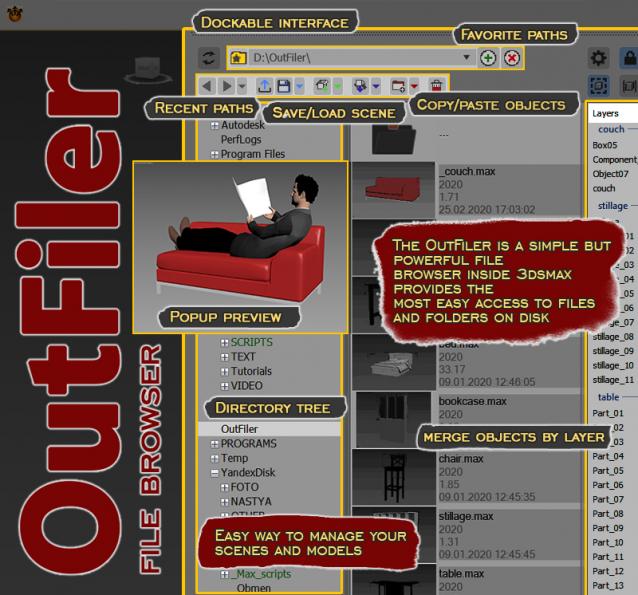
The OutFiler is a simple but powerful file browser inside 3dsmax that completely replaces standard save/load/save selected/merge/import/export dialogs. I believe folder tree much more comfortable and transparent.
The OutFilers provides the ability to quickly find the necessary folders, save the history of movements along them with back/next buttons and recent list and the favorite paths for quick access to working scenes.
The PBR Materials Generator is a powerful add-on for Project Manager and Materials Manager designed to expedite the creation of high-quality PBR materials. It empowers users to batch generate materials using custom settings and presets, all within the familiar Project/Materials Manager interface.
Esr mini browser is another inhouse script that i wrote for my daily basis works.Usually 3d artists work with many folders contains such as textures, materials , referances etc.With this tiny script you can save your favourite folders path,maxscipts full path and also software full path in a list.So you can launch all this paths in the list whenever you want. For complete usage please watch the video.
This tool simply helps organize, run, and edit your maxScripts more quickly. Quickly create a menu of your favorite scripts. Then place this menu anywhere you choose in the max. To change the currently selected name in the list. Just type in the top text box and press enter. Note that the .ms file name remains unchanged if you do this.
A tool that scans ms scripts and create a function index for them on the fly. The index is alphabetically sorted and can be filtered easily to quickly navigate through. You can open a script and jump to the line where the function is defined, with one click.