Tagged 'vertex'

Macro Snippets

26 votes

Show Vert Nums
Quick Z Direction
Distance to Clipboard
Angle to Clipboard

UniRemover

24 votes

And all this works by single button

v.10.61 изменена для быстродействия функция удаления рёбер вместе с вершиной. the function of removing edges along with a vertex has been changed for speed.
v.10.6 Fixed bug of convert to poly (Previously, on highpoly objects, after the conversion, there was a terrible braking in vertex mode)

PolyRotor

23 votes

PolyRotor is a modeling script that based on drag & drop.

PolyRotor make it possible to select vertex, edge and faces automatically.

But it should be in Editable Poly Mode.

Conform to Spline

22 votes

This script allow you conform(snap) selected verticies to a spline

Vertex to shape

21 votes

This is a script I did for a co-worker. It takes a vertex selection and turns that into a shape. It is the same as taking an edge loop and converting it to a shape but with less button clicks. Actually that is how it is scripted as well. It takes a vertex selection and converts it to a edge selection and then shrinks it to get the right edge loop. Then it just converts the edge to a shape. Pretty simple but it might help your work flow if you need something like this often enough.

Override -Selection Mode- & -Convert Selection- in EditablePoly/UnwrapUVW

19 votes

This script override selection mode in EditablePoly/UnwrapUVW AND allow to Convert subobject selection to an another in EditablePoly and Unwrap

Hit 1 or 2/3/4/5 ==> go in vertex/edge/..() mode
Re-hit 1 or 2/3/4/5 ==> go in object mode and you can select another object!
I have added a line, with "Max modify mode", like this, if your are not in "modify panel" when you select an object and hit 1 to set vertex mode, the script go automatically in the panel "modify"

Install:
Go in Customize User Interface, Group "Main UI", Category "zOffTy Tools" and set
1 for epoly_vertex

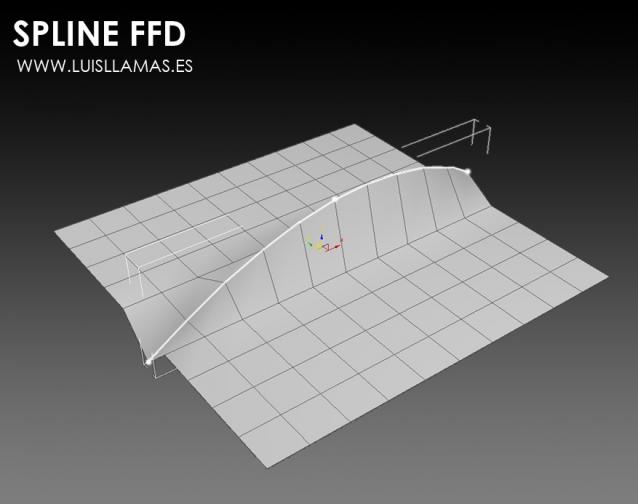
Spline FFD

19 votes

Spline FFD is a tool that allows you to move multiple vertices at once, moving the points of a spline.

New 1.1: Added mode that preserves the original distance between vertex.

With Spline FFD you can select a number of points on a mesh and creates a spline that passes through these points. By moving the points of the spline, the original mesh vertices move properly.

VertexTools

15 votes

Two simple scripts for simplifying work with spline vertices.

  • Connect Two Vertices - connects two ending vertices with new segment.

  • Select First Vertex - selects first vertex in selected spline sub-object.

Connect Always

14 votes

By default, Max has two separate commands for Connecting Edges and Connecting Vertices. You had to have two menus for both of them.With Connect Always, you just have to select the vertices/edges and hit "Connect Always"

Here is the code if you dont want to download:-

macroscript Connect_always
Category: "Butt tools" buttonText: "Connect Always"
(
$.EditablePoly.ConnectVertices ()
$.EditablePoly.ConnectEdges ()
)

The category and buttontext is needed if you want to put it in a menu or quad.

[CREDIT}

LiveMeasure

14 votes

Measure and show edges length, segments length and faces area in real time. Work with Splines, Editable_Poly and  Editable_mesh objects and Edit_Poly modifier.
--        In Polygon/Element sub-object level will show the selected faces area in generic units only.
--        In Edge/Border sub-object level will show the length of selected edges in user defined units.

Syndicate content