Tagged 'modeling'

Edges From Vert To Vert

11 votes

Tool for edge selection from vertex to vertex(point to point)
Has interactive update so when you move the mouse over the selected object you can see what would be the edge selection. By clicking you add the current vertex. By clicking + ALT over selected vertex you deselect it. The red vertices are the selected ones - the blue is the currently selected vertex. When you click RMB the tool stops and the edge selection from the SELECTED vertices stays - if you click the RMB with ALT you clear the selection.

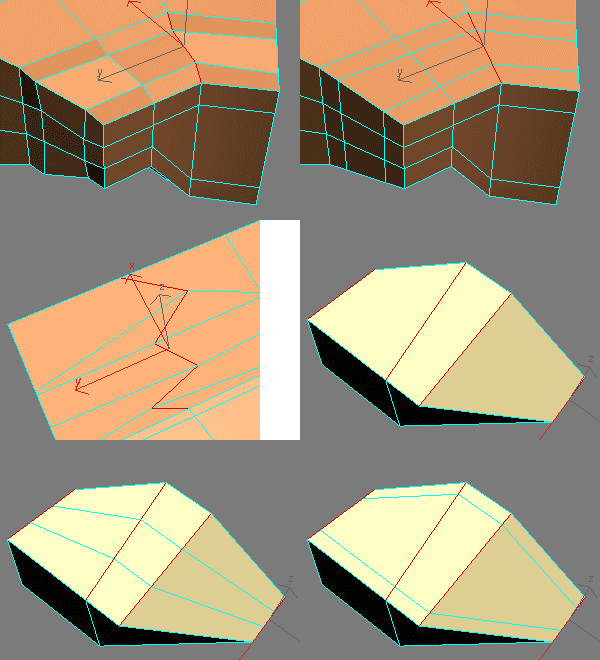
EdgeStraighten

24 votes

EditableMesh

5 votes

Just a few tweaks to the origional. I simplified things a little. For example - I made the collapse command - one command. The script is smart enough to figure out what you want collapsed by what mode you are in. I also made it so that if a tool isn't available because of what mode you are in - it stays invisible. I also added Ignore Backfacing.

EditablePoly

2 votes

A lot of the same thing that I did with the Editable Mesh script - except I added a few more things. I added the abillity to toggle on and off the NURMS subdivisions and put in 3 subd levels that you can put wherever.

eMesh

3 votes

"eMesh is a 3ds max 4 script to simulate real world erosion an terrain surfaces. At this version emesh only calculates water erosion"

EPoly MatID Randomizer

7 votes

Randomizes the material IDs on an editable poly object. Allows you to exclude certain polys (like if you have random stones set in uniform grout) by setting their ID outside the range of random values.

EPolyCounter

2 votes

"Simple tool that displays the triangle face count on Editable Poly and Editable Mesh objects. You can select multiple objects at once - and it works in Sub-Object mode.
Original script by Fred Ruff"

Erase Edgeloop Macro

1 vote

"Automates the process of selecting an edgeloop - converting to verts - deleting edges - EraseClean verts into a quick little button..."

Erase Vertex

3 votes

This works almost like the nendo vertex collapse tool. Differences: When deleting neighbouring vertices - the new polygon will be clear (no edges going through it - only around). This results in the following thing: When deleting vertices along a complete (circular) edge loop - the resulting object will look funny

Erase Vertex(Nendo Type)

6 votes

This works almost like the nendo vertex collapse tool. Differences: When deleting neighbouring vertices - the new polygon will be clear (no edges going through it - only around). This results in the following thing: When deleting vertices along a complete (circular) edge loop - the resulting object will look funny

Syndicate content