Tagged '3dsmax'

3DS Max - Plugin - CopyPasteDWG

0 votes

This plugin allows the user to copy-paste objects from an opened AutoCAD file into 3DS Max.
The plugin works with multiple opened CAD files, it recognizes the last copied objects.
The script offers many filtering options for the imported objects like:
1-removing the prefix "Layer:" and this will make it easier to select objects by name
2-remove any material applied to the imported objects
3-remove the Block/Style Parent hierarchies
4-select the imported objects when importing is done
5-turn the imported objects into a group

Quick Link Lock Tool

1 vote


Tronotools Quick Link Lock Info

A small tool I created to more quickly handle link locks. You can globally lock or unlock everything with one button. Same with just movement, rotate or scale separately. Supports multiple objects and behaves just like the normal 3dsMax Hierarchy->Link Info System.


v1.1 - Fixed a bug when no objects were selected.

Reindeer

1 vote

Reindeer 2018 Released!

The friendly node based Render Manager and Scene Automator for 3dsMax just got an update.


Easily create multiple versions of your renders using the all new Selector workflow. Perfect for product configurators and much more. Reindeer 2018 introduces new nodes, more script templates, Redshift support, VRay VFB support, more callback options, and more. With Reindeer it's all just one push of a button. Keep it simple or build advanced setups, it's your choice. Reindeer let's you automate the boring stuff so you can focus on what matters, Animation, Shading and Lighting.

What's New?
Selectors


3DS MaxTrackBar Markers Script

3 votes

This script marks specific frames in an animation, adds a note to each marked frame and save the list as xml.
The script is quite useful when juggling scenes and need to keep track of requiered changes, or team members need to share info among them.
The list will not be saved with the scene, it needs to be saved externally as xml to be used when re-opening the scene.

TrackBarMarkers XML AE v2.1.6 :

  • New AfterEffects script which imports and exports xml.
  • Bake Splines Animation

    0 votes

    Bakes the animation of one or more selected shapes to vertex animation, with a series of options.

    Set: animation range (start/end), sample rate, action over original shapes (hide/delete/none).

    Support for: modifiers animation / hierarchy animation / transform (position/rotation/scale) animation.
    Pending support for space warp animation.

    Compatible with 3dsMax 2012 and higher.

    Slate - View Selected

    21 votes

    This free MaxScript instantly displays the material of the selected object (or objects) in a new view in the Slate Material Editor. Currently, Slate does not have a quick and easy way to do this. Slate View Selected allows you to create multiple views as well. You can close the script dialog box and the script will continue to run until you re-run the script where you can stop it. In the dialog box you can also set a "display max" so that if you select a large number of objects, Slate won't waste time collecting and displaying all the materials used by objects in the selection.

    Obj-Selector of obj without a UVWMap modifier

    18 votes

    This short script allows the user to automatically select all
    objects in a scene that do not have a 'UVW Map' modifier applied to them.
    This is useful especially for users who work with imported data from AutoCAD. The imported data contains uvw information, but in most cases the uvw coordinates need an overwork. This script makes it easier to isolate those objects in the scene.

    Simply drag and drop the script into your 3ds max viewport after the import process is finished, et voilà.

    Fixes UVW mapping imported in 3ds max from maya

    38 votes

    hi all

    this was done for a very certain task...
    i'm working with team mates who work in maya platform while most of the work is done by 3ds max and it plugins..and i work on both but better at 3ds max..

    If you ever tried to export an FBX file from maya to max you will suffer from two or three basic things,
    1: all materials are phong with high specular
    2: some maps were defined in maya in som way that max understands them as maps with map channel != 1,then the need a uvw mapping
    3: some faces problems
    -----
    fixing these in a very big scene could be very painful

    Move to Surface - Updated

    0 votes

    I didn't create this script from scratch, this is an updated version of the script you can find in the maxscript documentation in the section called: How To - Practical Examples.
    http://docs.autodesk.com/3DSMAX/16/ENU/MAXScript-Help/

    I added two lines of code to that script to fix the problem of pivot points location
    for the objects that going to be dropped. Those two lines will shift the pivot point
    to the center of each object's lower part.

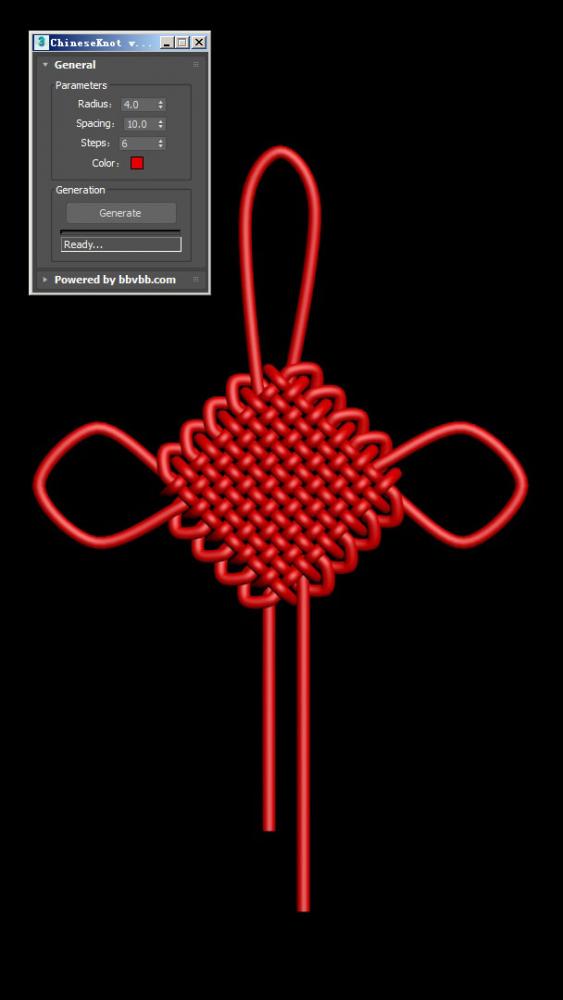
    ChineseKnot

    3 votes

    MAXScript for build Chinese Knot model.

    Syndicate content