Tagged 'Material'

SIGERSHADERS VPlastic2

66 votes

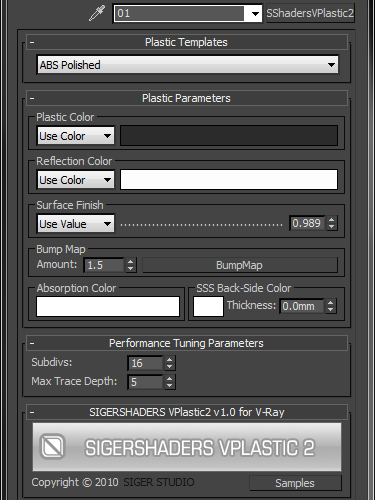
The SShadersVPlastic2 is integrated right into 3ds Max and becomes one of the Material options available within the Material Editor. It is expertly programmed Shader that control many components of the V-Ray Material based on specific Material criteria. You can customize everyone Preset flexibly and, the main thing, quickly, to adapt for the needs. This Shader exposes only the settings that are important to creating a highly realistic and optimized material.

Key Features

Vray ToolBox

6 votes

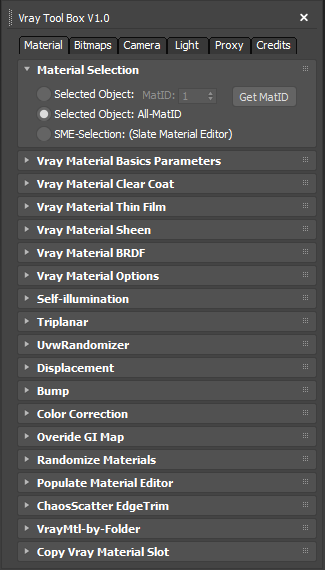
It is a Vray version of my script "Corona Automator" It has a lot of features for materials, bitmaps ,cameras, lights and proxies.

Its main goal is to automate property tweaking, and save time on repetitive tasks.

for now the material part is focused on Vray Materials , it won't work on other kind of materials like fastSSS or other materials.

Transfer Materials

1 vote

Transfer materials, object properties (standard and Vray) and modifiers between objects based on names, vertex count or transfom. Can work between multiple Max instances. Handy for transfering materials from lookdev to lighting scenes with caches.

Installation:

just drag&drop to max and the you can find the script inside ProgressiveFX category

Changelog:

v1.2

- bugfixes

- possibility to remove string from object name before copy

dwTools

16 votes


dwTools is a set of few handy scripts for 3dsmax, that I made to speed up repetitive operations at work.

Updates:
- some UI changes
- added: Assign Maps for materials of selected objects
- added: dw_tools_starter.mcr so script could be assigned to hotkey
- added: postfix customization for Assign Maps
- added: DX toggle for materials of selected objects
- fixed: crashing after 2nd check for SubMultiSub

Mass Image Populate

17 votes

A Max Script to populate selected objects with a series of sequential images.


Copy and Acquire

0 votes

This is a simple maxScript to make a copy from a base object and Acquire Position Rotation Scale and Material from the targets.

copy and acquire v1.0

UV Cage Rendrer

0 votes

#

This script is now a part of CheckMate tools by POPA_3D

 please checkout 

http://www.scriptspot.com/3ds-max/scripts/checkmate-tools-by-popa-3d-tur...

Random Material

3 votes

Select a root object with the material you want to copy. Adjust all values that you want and select the other objects. Press 'Let's go' and randomized materials are copied to the selection. Keep in mind that a simple material adds about 12.450 bytes to a MAX-file. You can choose between 1 and 64 random materials to be created.

Quad enhance

32 votes

These few scripts adds some new functions to your quad menu like hiding,selecting and isolating by objects layer or material.

Slate - View Selected

21 votes

This free MaxScript instantly displays the material of the selected object (or objects) in a new view in the Slate Material Editor. Currently, Slate does not have a quick and easy way to do this. Slate View Selected allows you to create multiple views as well. You can close the script dialog box and the script will continue to run until you re-run the script where you can stop it. In the dialog box you can also set a "display max" so that if you select a large number of objects, Slate won't waste time collecting and displaying all the materials used by objects in the selection.

Syndicate content