Tagged 'Material'

Attach by Same Material

2 votes

Attached all geometry with the same material to the currently selected object. This collapses to editable poly first, so make sure you're cool with that before you click. :)

Created for merging objects in heavy architecture scenes recieved in Max format with large numbers of individual objects.

PBR Material Importer

1 vote

postimage
A script i made during production that requiring importing a lot of PBR map into Vray.
This script require at least 4 map to run: Diffuse,reflection(specular),glossiness and normal.
It will create a Vray material with setting to look indentical to Quixel 3DO or substance viewport.
If your map have Mixed Dielectric and Metal , you will need to export Metalness Map.

ProceduralTextureBaker

11 votes

Bakes procedural textures as bitmaps rendered to a specified size. Designed as tool to aid in exporting materials to other 3d apps. For instance you might be using a nested tile / bitmap which of course can't be easily exported. Simply pick the map size you want to bake and all your procedural maps will be baked (rendered) as bitmaps and replaced in your scene.

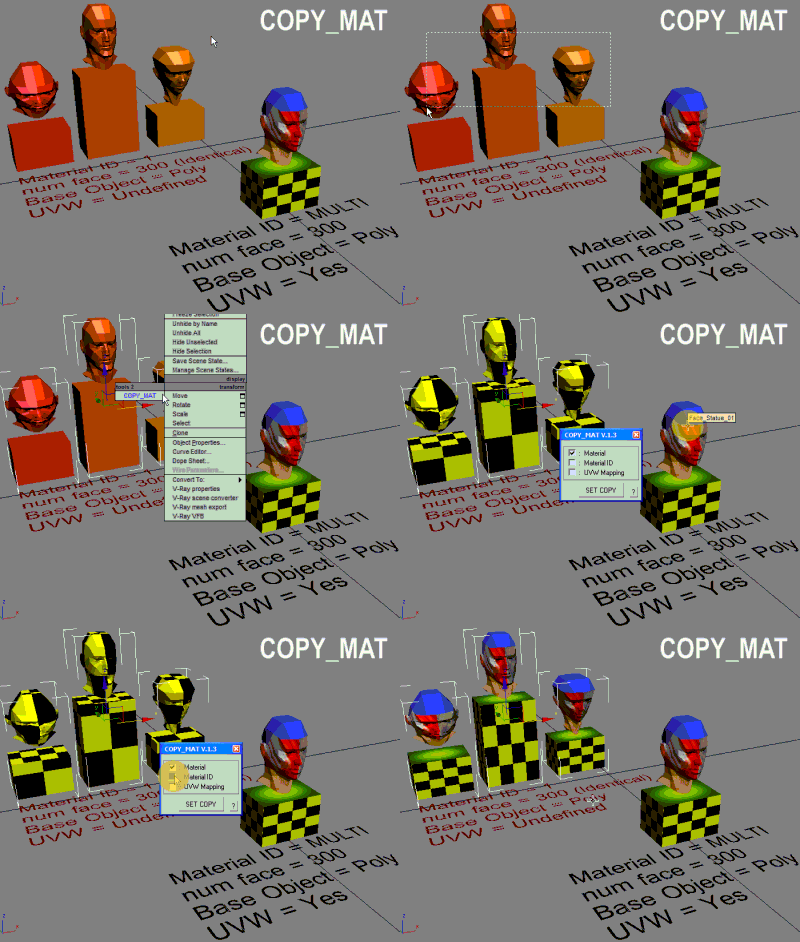
COPY_MAT

31 votes

Quick copy-paste object material to another object.

RDG PSD2Mat - a pipeline tool

23 votes

Hello,

I would like to invite you to take a look at our new pipeline tool:
PSD2Mat - a pipeline tool

PSD2Mat is a production proven connection between Adobe PhotoShop® and
Autodesk 3D Studio MAX®. This maxscript converts layered PSD Files into
a Scanline or VRay, Brazil and Mental Ray Material. Named layers are converted to bitmapfiles
and assigned to their respective material slots.

id_changer

7 votes

Selecting or applying material ID's with one click!
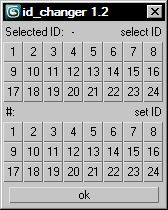
Rollout with button grid for selecting or setting material ID's of selected polys up to ID 24. Works with editable poly only. Displays selected poly's material ID if they're same.
Ctrl + click add specific IDs. Alt + click deselects specific IDs.

Examples:
Want to set some specific material ID up to 24 to selected polys? One click.
Want to select polys with same material ID's of selected poly? One click.

Textures2materials

3 votes

poster

Textures2materials is a very handy plugin which can turn multiple textures into materials at once (into multi-material or into multiple material slots). It also checks if your textures have a bump versions and load them as bump. "Must have" plugin for any 3D designer.

MissingTextures

7 votes
  • Checks the scene for missing Bitmap textures.
  • Shows offended material - optionally searches all local and network drives for the bitmap - and can load the materials with missing maps into Material Editor.
  • Fuzzy Scan - the script can now find bitmaps with slightly different names as possible replacement options.

egzVRayMaterials

7 votes

A collection of scripted material plugins that extend the VRay material. These materials replace the user interface with one specifically optimized for each material. In addtion there are things going on beneath the surface to make sure settings that affect each other do so in the correct way.

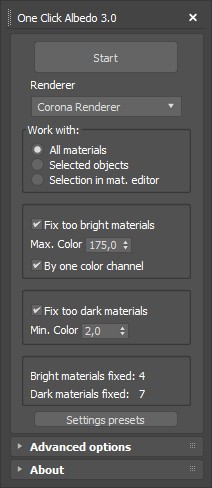
One Click Albedo for Corona render and V-ray

6 votes

Script Description:

This script is made to automatically adjust the albedo of materials in the scene. Too high albedo may slow rendering process down and make the materials look unrealistic. Especially when an object with a high albedo occupies the most part of frame area. Corona Render developers recommend to keep albedo of your materials under RGB 180 (For diffuse color or texture).

Syndicate content