Tagged 'workflow'

Project Manager

597 votes

After a long stretch of development, Project Manager 4 is officially out — the biggest release in the product's history, and now with full 3ds Max 2027 support.
The headline is AI Asset Classification.
Your library gets sorted automatically — by object type, material, and style — no manual tagging.

Project Manager 4 — What's New Since v3

Changelog · 3ds Max 2016–2027

AI-Powered Asset Classification

  • Automatic categorisation of 3D models and textures by object type, material, form, and style — no manual tagging required
  • Runs entirely on your machine — no cloud, no subscription, your assets never leave your computer
  • GPU-accelerated background processing at low priority — won't interfere with rendering or active work
  • Reclassify specific folders or categories on demand — no need to reprocess the entire library
  • Scale across a team: multiple workstations share the same database and classify in parallel

Colour Tools

  • Find assets by colour — pick from a palette and instantly see matching models or textures
  • Perceptual colour similarity search — finds visually related assets, not just exact hex matches
  • Find Similar by Colour in the right-click menu for models and textures

Find Similar

  • Find similar by content — AI matches 3D models by style, shape, and visual look
  • Find similar by colour palette — matches assets to a reference image or mood board by dominant colour proportions

Smarter Search & Filtering

  • Multi-keyword search: "Chair, Glass" finds a file named Chair.max described as "glass"
  • Category filter correctly includes all subcategories — filtering Furniture also returns Furniture → Chairs → Dining
  • Combine category and material filters: find glass-and-metal tables, or wooden ones, in one click
  • Categorised / Uncategorised quick filters — see which assets still need attention

Gallery & 3D File Browsing

  • Three gallery tabs for .max files: Models, Materials, and External Links
  • Drag materials directly from the gallery into your open 3ds Max scene
  • 3D viewport preview for FBX, 3DS, OBJ, and other formats — inspect geometry before importing
  • Edit external links inline — fix or replace missing textures without opening the .max file
  • Zoom & Pan for images — inspect textures at full resolution inside Project Manager

Migration & Compatibility

  • v3 and v4 share the same database format — point v4 at your existing library and go; no rebuild required
  • Run v3 and v4 side by side on the same team; supported from 3ds Max 2016 through 2027

Performance & Other Fixes

  • Significantly improved overall performance — faster navigation, filtering, search, and file/folder operations
  • Live sync in shared database mode — changes by colleagues appear automatically without reloading
More about new features   Project Manager version 4
 

ToTex Render To Texture

205 votes

TOTEX v3

Moved to github

The project Totex has been moved to gihub so community development is easier

https://github.com/svenfraeys/totex

New Version 3.0

"ToTex" is a render to texture script that gives you the ability to quickly bake multiple textures to a folder. ToTex will start baking all the selected objects with the chose selections and will save it to the specified folder

New features (3.0):


- Stability : Bigest issue with ToTex 2.0 was the stability. The ToTex engine is recreated for stronger stability, focussed on high speed expanding.
- Improved User Interface : More compact and focussed on usability
- Auto-Update functionality : Get directly the new features
- New maps in development : xNormal, instant preview and photoshop connection.


New features (2.4):

- new improved UI: much more clear design with thumbs
- Element map now works!

New features (2.3):

- Improved UI: a lot more compact design, better overview and more dynamic system
- Expert Mode: press on the *-button at the top, this will show all the maps of totex, you can easily toggle this on and off

New features (2.2):

- Max Merge: Merge a max file when baking, for embedding complex lightscenes, after the bake ToTex go back to your start state
- Render Preset: Override the renderpresets when baking with ToTex, you can choose between three RPS files that you can override to your own render settings.

New features (2.1):

- Preview : with realtime directX shader (Xoliul shader - http://www.laurenscorijn.com/)
- Light Trace Ambient Occlusion
- Gradient Map
- Mask Map
- For Each Material ID
- Selection Bake : Bake only the selected faces


FlyWiz - Vray Flythrough animation wizard 1.1

57 votes

This tool manages for you all the boring stuff to achieve a flythrough animation with Max And Vray.
All changes are made in the engine to help you control and render each necessary step.

Finally it can also do all the process in one click ! 

XUI Floater

18 votes

A compacted floater that is useful when working in Expert mode in 3dsmax. I created this to just speed up my workflow. Lots of simple UI buttons and categories. Also right-click options to run more commands. Watch the simple video to understand the use and workflow.

FilePathFinder Pro & Light versions

410 votes

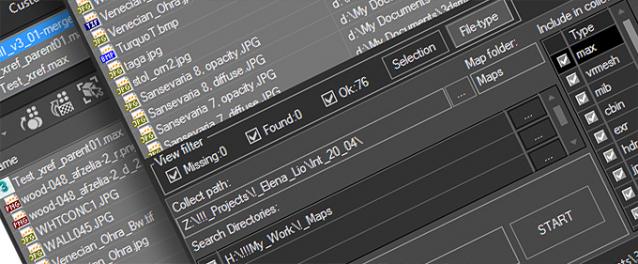
Using the FilePathFinder you can be sure that you have complete control over external links into your scenes.

Asset tracking features include support for XREF files and easy linking with external files.

Using the FilePathFinder (and Batch Render&Relink), you can search for missing assets and relink external files.

In addition, files that are linked to selected objects are displayed in Interactive Mode, and bitmap textures can be toggled and placed within the Material Editor.

Also with this tool, you can easily make an archive a 3ds Max scene.

Note that FilePathFinder supports the highest number of asset types of any plug-in.


The Batch Render&Relink tool helps manage your asset files into the 3D model and material libraries in Batch Mode.

BR&R is capable of rendering thumbnails for 3D models, materials, and IES photometric files.

Batch Mode makes for an easy way to gather and compile many assets at once.


The new version of FilePathFinder is released with support to 3ds Max 2026

and many new features that improve managing scene assets

FilePathFinder Pro version 4.17.01

  • Adds support to 3Ds Max 2026
  • Play IFL, and animated GIFs directly in the list view
  • Play IFL and animated GIFs in the external Asset Viewer
  • Ability to change selected assets directly from the Asset Viewer using keyboard shortcuts
  • Adds an ability to include/exclude search directories by filename
  • More accurate material/texture placement in SME
  • Drops support to light theme
  • Fixes an issue with including/excluding search directories by filename
  • Fixes an issue with searching, relinking, collecting, and archiving the content of IFL files
  • Fixes an issue with relink assets in batch mode for Demo version [Batch Render&Relink]
  • Fixes an issue with renaming external scene links with status #Found
  • Fixes some issues with relink assets using exclude directories
  • Fixes a bug with relinking assets in huge scenes
  • Fixes a bug when using the tool together with Materials Manager and Models Manager
  • Some other optimizations, fixes and speed improvements

Quick Collapse

34 votes

QuickCollapse is a maxscript Struct with a few functions to speed up collapsing large numbers of objects, it provides feedback in the listener window so you can see progress as it goes.

Run script will trigger ‘CollapseSelected’ on your current selection. there isn’t much Error Checking involved, so filter your selection for meshes, and remeber that it SHUTS UNDO OFF for the collapse so that we dont have RAM overruns on large objectsets, so save/hold first eh?

RappaTools v1.92

558 votes

RappaTools3 and RappaTools2 available... see new website: http://remusjuncu.com/rappatools/

See RappaTools3 PlayTime 02 Here  and RappaTools3 PlayTime 03 Here !

Tertium Organum CollectoREX

25 votes

TOCollectoREX is utility replacing and supplementing standard Resource Collector.
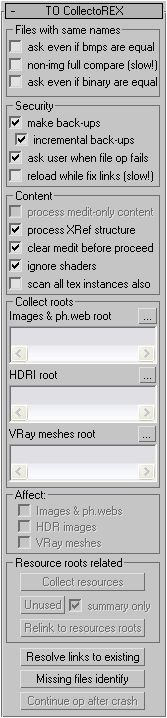
**IMPORTANT**
After more than 10 years I've finally decided to turn collectorex from internal utility to a public open source project. In the beginning it was paid utility, now it's completely free and not binded to hardware. Please feel free to edit code and commit here, use it as you like, distribute it freely, I just don't allow to sell my software as your own. That's it.

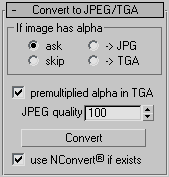
It allows gather all scene resources together, put them in specified place, find where all missing files are used (exactly in which objects). It can find which files in specified place are no longer used by scene. It also allows convert bitmaps to jpg, etc.
Utility supports XRefs of all types and processes all scenes linked to current.
Unlike all other such scripts, it really finds all resources (images, HDR-images, Vray meshes, IES-files, shaders), not only some bitmaps (Relink Bitmaps, Resource Collector). Below there is full description.
Interface:

JJTools

30 votes

I have used 3DS Max on a daily basis for almost 10 years now and I took an interest in MAXScript almost immediately. The learning process was slow but I was able to pick the brains of my very talented colleagues. I began by studying 3ds Max’s ‘Listener’ and with time and confidence I tentatively created short scripts of my own. Many years later, and with a lot of help from my friends, I am in the fortunate position of being able to create my very own 3ds Max tools.


http://www.jimjagger.com/Pages/Tools/index.htm

Most of my scripts are workflow improvements in an effort to avoid repetitive tasks. With any luck, they may save you some time too.

SolidRocks

569 votes

SolidRocks V2.4 is out !!  Support for V-Ray 6 (hotfix 2) and  MAX 2013-2023 ! 

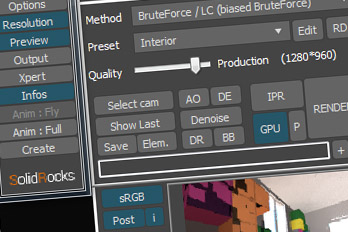
SolidRocks adjusts and optimise all needed Vray parameters to reach the best rendertime/quality ratio.

Learn Vray progressively, see in realtime changes made by SolidRocks when you change resolution/quality.

SolidRocks includes new tools for both VrayMasters and Beginners: