Tagged 'Rendering'

FFX Render

70 votes

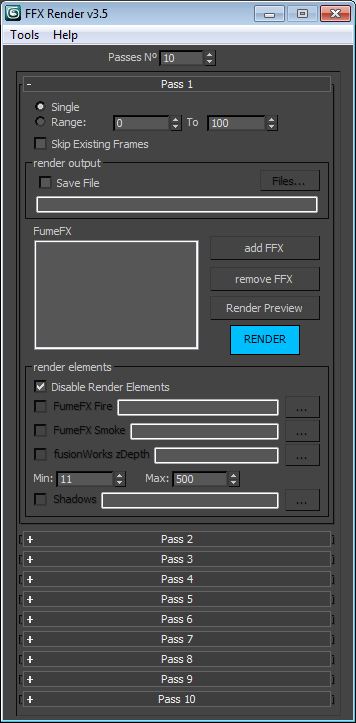
This script allows you to split your FFX containers in several passes. You can also add objects in the Matte tab, and they will get the matte/shadow material. It supports up to 10 passes. This script makes changes only at render time.

Version 4.0 updates:
-Added "Snapshot before Render" feature.

Version 3.5 updates:
-Added load/save system.
-Fixed minor bugs.

Version 3.0 updates:
-Added the Render Manager tool which allows you to choose which pass to render consecutively.
-Fixed Render Preview alpha problem.

Project Manager

597 votes

After a long stretch of development, Project Manager 4 is officially out — the biggest release in the product's history, and now with full 3ds Max 2027 support.
The headline is AI Asset Classification.
Your library gets sorted automatically — by object type, material, and style — no manual tagging.

Project Manager 4 — What's New Since v3

Changelog · 3ds Max 2016–2027

AI-Powered Asset Classification

  • Automatic categorisation of 3D models and textures by object type, material, form, and style — no manual tagging required
  • Runs entirely on your machine — no cloud, no subscription, your assets never leave your computer
  • GPU-accelerated background processing at low priority — won't interfere with rendering or active work
  • Reclassify specific folders or categories on demand — no need to reprocess the entire library
  • Scale across a team: multiple workstations share the same database and classify in parallel

Colour Tools

  • Find assets by colour — pick from a palette and instantly see matching models or textures
  • Perceptual colour similarity search — finds visually related assets, not just exact hex matches
  • Find Similar by Colour in the right-click menu for models and textures

Find Similar

  • Find similar by content — AI matches 3D models by style, shape, and visual look
  • Find similar by colour palette — matches assets to a reference image or mood board by dominant colour proportions

Smarter Search & Filtering

  • Multi-keyword search: "Chair, Glass" finds a file named Chair.max described as "glass"
  • Category filter correctly includes all subcategories — filtering Furniture also returns Furniture → Chairs → Dining
  • Combine category and material filters: find glass-and-metal tables, or wooden ones, in one click
  • Categorised / Uncategorised quick filters — see which assets still need attention

Gallery & 3D File Browsing

  • Three gallery tabs for .max files: Models, Materials, and External Links
  • Drag materials directly from the gallery into your open 3ds Max scene
  • 3D viewport preview for FBX, 3DS, OBJ, and other formats — inspect geometry before importing
  • Edit external links inline — fix or replace missing textures without opening the .max file
  • Zoom & Pan for images — inspect textures at full resolution inside Project Manager

Migration & Compatibility

  • v3 and v4 share the same database format — point v4 at your existing library and go; no rebuild required
  • Run v3 and v4 side by side on the same team; supported from 3ds Max 2016 through 2027

Performance & Other Fixes

  • Significantly improved overall performance — faster navigation, filtering, search, and file/folder operations
  • Live sync in shared database mode — changes by colleagues appear automatically without reloading
More about new features   Project Manager version 4
 

ToTex Render To Texture

205 votes

TOTEX v3

Moved to github

The project Totex has been moved to gihub so community development is easier

https://github.com/svenfraeys/totex

New Version 3.0

"ToTex" is a render to texture script that gives you the ability to quickly bake multiple textures to a folder. ToTex will start baking all the selected objects with the chose selections and will save it to the specified folder

New features (3.0):


- Stability : Bigest issue with ToTex 2.0 was the stability. The ToTex engine is recreated for stronger stability, focussed on high speed expanding.
- Improved User Interface : More compact and focussed on usability
- Auto-Update functionality : Get directly the new features
- New maps in development : xNormal, instant preview and photoshop connection.


New features (2.4):

- new improved UI: much more clear design with thumbs
- Element map now works!

New features (2.3):

- Improved UI: a lot more compact design, better overview and more dynamic system
- Expert Mode: press on the *-button at the top, this will show all the maps of totex, you can easily toggle this on and off

New features (2.2):

- Max Merge: Merge a max file when baking, for embedding complex lightscenes, after the bake ToTex go back to your start state
- Render Preset: Override the renderpresets when baking with ToTex, you can choose between three RPS files that you can override to your own render settings.

New features (2.1):

- Preview : with realtime directX shader (Xoliul shader - http://www.laurenscorijn.com/)
- Light Trace Ambient Occlusion
- Gradient Map
- Mask Map
- For Each Material ID
- Selection Bake : Bake only the selected faces


V-Ray Studio Setup Pro

255 votes

V-Ray Studio Setup Pro is a plugin for automating studio lighting setups for use with the V-Ray rendering engine and 3ds Max.

FEATURES

G.I. Toggle

11 votes

A simple script for mental ray, which will give you a toggle for Global Illumination that you can have in a toolbar, quad or floater.

I created this as I found myself often turning GI on and off to test various assets in a scene in isolation.

Update Shader Utilities for 3dsmax2015

72 votes

Hi Guys,

Shader Utilities Pro for 3dsmax2015 is released. Update and Bug Fix!

New Tutorial  in english !!!

- support Vray 2.x to mental ray
- support Iray Material  & MILA Layering Shader from NVidia
- Global Shader Optimizing: Reflection/Refraction, AO, CutOff´s, Bitmap Blur/Filtering ...
- Cleaner ( incompatible Maps, DWG, Revit import)
- Global Settings Optimizer (Sample Curve Technology only by Infinity Vision)

have fun!

Virtual GI v.0.3b

16 votes

This is the version 0.3b of the Virtual Global Illumination (VGI) script, and allows to simulate the Global Illumination outside.
Simply, a light sphere is created about to an object selected to simulate the bounce of the ray in the object.
VGI is very useful to preview some short animations in "Virtual GI" using not only the render Scanline but Mental Ray engine with very short times for the rendering! Optimum to illuminate integer scenes outdoor with a hot and suffused light.

Little Batch Render

33 votes

Vray - LittleBatchRender
Version 0.84

Description:
with the "LittleBatchRender"-script you can easily render multiple cameras in your scene with one Click
Features:


• correct autonaming for Render Elements
• NetRenderSupport
• Spawning can be disabled when rednering with NetRender
• consistent Naming for local and NetRender - no relinking in Compositing necessary
• Turning of and on individual Xrefs for individual Cameras

Photo Studio Pro+ for Vray

44 votes

Photo Studio


Photo Studio Pro (PS Pro) is a photographic exposure control tool for computer generated images. Since 3dsmax2016 physical camera is supported and new perspektive and DOF functions. The interface is designed to manage your exposure output. PSPro has some very special features like: realtime exposure or the simulation of the Av/Tv mode of a SLR camera. 


FlyWiz - Vray Flythrough animation wizard 1.1

57 votes

This tool manages for you all the boring stuff to achieve a flythrough animation with Max And Vray.
All changes are made in the engine to help you control and render each necessary step.

Finally it can also do all the process in one click !