Tagged 'Rendering'

FFX-Render-Manager

9 votes

Big scale effects require usually more than one FFX. Having a lot of FFX and holdout objects asks for a lot of memory. Limited memory means rendering in passes. Different lights and shaders per pass multiply the renderpasses again.

To setup a render, it takes some steps and usually you forget one and need to resubmit. That's why I wrote this script, that overviews everything and gives the ability to set it up fast.

I avoided using .NET intentionally, because in big scenes it sometimes takes a long time just to open a scripted tool.

QTO (Quick Tools Object) v.0.1

10 votes

This simple script, allows to accelerate the workflow in 3DSMax.
It assembles the normals tools of Selection, cloning, Hide, Freeze, Color, Rendering and Convert object in an only window allowing a fast search. Very useful for all the uses.

Virtual GI

22 votes

This little script, allows to simulate the Global Illumination outside.
Simply, a light sphere is created about to an object selected to simulate the bounce of the ray in the object.
Used for a little job, it was very useful to preview some short animations in "Virtual GI" using the render Scanline engine with very short times for the rendering! Optimum to illuminate integer scenes outdoor with a hot and suffused light.

Batch Camera Render

274 votes

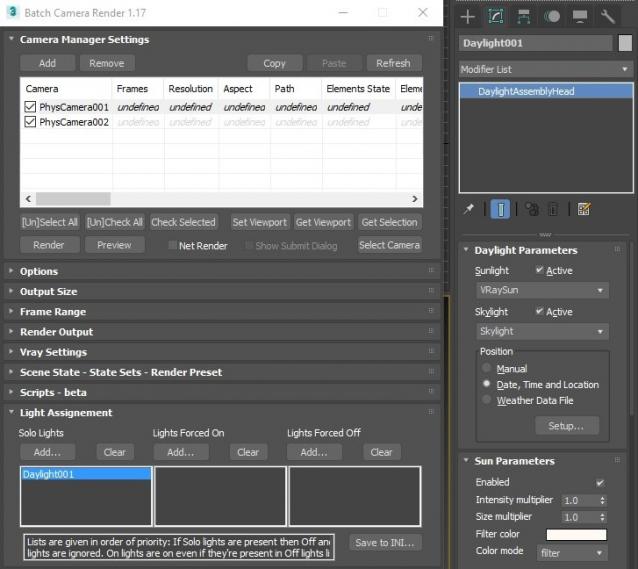
This script aims to replace standard 3dsmax's Batch Render and imitates Houdini Output Node workflow. Using it you can specify rendering parameters - frame size, frame number, output path - directly to camera object, so every camera in scene 'knows' what it intended to render. Additional functionality is Lighting Assignment - you can specify which light will be turn on or off for selected camera during the rendering.

1.19:

  • Support 3ds max 2026

1.18:

  • Support for 3ds max 2023 Update fixed

1.17:

  • Corona and Vray Sun inside Daylight System fixed (thanks to busseynova for reporting)

1.16:

  • CoronaSun supported inside Daylight System

1.15:

  • Don't Save Render Elements Checkbox (Thanks to antomor)
  • Limited support for camera objects in xref scene files (Only root objects in first level xrefs. Cameras in nested xrefs not supported)

1.13 Bugfix:

  • Deadline submission should work now

1.12 New Feature:

  • Deadline support.
    Very basic imlementation, it allows you to submit your jobs on a deadline server. Enter deadline repository address and check "Use Deadline" checkbox. Other checkbox doesn't matter in this case ("Net render", "Show Submit Dialog").
    Probably it requires Deadline 3ds max Submitter installed. I didn't have a chance to check it on a clean machine.

1.11 Features and fixes:

  • State sets support added
  • "projectname" keyword added which resolves to project's folder name
  • other fixes and improvements

1.10.3b Fixes:

  • Crash when vray ir/lcache maps are set to auto-save
  • Region render was not set properly during the rendering

This is major update of the script, so it may not be as stable as before. Backup scenes or cameras at least before running this version. More information can be found here - 1.10b Multiple presets for each camera

Previous updates:

1.10.2b Fixes:

  • Problems with render elements paths
  • Copy/paste of render region settings
  • Properly convert render region values when change resolution

New features:

  • Multiple presets for each camera
  • New keyword %presetname% to support multiple presets
  • Distributed rendering checkbox added to vray common settings
  • Bugfix - Net render not starting after cancelling during local rendering.
  • Improved performance with scenes with lots of cameras
  • Added support of Vray RT as a production renderer
  • Added support of using MFRender script to render scenes through BatchCamera script.
  • Bugfix - Error was popping up sometimes during drag-n-drop
  • Bugfix - Render elements didn't render in certain conditions
  • Bugfix - Pre-render/post-render scripts didn't work on network rendering
  • Bugfix - Select All and Toggle All buttons didn't work properly

Here are some details: http://usakhelo.github.io/batchcam/batchcam-1.9.20.html

RenderMask

374 votes

Render different types of masks (Luminance, RGB, Reflection, Lights/Shadows, ObjectsID, SSS, Texture, AO, ZDepth, Specular, Refraction). The script don't affect the scene materials, lights and render settings.
(this version support only V-Ray render engine)


Delete Bad Frames on Backburner

12 votes

This script allows you to delete bad frames that were rendered by a given
node on backburner. This happens if the render farm is heterogeneous
(= different software or hardware configuration on the render nodes). Instead
of manually deleting the frames, it will delete all frames that were rendered
by a certain machine for a certain job. To find out which frames need to be
deleted it connects to the manager and fetches information about every
rendered frame. If the frame was rendered by the machine that has the name

RappaTools v1.92

558 votes

RappaTools3 and RappaTools2 available... see new website: http://remusjuncu.com/rappatools/

See RappaTools3 PlayTime 02 Here  and RappaTools3 PlayTime 03 Here !

MPManager (Matte Pass Manager)

51 votes

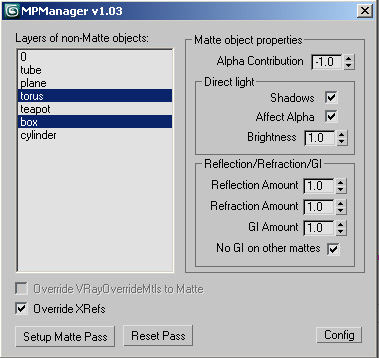
This script creates Matte Passes by layers, and works with xrefs!

V-Ray Irradiance Map Pre Calc

27 votes

This is a script I created to automatically setup your Irradiance Map for V-Ray. Basically you select what camera you want to render from, select what frame range, the path where you want your Irradience Maps to Generate to and the information automatically goes into your Irradiance settings. It will even create the file for you.

This is useful for companies that send many animations via network rendering by saving time in setting up your irradiances.

If you have any questions please contact me at [email protected]

Updated -
Version 1.1

InterLight for Mental Ray, Final Rener, Brazil Rio and Vray

48 votes

Update: May/05/2010. - support for Max2011

- Mental Ray 3.6.51.7 (Max 2009) :
with the materials: