Tagged 'Poly'

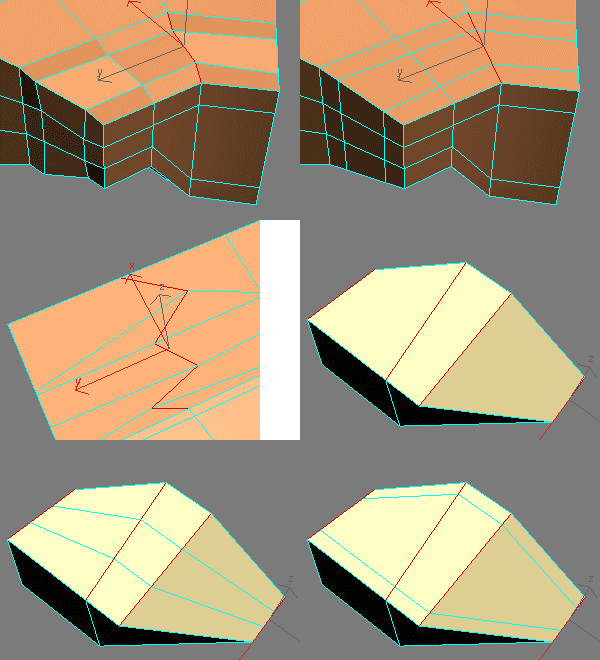
EdgeStraighten

24 votes

subdivisionAutomator

7 votes

Quickly assigns a subdiv modifier (meshsmooth or turbosmooth) to all scene or selected objects. This is good if say you want to have all objects in your scene converted into subdivs at rendertime without the need to constantly select objects, find the right modifier, assign the modifier, etc.

selectionHighlighter

9 votes

This script simulates the Selection Highlighting mode from Silo in max. The idea is if you hover over an object, the object is selected, if you hover over a vertex, it selects the vertex, if you hover over an edge, the edge is selected, etc. No need for extra mouseclicks. Autodesk has half added this feature, this script goes all the way to adding full silo style selection highlighting. Note: This only works in max 2008.

Orionflame 4

31 votes

Orionflame 4 is the successor of the acclaimed production-proven modeling toolset for 3ds max, featuring a completely redesigned and rewritten core architecture, along with several new powerful modeling tools.

Experience the difference yourself.

Note: this is a commercial script

polymagus action items

10 votes

long time it was lost and no where to download, but here it is again..the polymagus action items...with its amazing, amazing "blend edges" script...just assign it to a key...like "b" or something, in editable poly mode...and then go and create polys between edges with ease!

here is what it also does:

FindBadPolys

5 votes

this script finds triangular faces, quadrilateral polygons as well as any other n-sided polygons in your mesh and selects them for you.

Warning: It converts your object into an editable poly so make sure you don't mind your modifier stack
being collapsed.

known issues: 3dsMax crashes when you undo the operation a couple of times

FaceGrabO

18 votes

Initially, this a only script to assist making tight cloth for character of with editablepoly.
But perhaps this can assist to make the other model. ^^
Handy to create twin faces from selection of polygons to becoming raw model or maybe final model.

Grid_Slicer

15 votes

This tool can slice selected faces in mesh and poly at any angle with given step.
Usefull in game development for slicing lightgrids or landscapes.
You can use Slice Plane Helper grid for slicing and set your own custom step. It also has 'Hold' function for undoing results.

Syndicate content