Tagged 'UVW'

SteamRoller

14 votes

Steamroller unwraps every objects in a selection using Max's built-in flatten function based on the specified parameters. Steamroller is mainly intended as a quick and dirty method of quickly unwrapping lightmap UVs on large sets of objects, similar to the automatic unwrap in Render to Texture.

UVSetscale

3 votes

"Preview"

Z Manager

2 votes

SORRY, BUT THIS SCRIPT IS CURRENTLY NOT AVAILABLE.

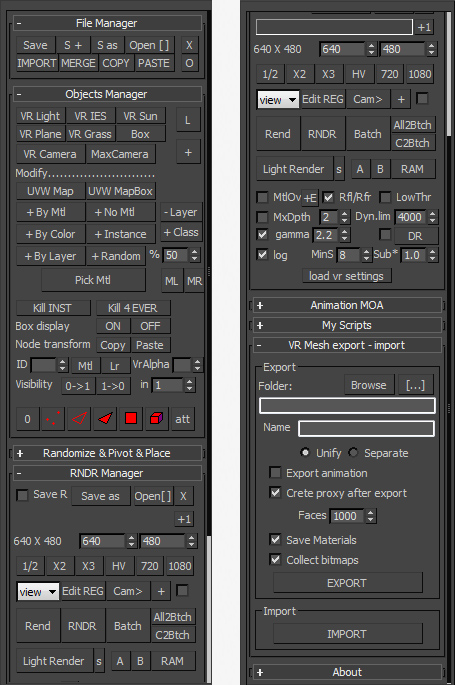
This is a 3dsMax manager tool, preferably for Vray users, very useful for editing architectural models created with other software (eg. ArchiCAD) and fast scene setup. Very useful tools for Selection, Rendering, Incremental Rendering, Copy/Paste objects from other scenes, Material Replacer, Animation with Moving Objects, Exporting/Importing Vray Proxy with material and so on...

UVW Randomizer

2 votes


INTRODUCTION

Randomizer is a plugin to create UVW maps in several objects at the same time with the intention of randomize the position and rotation of them. It can be useful in the creation of objects with the same material but different pattern like tiled floors.

ChannelCleaner

4 votes

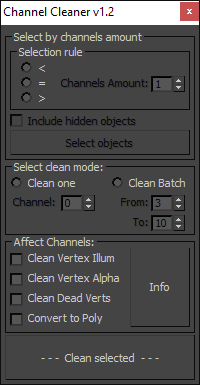
Hello, it's a simple script which make life easier for game-dev 3d artists.

Channel Cleaner 1.2

Channel Cleaner:

-Clean selected UV channel

-Clean several UV  channels "From: N-channel To: N-channel"

-Clean Vertex Color/Illumination/Alpha channels

-Works with editable poly and mesh

-Works with one and multiple objects

Thats all.

UPDATED to version 1.2:

ToTex Render To Texture

205 votes

TOTEX v3

Moved to github

The project Totex has been moved to gihub so community development is easier

https://github.com/svenfraeys/totex

New Version 3.0

"ToTex" is a render to texture script that gives you the ability to quickly bake multiple textures to a folder. ToTex will start baking all the selected objects with the chose selections and will save it to the specified folder

New features (3.0):


- Stability : Bigest issue with ToTex 2.0 was the stability. The ToTex engine is recreated for stronger stability, focussed on high speed expanding.
- Improved User Interface : More compact and focussed on usability
- Auto-Update functionality : Get directly the new features
- New maps in development : xNormal, instant preview and photoshop connection.


New features (2.4):

- new improved UI: much more clear design with thumbs
- Element map now works!

New features (2.3):

- Improved UI: a lot more compact design, better overview and more dynamic system
- Expert Mode: press on the *-button at the top, this will show all the maps of totex, you can easily toggle this on and off

New features (2.2):

- Max Merge: Merge a max file when baking, for embedding complex lightscenes, after the bake ToTex go back to your start state
- Render Preset: Override the renderpresets when baking with ToTex, you can choose between three RPS files that you can override to your own render settings.

New features (2.1):

- Preview : with realtime directX shader (Xoliul shader - http://www.laurenscorijn.com/)
- Light Trace Ambient Occlusion
- Gradient Map
- Mask Map
- For Each Material ID
- Selection Bake : Bake only the selected faces


UVall!

1 vote

UVall! is a script that adds a modifier UVWmap to each selected object. The UV addition is of cubic type. Script UVall! lets you choose the size of the UV map, offering three choices: 1, 10, 100. The unit of these values is set in the project.
UVall! has also an UNDO button that lets you cancel UV set to the script, if you feel they have chosen the proper fit. You can choose another measure, evaluate and possibly change it.

UVall! a script is very useful especially for those working on Architectural projects, in which 90% of the UVW maps are of cubic type.

noMissingUV

1 vote

Do you ever get the "Missing Map Coordinates" window popping up while you're trying to render?

We all do.

This script will add simple UV's to all Editable Poly and Editable Mesh objects that either lack UV's or have corrupted UV's.

Please, use caution when using this script. It may screw everything up. So, save a copy of your scene before use.

[ 3dsMax <> UVLayout ] UVPipe mod by miauu

11 votes

This script will allow you to send the selected objects to UVLayout and get them back.

This is useful when you wants to have more than one object in the same UV square.

All editable poly objects from the selection(selected objects or groups) will be sent to UVlayout.

Override -Selection Mode- & -Convert Selection- in EditablePoly/UnwrapUVW

19 votes

This script override selection mode in EditablePoly/UnwrapUVW AND allow to Convert subobject selection to an another in EditablePoly and Unwrap

Hit 1 or 2/3/4/5 ==> go in vertex/edge/..() mode
Re-hit 1 or 2/3/4/5 ==> go in object mode and you can select another object!
I have added a line, with "Max modify mode", like this, if your are not in "modify panel" when you select an object and hit 1 to set vertex mode, the script go automatically in the panel "modify"

Install:
Go in Customize User Interface, Group "Main UI", Category "zOffTy Tools" and set
1 for epoly_vertex

Syndicate content