Tagged 'modeling'

Modifier Auto-Select

51 votes

This is a tool I put together because sometimes you have to work with modifiers on multiple nodes and the modifiers aren't at the very top of the stack. You’re constantly having to select the node and then selecting the proper modifier. Prime example of this is when you have a turbosmooths on top of all of your geometry while you are either skinning or modelling. It would be much easier, and save quite a bit of time, if every time you selected a node you just automatically were on the skin modifier or edit poly modifier.

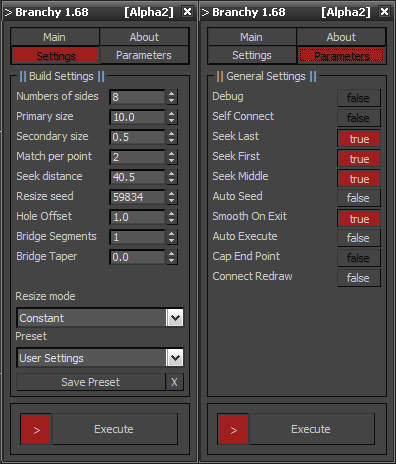
Branchy

68 votes

resetObjState

19 votes

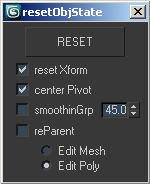
resetObjState

this script is used before to export scenes in any other format.

it unparents and reparents objects if necessary, collapse into mesh, center pivot, reset xform and, if you choice, reassign smoothing group (default with 45° threshold).

to assign a shortcut: "customize user interface" -> "mainUI" -> "compariello"

Urgaffels script pack 01

11 votes

Small pack of scripts created by me to speed up tasks while creating environments for games. Contains the following scripts...

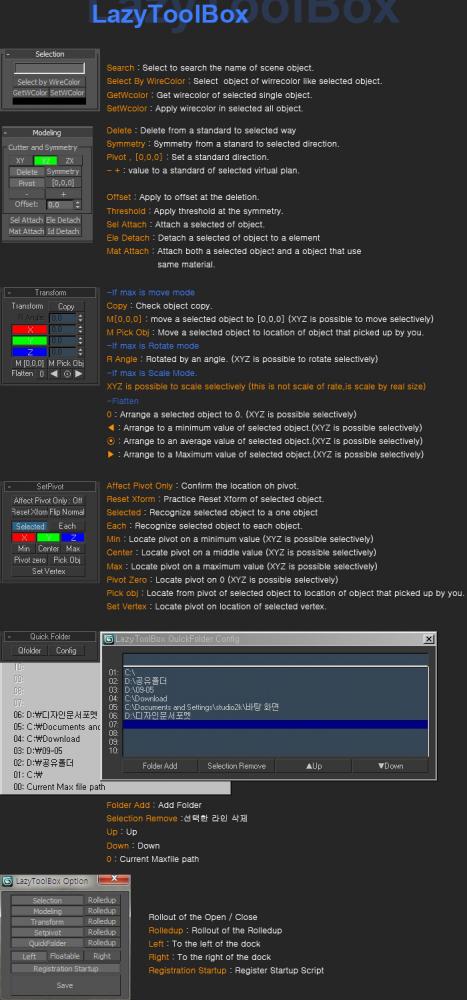
Lazytoolbox

15 votes

 Choose Install Location window, select the folder to use version of the Max!

knottyLine

26 votes

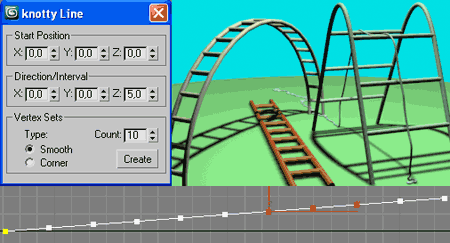
"knotty Line" is a auxiliary mini tool for spline modeling.
It's draws a line with the set number of vertex.
Knotty Line

PolyRotor

23 votes

PolyRotor is a modeling script that based on drag & drop.

PolyRotor make it possible to select vertex, edge and faces automatically.

But it should be in Editable Poly Mode.

Voronoi cells

27 votes

This script allow you to create Voronoi cells based on any object vertex cloud or any particle system.

This script based on FRACTURE VORONOI script by GARP 

FaceGrabO v1.5

11 votes

Handy to create twin faces from face selection of sublevel editablepoly to becoming new object for raw model or maybe final model.

Connect Always

14 votes

By default, Max has two separate commands for Connecting Edges and Connecting Vertices. You had to have two menus for both of them.With Connect Always, you just have to select the vertices/edges and hit "Connect Always"

Here is the code if you dont want to download:-

macroscript Connect_always
Category: "Butt tools" buttonText: "Connect Always"
(
$.EditablePoly.ConnectVertices ()
$.EditablePoly.ConnectEdges ()
)

The category and buttontext is needed if you want to put it in a menu or quad.

[CREDIT}