3ds Max | All

Material ID Condense

12 votes

What it does:
Condenses material ID's Based on the texture name or material name.

How to use it:
Under Utilities Tab, hit the MAXScript button
then push run script, locate CondenseMaterialIDs.mcr and hit open.
Now in the Utilities drop down, choose Condense material ID's.

Here you may choose to
A:
condense it from the material name i use a script i found on Scriptspot called "OS3D_SetMaterialName_v01.ms" i cant seem to locate it again but it sets all material names to the Image names.

B:
Condense by the diffuse texture name eg Image1.jpg

bake animation to vertex

6 votes

convert animation to vertex animation,
convert Object PRS key to Xform modifier.

TronoTools: Animated Gravity Helper / Projection Path

0 votes

How would your object be projected with gravity? Nothing is more annoying than to see basic physics being broken!

This little helper creates a help path for your object to show you the most realistic path it will follow when falling from it's initial path. Keep your objects to the right scale and speed, and this script should be 99% correct for almost any object. (Feathers excluded ;))

Select Hidden, Visible or Occluded Objects

5 votes

Select only visible objects! Delete all objects hidden inside other objects!

If you are working with object heavy CAD models you probably know that often 90% of the objects are hidden internal components of the rig. Stuff you usually don't need or want. Object count that make 3dsMax crawl.

This script lets you either select what is visible or hidden from the current view - or let you scan the whole scene. 
It's a very efficient way to clean up your scenes with a high accuracy!

Quick Link Lock Tool

1 vote


Tronotools Quick Link Lock Info

A small tool I created to more quickly handle link locks. You can globally lock or unlock everything with one button. Same with just movement, rotate or scale separately. Supports multiple objects and behaves just like the normal 3dsMax Hierarchy->Link Info System.


v1.1 - Fixed a bug when no objects were selected.

Maya-like Time Slider

0 votes

I've always liked animating in Maya and missed the time slider toolbar you have there. I quickly recreated something similar for 3dsMax. It's not identical or perfect, but it works. I would love for it to lock and scale to match 3dsMax own Timeline/slider, but it sticks to the bottom of the screen and should work for most resolutions.


v1.1 Fixed a bug with a function not being declared

FumeFX Grid Settings Deep Copy

0 votes

This script copies settings from one grid to another. It does not touch output paths, size etc, but it'll merge the other parameters from one grid to one or more other grids. Handy if you have a lot of grids, do a change in one and need to apply the same changes to all the other grids.

Current version has a couple of limitations. It does not support copying all effectors and keys from colors.


SIGERTEXMAPS SIKKENS Color Solid

2 votes

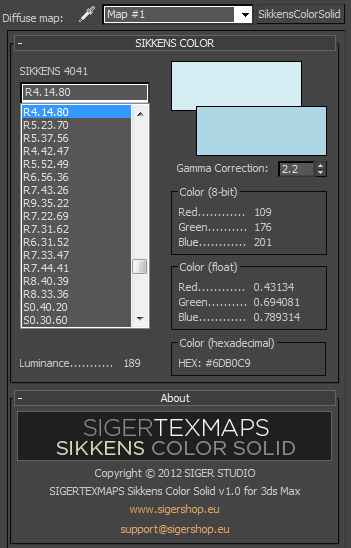
The SIGERTEXMAPS SIKKENS Color Solid is a scripted 2D Texture map plug-in for 3ds MAX.

KEY FEATURES

  • All 1624 SIKKENS 4041 colors
  • Compatible with V-Ray, finalRender, Brazil, default Scanline render
  • Compatible with mental ray (3ds Max 2010 and above)
  • Gamma correction possibility
  • Color info (8-bit: 0… 255, float: 0… 1 and Hexadecimal)
  • Friendly and simple interface

Nuts and Bolts

38 votes

Nuts & Bolts

Finally patched the bugs that caused deformed models on 3ds max versions above 2015. It now supports versions up to 2019. A new and improved version of Nuts & Bolts is now available for free download. Enjoy !


3dsmax 2016 small export script

2 votes

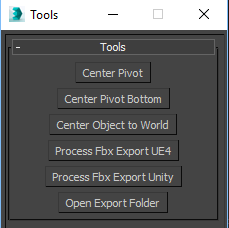
A very simple script, create to simplify game engine export process, with minimal options.

Center pivot : do a simple center pivot on selected objects,

Center pivot bottom : like previously, but on the bottom (-Z) of the transformation matrix.

Center object to world : align selected objects to 0.0.0.

Process fbx Export UE4: Make a clean simple unreal 4 export :

Syndicate content