3ds Max | All

CoreLink

0 votes

CoreLink - 3ds Max Asset Library Manager

Free to try. Free to use with up to 5,000 indexed assets.

Stop waiting for your assets to load.

CoreLink is a fast and lightweight asset library manager designed for 3ds Max artists. It helps you organize, preview, search, and drag assets into 3ds Max without digging through folders or using a heavy asset browser.

Material Properties Mass Editor

2 votes

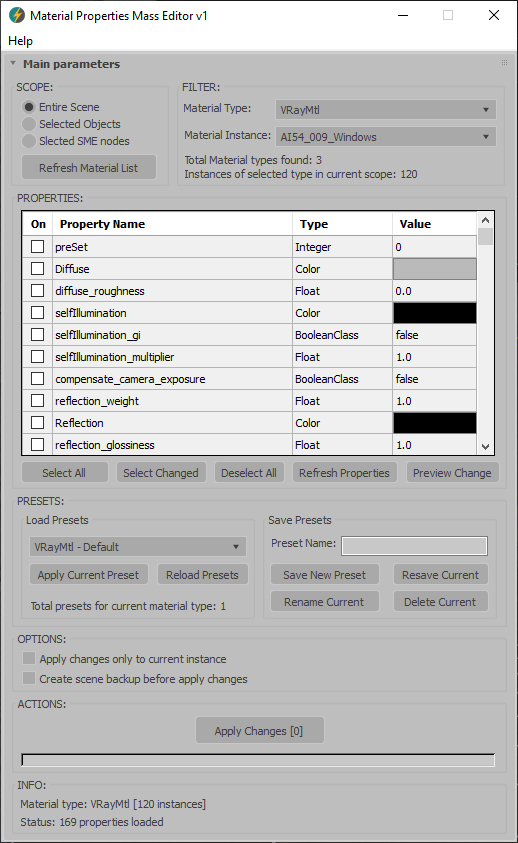
Material Properties Mass Editor (MPME) is the professional tool for batch editing of material properties in 3ds Max. Allows you to modify properties across multiple materials of the same type, including native 3ds Max materials and third-party render engine materials (V-Ray, Corona, Arnold, FStorm, Redshift etc.), and any other installed material types. Changes can be applied according to the chosen scope: entire scene (including Material Editor and SME), selected objects, or selected SME nodes. The script implements a preset system that allows you to save custom property sets as presets for later use, streamlining workflow across different projects and render setups.      

Current version: 1.0001

Library Track / Relink...

63 votes

.
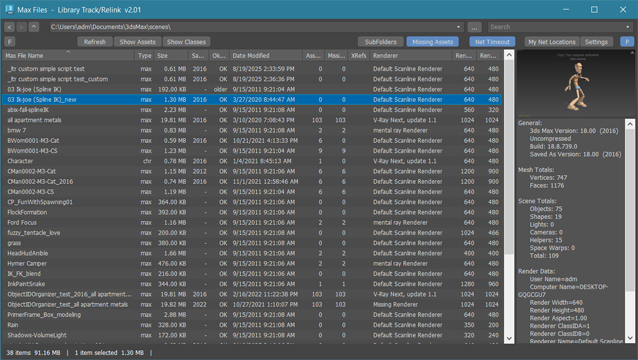
New:  added filters in assets window to filter by asset type, file extension or status
New:  added "Show Classes" - new window with list of all classes and plugins used in max file
New:  added right-side panel displaying max file preview (thumbnail) and max file info.

.

Library Track / Relink... works with Multiple .MAX .MAT or XRef files without opening them. 

Dedicated to organize, collect or relink whole model library or all projects after moving them to new location. Just few clicks and they ready to merge / open !

Project Manager

597 votes

After a long stretch of development, Project Manager 4 is officially out — the biggest release in the product's history, and now with full 3ds Max 2027 support.
The headline is AI Asset Classification.
Your library gets sorted automatically — by object type, material, and style — no manual tagging.

Project Manager 4 — What's New Since v3

Changelog · 3ds Max 2016–2027

AI-Powered Asset Classification

  • Automatic categorisation of 3D models by object type, material, form, and style — no manual tagging required
  • Runs entirely on your machine — no cloud, no subscription, your assets never leave your computer
  • GPU-accelerated background processing at low priority — won't interfere with rendering or active work
  • Reclassify specific folders or categories on demand — no need to reprocess the entire library
  • Scale across a team: multiple workstations share the same database and classify in parallel

Colour Tools

  • Find assets by colour — pick from a palette and instantly see matching models or textures
  • Perceptual colour similarity search — finds visually related assets, not just exact hex matches
  • Find Similar by Colour in the right-click menu for models and textures

Find Similar

  • Find similar by content — AI matches 3D models by style, shape, and visual look
  • Find similar by colour palette — matches assets to a reference image or mood board by dominant colour proportions

Smarter Search & Filtering

  • Multi-keyword search: "Chair, Glass" finds a file named Chair.max described as "glass"
  • Category filter correctly includes all subcategories — filtering Furniture also returns Furniture → Chairs → Dining
  • Combine category and material filters: find glass-and-metal tables, or wooden ones, in one click
  • Categorised / Uncategorised quick filters — see which assets still need attention

Gallery & 3D File Browsing

  • Three gallery tabs for .max files: Models, Materials, and External Links
  • Drag materials directly from the gallery into your open 3ds Max scene
  • 3D viewport preview for FBX, 3DS, OBJ, and other formats — inspect geometry before importing
  • Edit external links inline — fix or replace missing textures without opening the .max file
  • Zoom & Pan for images — inspect textures at full resolution inside Project Manager

Migration & Compatibility

  • v3 and v4 share the same database format — point v4 at your existing library and go; no rebuild required
  • Run v3 and v4 side by side on the same team; supported from 3ds Max 2016 through 2027

Performance & Other Fixes

  • Significantly improved overall performance — faster navigation, filtering, search, and file/folder operations
  • Live sync in shared database mode — changes by colleagues appear automatically without reloading
More about new features   Project Manager version 4
 

create stairs

22 votes


Artakan Architect Desktop

3 votes

Artakan Architect Desktop is a useful tool for architects to meet their needs and is an efficient tool.

PlanTo3D

1 vote

What is PlanTo3D?

PlanTo3D is a powerful and innovative plugin for 3ds Max that simplifies the process of transforming 2D floor plans into detailed 3D building models. Designed for architects, interior designers, and 3D modelers, PlanTo3D saves time and effort while delivering professional and precise 3D models.

Custom Align

4 votes

This script is intended to align objects with a given spacing. You can randomnize position and scale and choose between object center or object base, you can also align to min and max, this is especially useful for randomizing books on shelves or any similar task like populating supermarket shelves or if you have to evenly space any objects.

UV Tools

24 votes

Easy to use uv mapping tools for Archviz and not only

More info here

Collaborative Copy Paste Update: Copy to Older Versions

1 vote


The Cross-Computer & Local Copy-Paste script for 3ds Max, is designed to streamline your workflow and enhance productivity. This script allows you to easily copy and paste elements between scenes on a local machine, as well as across different computers connected to the same file server and across different versions of 3ds Max.

Syndicate content