
Material Properties Mass Editor
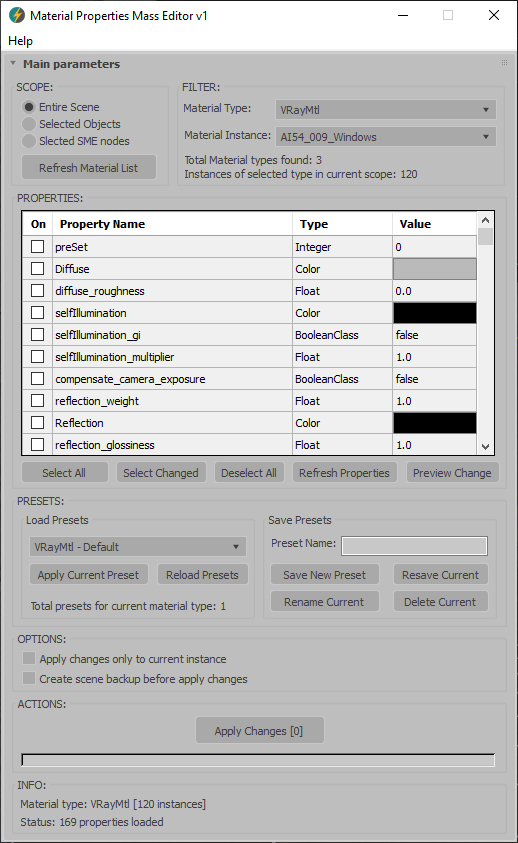
Material Properties Mass Editor (MPME) is the professional tool for batch editing of material properties in 3ds Max. Allows you to modify properties across multiple materials of the same type, including native 3ds Max materials and third-party render engine materials (V-Ray, Corona, Arnold, FStorm, Redshift etc.), and any other installed material types. Changes can be applied according to the chosen scope: entire scene (including Material Editor and SME), selected objects, or selected SME nodes. The script implements a preset system that allows you to save custom property sets as presets for later use, streamlining workflow across different projects and render setups.
Current version: 1.0001
Main features:
- Batch editing of properties across all materials of the same type in the scene.
- Support for any installed material types (classes).
- Flexible scope selection: entire scene, selected objects, or nodes in the Slate Material Editor.
- Recursive processing of materials located inside multi-materials
- Clear visual feedback for all modifications made.
- Powerful and intuitive preset system based on XML structure.
- Preview all changes before applying them to the scene materials.
- Automatic intelligent validation of input values depending on the property class.
- Option to create a backup of the scene file before applying changes.
More detailed information about the all features and capabilities of the "Material Properties Mass Editor" can be found here: https://maxtools.3dzver.com/product?id=2
PS: Please, respect the developers and other users - do not post promotional messages in comments (ie spam).
If you have any suggestions or comments related to the work of the plugin, use the support form at this webpage: https://maxtools.3dzver.com/mxtsupport
Comments
Yes, this is possible. For
Yes, this is possible. For this, use the "Selected SME nodes" option in the "Scope" section.
If you have any questions, please contact support at [email protected]; they will respond promptly and assist you.
I so wanted this
one question, is it possible to change the materials based on id, for example I have an object that has 1 MultiSubMaterial and I want to change the values only for material 1,2,3 is there an option to do this ? Great script bro, congrats.
Excellent script, I really
Excellent script, I really needed a tool like this! Thank you!