ScriptSpot is a diverse online community of artists and developers who come together to find and share scripts that empower their creativity with 3ds Max. Our users come from all parts of the world and work in everything from visual effects to gaming, architecture, students or hobbyists.
Submitted by Jean-François ... on Fri, 2006-10-20 20:45
4
votes
Keep the named selection sets when you merge objects! Once you will install this script - it will automatically save the named selection sets of your scene - and it will automatically merge them when you will merge objects.
This script allows you to select objects by their size or volume, by checking their
- bounding box size (= bounding box volume) or
- the actual volume of the mesh (the calculation function for this is taken from the MAXScript manual, I think Bobo is the genius behind it ! :-) )
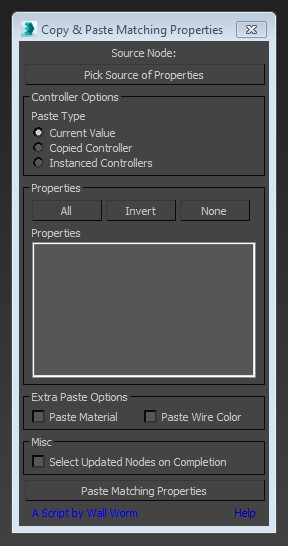
This little script will help you transfer arbitrary properties from one object to another. All properties that you selected that have matching names and types in the destination nodes will get the property values of the source node. You also have the option of instancing the source value's controller across the updated properties.
A script that selects all objects in the scene based on their diffuse color. This is most helpful for imported PDB files in which all the elements have unique materials, but share a diffuse.
Color can be chosen from object or by color picker.
Aligns the perspective view to the face that is under the mouse while keeping the distance to the selected object (the distance will pretty much the same as between the view and the face to align to). It does not matter if the object has modifiers applied and the view will not be distorted into some strange rotation but kept aligned to the world axis.