Tagged 'VRay'

V-Ray Studio Setup Pro

255 votes

V-Ray Studio Setup Pro is a plugin for automating studio lighting setups for use with the V-Ray rendering engine and 3ds Max.

FEATURES

Vray Quick-Render

-1 vote

"Vray Quick-Render" the utility for creating fast preview test-renderings.
It help you make fast test-renderings for setup lights and tuning materials.
All changes for Vray will be applied only on render-time.
Your settings for Vray not will be change.

VrayCamLister

30 votes

Simple script for VRay & PhysicalCameras management in your scene.

FS Scene Converter (FStorm)

6 votes

FS Converter is a scene convertor to come back from FStorm renderer or to only convert some objects.

This converter allow to convert all the Fstorm renderer feature to Vray or Corona and Redshift.

It's not a simplicity converter, it's keep all the compatible settings...
Compatible: Fstorm Camera, Fstorm materials, Fstorm proxie, Fstorm Lights (including SunLight), Fstorm Displacement...

Convert all the scene or only selected Object... See how many instance it's necessary to convert...

Real time informations for the convertion state.

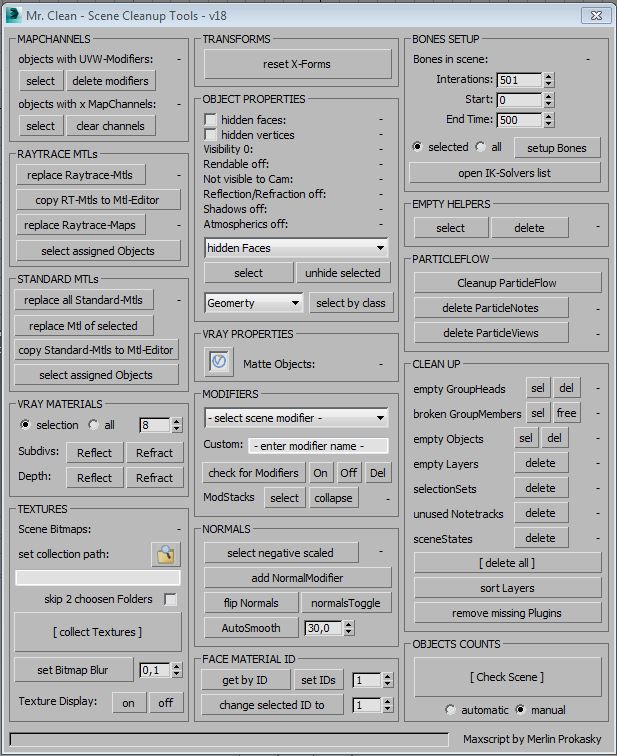
Mr. Clean - Scene Cleanup Tools for Max and VRay

7 votes

Vray ambient occlusion

49 votes

This script renders an ambient occlusion pass with VRay from any scene - without changing anything. There is no need to prepare the scene in any way either.

VRay 1.5 or higher is required for the script to run!
If you are using VRay 1.46, there is an older version available, without dirtmap features.


VRay Studio Tools

5 votes

Tools for studio setup and soft studio light.

VrayLightLister

32 votes

Lister for Vray Lights. I use this script permanently. Extremely comfortable for controlling VrayLights present in the scene. You can find the script in "IllusionBoxStudio" category (Customize/Customize User Interface/IllusionBoxStudio)

Create Vray Camera from Perspective View

6 votes

This is a script that will allow you to create a Max Standard Target Camera (Ctrl+C) at the click of a button. More importantly it will allow you to create a VRay Phycical Camera from prespect view at the touch of a button. No more having to align your Vray-camera with the standard Max Camera. You can also choose which camera to display in the selected viewport from a drop-down list


Object Properties 2.0

7 votes

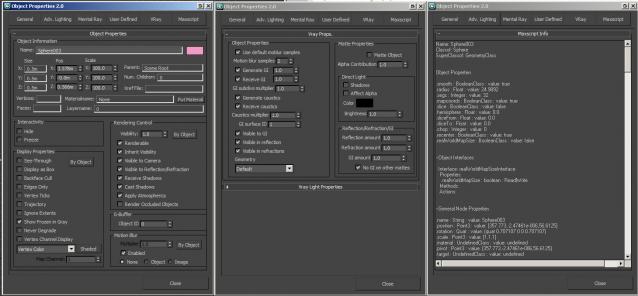
A non-modal Object Properties window, very simliar to the original one in 3dsmax but this allows you to change selection with the dialog open!  It also has the VRayProperties window included so you don't have to switch dialogs when setting up passes. (Needs updating for VRay 3.0+) There is also a MaxScript tab which shows you loads of information about the object you have select and this is really powerful for learning to script!