Tagged 'VRay'

Batch Camera Render

274 votes

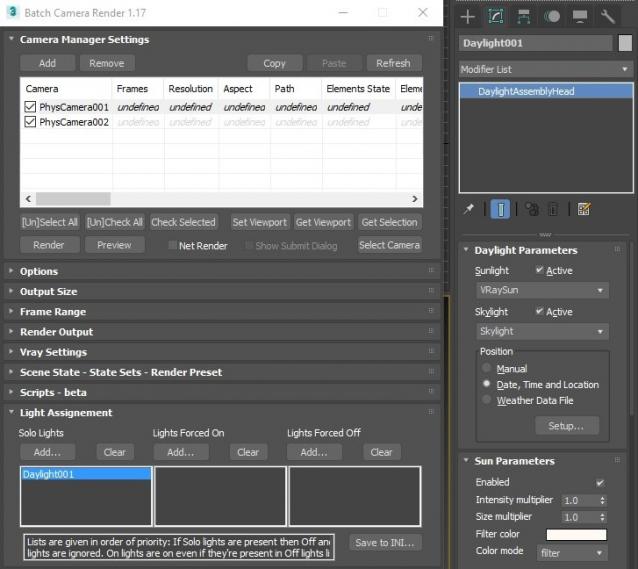
This script aims to replace standard 3dsmax's Batch Render and imitates Houdini Output Node workflow. Using it you can specify rendering parameters - frame size, frame number, output path - directly to camera object, so every camera in scene 'knows' what it intended to render. Additional functionality is Lighting Assignment - you can specify which light will be turn on or off for selected camera during the rendering.

1.19:

  • Support 3ds max 2026

1.18:

  • Support for 3ds max 2023 Update fixed

1.17:

  • Corona and Vray Sun inside Daylight System fixed (thanks to busseynova for reporting)

1.16:

  • CoronaSun supported inside Daylight System

1.15:

  • Don't Save Render Elements Checkbox (Thanks to antomor)
  • Limited support for camera objects in xref scene files (Only root objects in first level xrefs. Cameras in nested xrefs not supported)

1.13 Bugfix:

  • Deadline submission should work now

1.12 New Feature:

  • Deadline support.
    Very basic imlementation, it allows you to submit your jobs on a deadline server. Enter deadline repository address and check "Use Deadline" checkbox. Other checkbox doesn't matter in this case ("Net render", "Show Submit Dialog").
    Probably it requires Deadline 3ds max Submitter installed. I didn't have a chance to check it on a clean machine.

1.11 Features and fixes:

  • State sets support added
  • "projectname" keyword added which resolves to project's folder name
  • other fixes and improvements

1.10.3b Fixes:

  • Crash when vray ir/lcache maps are set to auto-save
  • Region render was not set properly during the rendering

This is major update of the script, so it may not be as stable as before. Backup scenes or cameras at least before running this version. More information can be found here - 1.10b Multiple presets for each camera

Previous updates:

1.10.2b Fixes:

  • Problems with render elements paths
  • Copy/paste of render region settings
  • Properly convert render region values when change resolution

New features:

  • Multiple presets for each camera
  • New keyword %presetname% to support multiple presets
  • Distributed rendering checkbox added to vray common settings
  • Bugfix - Net render not starting after cancelling during local rendering.
  • Improved performance with scenes with lots of cameras
  • Added support of Vray RT as a production renderer
  • Added support of using MFRender script to render scenes through BatchCamera script.
  • Bugfix - Error was popping up sometimes during drag-n-drop
  • Bugfix - Render elements didn't render in certain conditions
  • Bugfix - Pre-render/post-render scripts didn't work on network rendering
  • Bugfix - Select All and Toggle All buttons didn't work properly

Here are some details: http://usakhelo.github.io/batchcam/batchcam-1.9.20.html

MultyConvertor

288 votes

MultyConvertor - allow to convert any materials, lights (objects) of any renders to any materials, lights (objects) and renders!!! It is all in one.

You can simple create *.mct (edit text file in any text editors and change extension) file for new render and facilities that support this type of rendering. See any *.mct in archive

Now you start the script and setup link properties from one render type to other. You can also use expression for translate value to other value or execute any max script expression.

Vray Quick-Render

1 vote

"Vray Quick-Render" the utility for creating fast preview test-renderings.
It help you make fast test-renderings for setup lights and tuning materials.
All changes for Vray will be applied only on render-time.
Your settings for Vray not will be change.

EffectsChannelSet

79 votes

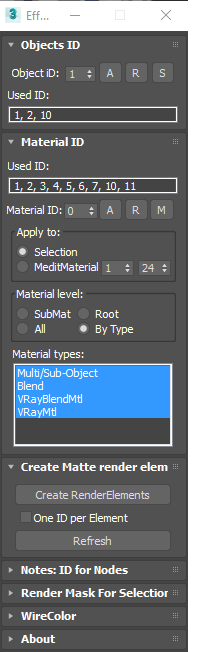
  • Management the Material ID and Objects ID.
  • Assigning a wirecolor for objects.
  • Automated creation MultiMatteElement for V-Ray renderer.
  • Automated creation MatteRenderElement for Mental Ray renderer.
  • Automate the creation of CMasking_Mask for Corona Renderer.


EffectsChannel 1.67.4

  • Some fixes and speed improvements

EffectsChannel v1.64

  • Fixes an issue with assigning ID to sub-materials in the version 1.62

EffectsChannel v1.62

  • This version speed-up opening on complex scenes. The time of opening on a very big scene decreased from 16 sec to 0.094sec.

EffectsChannel v1.60

  • Adds support to Corona Renderer: Automate creation of CMasking_Mask.

SolidRocks

569 votes

SolidRocks V2.4 is out !!  Support for V-Ray 6 (hotfix 2) and  MAX 2013-2023 ! 

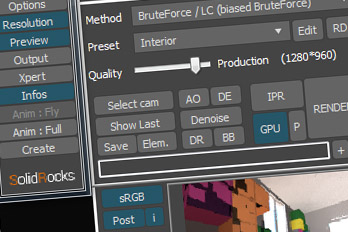
SolidRocks adjusts and optimise all needed Vray parameters to reach the best rendertime/quality ratio.

Learn Vray progressively, see in realtime changes made by SolidRocks when you change resolution/quality.

SolidRocks includes new tools for both VrayMasters and Beginners:

SnowFlow - make snow with the click of a button

229 votes

snow bench test scene

This plugin is out of date. Please use the new SnowFlowPro instead!

SnowFlow is a 3D Studio Max script/plugin that creates realistic snow with ease! You just pick an object and SnowFlow does the snow for you! Let the snow fall on your 3D objects and scenes with the click of a button.

Content Browser

2 votes

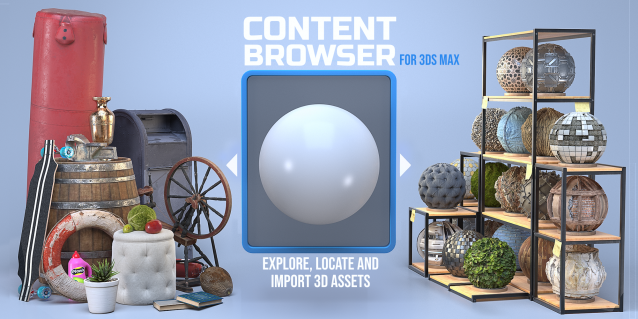
The Content Browser helps you quickly browse and import 3D assets on your computer.

Load any folder accessible on your machine and the Content Browser will find any materials, hdri’s, models, and max files. It will group, organize and display these files as assets, recognizing previews, LODs, mapping channels, resolutions and other important information automatically. 

It simplifies the importing and merging process for 3d models, max files, material creation and hdri environment maps by allowing you to directly browse, filter and drag all of your 3D assets from sources like MegaScans, PolyHaven, gameTextures, Poliigon, Arroway into 3ds max viewport or material editor. 

Main Features

  • Load any folder and find 3D models, max files, materials and hdri’s.
  • Show grouped files as assets, group matching assets and find preview images.
  • Drag and Drop asset into the 3ds max viewport or the Slate Material Editor
  • Import assets to Slate and Compact Material Editors
  • Default Merge and Import 3d files and max scenes, with automatic relinking filepaths
  • Choose LODs/resolution/variations and Import multiple assets at once
  • Folder hierarchy, File list and Preview Gallery

Quick Clouds Generator

1 vote

QUICK CLOUDS GENERATOR is a script that is efficient in automatically creating sun/ sky & clouds in 3dsMax. It can be applied flexibly in Archviz projects while saving a lot of time for 3D Artist.

.: Compatible with 3dsMax 2018 & higher

.: Compatible with V-Ray 6 & Corona Renderer 9 & higher

.: Compatible with System Units: Millimeters, Centimeters, Meters, Inches & Feet

.: Version: 2.0

.: Author: Wuan Hyu

If you have any comments or questions, please don't hesitate to contact us via email: [email protected]

We will respond as soon as possible.

---

Little Batch Render

33 votes

Vray - LittleBatchRender
Version 0.84

Description:
with the "LittleBatchRender"-script you can easily render multiple cameras in your scene with one Click
Features:


• correct autonaming for Render Elements
• NetRenderSupport
• Spawning can be disabled when rednering with NetRender
• consistent Naming for local and NetRender - no relinking in Compositing necessary
• Turning of and on individual Xrefs for individual Cameras

MultiMatte Tamer

1 vote

This script makes it very easy to apply Object ID's and store the MultiMatte Render Elements.

Objects are selected within the grid table. If objects and layers in your scene are not recognized by its name this script will not be much use.

  • Add Button will add another additional numbered ID button.
Syndicate content