Tagged 'Material'

Attach by Same Material

2 votes

Attached all geometry with the same material to the currently selected object. This collapses to editable poly first, so make sure you're cool with that before you click. :)

Created for merging objects in heavy architecture scenes recieved in Max format with large numbers of individual objects.

Strip Paths from Bitmaps

3 votes

Removes current paths from all bitmaps in the scene. Primarily for getting rid of irrelevant paths on files recieved from users on other systems.

This functions in a similar way to stripping paths manually in asset tracking, but when doing that I've found that it can lag a lot and sometimes fail to strip some of the paths until you do it multiple times.

Bad paths can cause lag when Max tries to search for the missing textures, especially when they're pointing to a nonexistent network location.

Vertex Color Killer

1 vote

Removes vertex alpha, vertex illumination and vertex color data on the current selection.

This uses the same method as clearing those channels in the Channel Info utility, but across a selection.

Material Name to Mat ID Name

2 votes

Material IDs are blank by default. This populates the blank names by copying the names of the current submaterial, ignoring undefined materials and slots that already have names in them.

Written in Max 2016, but should work in all other recent versions as well.

PBR Material Importer

1 vote

postimage
A script i made during production that requiring importing a lot of PBR map into Vray.
This script require at least 4 map to run: Diffuse,reflection(specular),glossiness and normal.
It will create a Vray material with setting to look indentical to Quixel 3DO or substance viewport.
If your map have Mixed Dielectric and Metal , you will need to export Metalness Map.

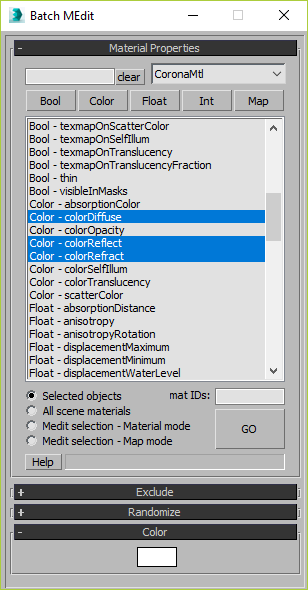
Batch Material Editor

14 votes

This script allows you batch edit multiple materials and bitmaps.

Dirtizer 2

5 votes

A very helpful plugin which can make your materials dirty in one click!
- You can control the level of dirtiness.
- You can make it dry or wet.
- Dirtizer supports Multi-materials (you can set random dirt to all materials at once)
- You can add your own textures of dirt. (Organize your textures in "Dirtizer" folder as you want)

Most render systems are supported now! Tested with V-Ray, Mental Ray, Scanline, Corona, Redshift.

Vray Mat Lister

4 votes

Hi everyone,

I'd like to share a script I have made.
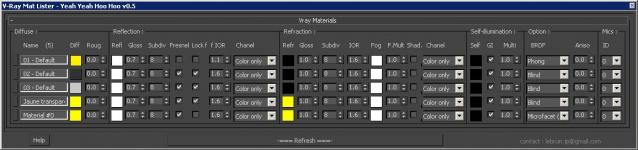
It's for Vray and it makes a list of all your VrayMtl (and of the main parameters) you have in your scene.

UPDATE Version 0.5 for vray 3.xx

This tool allow you to modify all your vray materials parameters quickly. Globally it works like the Vray Lightlister

Dirtizer 2

2 votes

A very helpful plugin which can make your materials dirty in one click!
- You can control the level of dirtiness.
- You can make it dry or wet.
- Dirtizer supports Multi-materials (you can set random dirt to all materials at once)
- You can add your own textures of dirt. (Organize your textures in "Dirtizer" folder as you want)

Textures2materials

3 votes

poster

Textures2materials is a very handy plugin which can turn multiple textures into materials at once (into multi-material or into multiple material slots). It also checks if your textures have a bump versions and load them as bump. "Must have" plugin for any 3D designer.