
Helper Manager
A support panel containing many methods for adding point or dummy helpers to the scene, as well as options for baking, constraining, linking, orienting, selecting, manipulating, duplicating existing hierarchies using helpers, or replacing them with a Bones System.
See online guide in links section.
Features include...
- Various methods of helper creation such as: origin, surface, object pivots, picked points, or selected sub-object components.
-
Ability to add helpers to a selection of objects including; linkage, constraints or baked keys.
-
Convert existing bindings (hierarchy links, Link Constraints, Pos/Rot constraints) to an alternative type.
-
Ability to add helpers to (Editable Poly or compatible) sub-object (SO) parts, average centers, or elements - based on either direct SO selection or pre-defined SO selection sets.
-
A shared size setting used throughout all creation methods, to quickly unify all helper sizes.
-
Point helper style toggles (axis, cross, box, x).
-
Toggle display links and trajectories for a selection.
-
Show object names or pivot axes.
-
Set the wire colors of selected objects using an interface with a palette of up to 6 colors.
-
Convert helper types from point to dummy or visa-versa.
-
Reset scale on a selection.
-
Link points to dummies via common naming.
-
Link a selection of objects to the last selected object.
-
Link a selection of objects into a hierarchy based on their sorted node names. Order can be reversed using CTRL.
-
Link a selection of objects into a hierarchy based on the order in which they are selected. Order can be reversed using CTRL.
-
Re-orient helpers or align down X-axis, including hierarchies.
-
Selecting full hierarchies and manipulating them.
-
Toggling skin modifiers.
-
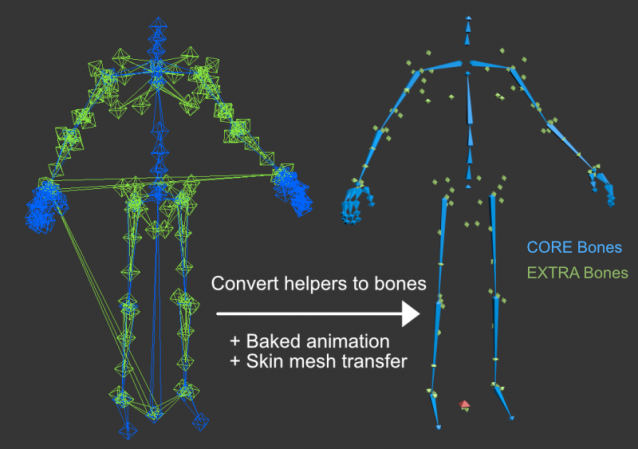
Duplicate an existing hierarchy of objects with new helpers. You can bake keys on the new hierarchy (point or dummy helpers only) to match the animation of the original selected hierarchy. Or instead add constraints to follow the original hierarchy. Optionally add a prefix to the new helper names, or leave blank to match the original hierarchy names. Transfer any found skinned meshes to the new helpers.
-
Constrain a hierarchy based on distance to nearest objects given a distance threshold.
-
Constrain an existing hierarchy to another similar hierarchy that shares the same pivot locations for each node. This is independent of how the hierarchies are linked or named.
-
Completely replace an existing hierarchy of helpers with a matching Bones System. Utilizing a separation of CORE bones and EXTRA bones to handle bone lengths. Alternatively, replace while keeping existing hierarchy local axes (using a legacy algorithm) along with display-only bones.


Latest Updates:
Version 2.8;
- Moved all the display options to a new Display rollout to shorten UI.
- Added Display rollout ability to "Toggle Bones" which affects bone system objects, CAT parts and Biped parts.
- Added Display rollout ability to filter display Names and Pivots by object selection.
- Added Display rollout parameter "Names Offset" which pushes display names away from objects along with a visible connection ilne.
- Added Hiererchies rollout ability to "Select Full Hierarchy" based on partial selection. First hierarchy found in selection gets selected.
- Added Hiererchies rollout ability to "Store" and "Restore" a hierarchy based on selection.
- Added Hiererchies rollout ability to "Straighten Evenly" a hierarchy so middle objects lie in line from root to tip and spaced evenly.
- Added Hiererchies rollout ability "Joint Shifter", which allows transforming a selection without affecting immediate child objects.
- Added Hiererchies rollout ability to toggle "Skins On" and "Skins Off" for any skinned meshes found in the scene.
Version 2.7.1;
- Hotfix; fixed crash when reapplying re-align X-axis in orientation rollout due to deleted dummies.
Version 2.7;
- Added "Transfer Skinned Meshes" option to Duplicate Hierarchy. Creates a new hierarchy of helpers and transfers all found skin meshes to it then deletes the original hierarchy. Useful for replacing a Bones System with helpers.
- Added new rollout "Orientation" containing functions to re-align axes down positive X, as well as applying individual axis rotation offsets.
- Added new ability to show object names, as well as object pivots with adjustable axis length to Display options.
The script can be found in category “LB Tools”.
Installation:
Drag the MZP file into your Max viewport.
Files will be copied to...
C:\Users\<userName>\AppData\Local\Autodesk\3dsMax\<maxVersion>\ENU\scripts\startup
and...
C:\Users\<userName>\AppData\Local\Autodesk\3dsMax\<maxVersion>\ENU\usericons
| Attachment | Size |
|---|---|
| old_2-7-1_lbtools_helper_manager.mzp | 30.97 KB |
| lbtools_helper_manager.mzp | 34.42 KB |
Comments
Re: installation
Thanks for the tip.
I've replaced it now with the MZP format.
Lorne Brooks
.
Why you not make an installer for your scripts?
No need to install all files manually, when a simple .mzp installer can do it automatically.
Tools and Scripts for Autodesk 3dsMax