
Select Objects By BitmapTex
•••••••••••••••••••••••••••••••••••••••••••••••••••••••••••••••••••••••••••• VERSION 1.6
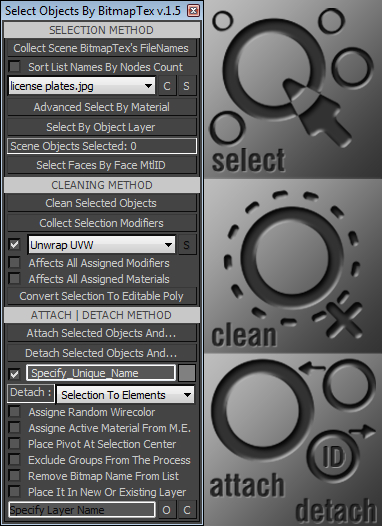
With this tool you can quickly perform certain operations that normally require more time to perform, such as:
. Selecting all scene objects by choosing a specified bitmap texture used in the current scene file. >>>
. Selecting objects with the same material as the first object in the selection.
. Selecting all scene objects by choosing a specified modifier from the other objects.
. Cleaning all unwanted modifiers or materials from selection.
. Attaching or detaching objects with given options.
••••••••••••••••••••••••••••••••••••••••••••••••••••••••••••••• Usage:
All commands and options are self-explanatory.
If you have problems or questions please post them on this page.
••••••••••••••••••••••••••••••••••••••••••••••••••••••••••••••• Update: [version 1.1]
-> Fixed some minor bugs
-> Optimized code
-> Added attach method (works with geometry objects only) with options:
...#1: Specify new name for attached object
...#2: Auto assigne material from the Material Editor (active mtl slot)
...#3: Place pivot at center of newly attached object
...#4: Automatically remove the texture filename from dropdown list
...#5: Add newly attached object to specified layer
NOTE: If the name (from edittext field) matches the layer name (from Layer Manager) then new object
will be added in that layer else it be placed in the new layer (with name from edittext).
••••••••••••••••••••••••••••••••••••••••••••••••••••••••••••••• Update: [version 1.2]
-> Improved performance and code optimizations
-> New options:
...#1: *Advanced Select By Material* (perform searching inside groups)
...#2: *Convert Selections To Editable Poly* objects
...#3: Select all objects with specified modifier
...#4: Added cleaning method (for unwanted modifiers and materials)
...#5: Added *Detach* operation with some options
...#6: Object wirecolor colorpicker
...#7: *Assigne Random Wirecolor* when perform Attach | Detach operations
...#9: *Exclude Groups From The Process* option
NOTE: Attach | Detach operations works only with Editale Poly types of objects.
Detach operation not supports options:
-- *Exclude Groups From The Process*
-- *Remove Bitmap Name From List*
••••••••••••••••••••••••••••••••••••••••••••••••••••••••••••••• Update: [version 1.3]
-> Code optimizations
••••••••••••••••••••••••••••••••••••••••••••••••••••••••••••••• Update: [version 1.4]
-> Improved detach method (now supports multiple selected objects)
-> Also you have two new options (radiobuttons):
...#1: *Detach Selection To Elements*
...#2: *Detach By Face Material ID*
NOTE: All objects that have only one material ID assigned will be excluded from process.
...#1: *Sort List Names By Nodes Count* (sort texture list by greatest number of assigned textures first)
NOTE: if this option is not checked then list will be sorted alphabetically.
...#2: Added button for cleaning the texture dropdown list.
...#3: *Open / Close Layer Manager Dialog* checkbutton
...#4: *Clean Empty Layers* button
••••••••••••••••••••••••••••••••••••••••••••••••••••••••••••••• Update: [version 1.5]
-> A few bugs fixed
-> New options:
...#1: *Select By Object Layer* (select all objects that are placed in the same layer as selected object)
...#2: *Select Faces By Face MtlID* (select all faces of EPoly that are used the same face ID as selected face)
...#3: *Detach Types* dropdown list (replaced radiobuttons)
-- *Selection To Elements*
-- *By Face Material ID*
-- *Selected Faces* [NEW] (supports multiple selected object with already selected faces)
NOTE: You can use this (last) option in combination with *Select Faces By Face MtlID* button.
••••••••••••••••••••••••••••••••••••••••••••••••••••••••••••••• Update: [version 1.6]
-> New option:
...#1: *Assigne Sub-Material Name* (every detached object will have sub-material name)
••••••••••••••••••••••••••••••••••••••••••••••••••••••••••••••• Requested: by asymptote
| Attachment | Size |
|---|---|
| bga_selectobjectsbybitmaptex_v.1.5.ms | 19.71 KB |
| bga_selectobjectsbybitmaptex_v.1.6.ms | 20.1 KB |
Comments
delViper, do you have AVG
delViper, do you have AVG extension installed? The appendIfUnique is part of this extension( not in the standart max9 installation). So, install AVG(attached below), unzip and copy the proper,32 or 64 bit. dlx file to maxRoot - plugins folder, restart max and try the script again.
Tools and Scripts for Autodesk 3dsMax
Sorry but i not have
Sorry but i not have installed max9.I curently use max 2013x64
bga
Is it possible to adapt it for 3ds Max 9 ?
I'm using Max 9, importing ripped frames with 3DxRipper and so I get several objects, each with his own material even if they use the same bitmap as diffuse. I love your script but I get this error in Max 9 :
-- Error occurred in b loop; filename: C:\Program Files (x86)\Autodesk\3ds Max 9\Scripts\bga_selectobjectsbybitmaptex_v.1.2.ms; position: 5869
-- Frame:
-- b: Map #47:Bitmap
-- appendIfUnique: undefined
-- called in btn_collb.pressed(); filename: C:\Program Files (x86)\Autodesk\3ds Max 9\Scripts\bga_selectobjectsbybitmaptex_v.1.2.ms; position: 5905
-- Frame:
-- bmptexArr: #(Map #47:Bitmap, Map #58:Bitmap, Map #59:Bitmap, Map #60:Bitmap, Map #3:Bitmap, Map #53:Bitmap, Map #62:Bitmap, Map #63:Bitmap)
>> MAXScript Rollout Handler Exception: -- Type error: Call needs function or class, got: undefined <<
So, is It possible to get it working in Max 9 or to give just the code to collect all bitmaps names in scenematerial and select all object corresponding to one bitmap ?
Thanks for your work
version 1.6
Requested: by Gabriel G.
bga
Thanks asymptote
Thanks asymptote,
...this is turning into the "must have" tool for importing scenes
For the next week I'm preparing another very useful update.
You are wrong, not only for importing scenes, but for "every day" use.
:)
bga
Wow I take a few days off,
Wow I take a few days off, and when I come back there are 3 revisions, from a simple request, this is turning into the "must have" tool for importing scenes.
Many thanks for the revisions and updates/additions.
I will test them after this weekend, I live in the UK and have the Jubilee Celebrations to avoid ;)
Fantastic scripting again.
Thanks The Mind Forest,
Thanks The Mind Forest,
Do you have any suggestion for the next update? :)
I already prepared a few options but new ideas are always welcome.
bga
Awesome!
I was just looking for this feature in max the other day to select an object by material. I found in the Material Editor/Utilities menu an option to select by material. I couldn't figure out how it worked though, lol. Seems to just be a select obj by name function. This script looks like it might do the trick though.. Thanks for sharing!!!
Check out my site - www.themindforest.com
Thanks,kimarotta Just wait to
Thanks,kimarotta
Just wait to see new version :)
Cheers!
bga
.
Yeah, this is a very good script man...
Thanks Barigazy for share this.
kimarotta.com.br
3d Artist