3ds Max | All

ResizeAfterZBrush

0 votes

Hi,
this is a little Script I made 10 month ago ...
And from then to now it was indispensable for my 3ds-Max <-> Zbrush Workflow.

It's a rough version so use it carefully -> save your scene before you use it until you get how to use it ... maybe I'll upload an easier understandable version ... but it should be selfexplainable enough.

What it does? I scales you Mesh to the correct size (in cm's!) like my character is 1,65 cm tall ...
well even a few more features are there too
like the *10 scale and the /10 scale button and so on


FumeFX Dimension Copy

0 votes

FumeFX Dimension Copy

This macroscript takes a selected Box and then copies it's dimensions and creates a Fume grid with the same area. I got sick of having to drag out a real-world scale Box and then dragging out a fume grid to match. This just takes the extra step out of it.

3DS Max - Hidden features - 2D drawing aid - Polar / ortho Snapping

1 vote

Undo SubObject Level

2 votes

Macro script requested in the forum.
"go to the last-used subobject level"

* "last-used" here means last recorded (when you invoke the macros)

Camera Cutter

9 votes

"This utility lets you specify when to cut between any number of cameras and creates a new camera animated to that effect. This is not a replacement for Video Post camera cutting for final rendering - but rather a way to view cuts directly in the viewports - and for previews."

Copy_PathControled_Object_Along_Same_Spline.ms

3 votes

This script will take ann object that is on a path (using a path controller) and make X copies of it along the spline.

Path Repeater

3 votes

This script is similar to the Path Snapper except this one animated the objects along a spline. I created this one to do luggage moving along a treadmill in an airport.

Arac Bone Rig

0 votes

With the Arac Bone Rig 1.0 script you can automate the bone-based rigging of a four tire wheel vehicle in 3ds max and animate on a spline. With the flexibility and usefulness of the bone bone system we can send the tool we rigged and animated to a game engine like unity yada unreal engine 4 and we can easily use it in the project we want.

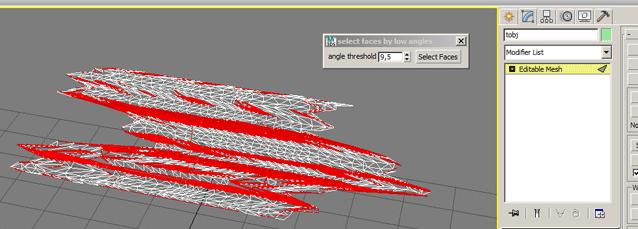
selectFaceByMinAngle

0 votes

Select faces by min angle. works only on collapsed wditable_mesh object.

My Blog Huh?

Actually I have already started a blog here: (can i put a link here?)

mertens3d - Blog

Syndicate content