3ds Max | All

ModifierManager

4 votes

"Allows you to add a modifer to selected objects (each modifier is a seperate modifier - not an instance of the same modifier which happens if you multiselect objects and apply a modifier in the modifier panel) - and to delete modifiers from selected objects (Any selected objects will have their modifier stacks checked - and any modifier that you specify in there will be deleted.) Replaces RemoveM

STEPAdjust

1 vote

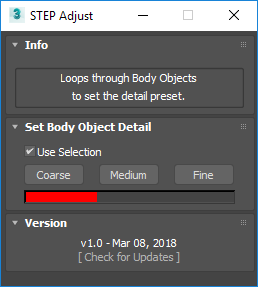
STEP Adjust loops through Body Objects, such as ones imported from STEP files, to quickly swap between the Coarse, Medium and Fine presets.

Toggle Vertex Colors

3 votes

"This macro creates a toggle button you can put in a menu or toolbar that acts as toggle for whether Vertex colors are rendered. Makes changes only at render time so your scene is unaffected.

SnapSwap

2 votes

A tool for replacing the currently selected geometry with a same named snapshot (old model is deleted). Can be used for dealing with corrupt geometry.

To use: Run the macroscript, and add SnapSwap to a toolbar from the category "# SP_MeshScripts".

Motiva Christmas Revolution promo

1 vote

Motiva is glad to announce our Christmas Revolution promo. witha 35% off in Motiva Colimo and the novel Motiva RealPerception, a plugin pack in OFX format developed to be a help in postproduction task. As its name says it tries to mimic effects produced by the perception from either human based, camera or photographic film.

Take advantage of the prices until January the 15th. Merry Christmas to everyone! HO HO HO!

Motiva RealPerception: http://www.motivacg.com/en/realperception-ofx/

PSD to Material

3 votes

Converts a PSD file's layers into a material. This can either be done Manually - or Smartly. Manually gives you lists of the layers in the PSD file and allows you to choose which layer goes where. Smart does this for you by looking for keywords.

Random Select

10 votes

Randomly select objects in your scene.

RPC Silhouetter

5 votes

The Silhouette Script will allow you to change your RPC's to silhouettes including selecting their color and opacity for a more stylized look to your scene.

LoadBitmapInPhotoshop

10 votes

"If you have a bitmap viewed in the ME this will load it into Adobe Photoshop (if you have PS that is). Install by simply running the .mzp (rename if it downloads as .mzp.zip) - but to work you MUST have a shortcut to photoshop in your 3dsmax root directory - and the shortcut must be labelled 'Photoshp.exe' (note no 'o' in shop).

maxMediaPlayer

4 votes

maxMediaPlayer allows you to arrange max files in playlists for self running demos.
Great for tradeShows and demo rooms.

Syndicate content