3ds Max | All

matMerge

12 votes

"Lets you select the name of a material in the scene - the script merges all materials with the same properties:

  • ambient color
  • diffuse color
  • specular color
  • shinness
  • shinness strength
  • opacity
  • diffuse map
  • "

    Invert Selection

    5 votes

    A very simple modifier to invert selection (volume select with some values pre-set).

    MCG RescaleUV

    1 vote

    This MCG will rescale your existing UV (to help someone with export engine workflow).

    Please note: if you apply an Unwrap UVW modifier above this to see changes, if you go back down the stack and change Vu_RescaleUV....in the Unwrap UVW you'll have to 'reload' by changing the map channel, it will ask you to Move or Abandon, select Abandon, then you'll see the effect.

    MCG + DCP Hitchcock Size

    4 votes

    2 ways to get your geo to stay constant size 'on screen'.

    MCG uses cache method...which unfortunately is not permanent after you close/reopen a saved file, I suggest you Point Cache it out..or export as Alembic...etc... The DCP method will stick after you closed/reopened the file...but not everyone might have 2017.1.....so use the MCG. A pic does nothing to illustrate this...you'll simply have to watch the video...

    IK Tools

    2 votes

    This tool can bake IK animation and correct bone's name to pass the requirement of warcraft3.

    Solar Time

    2 votes

    Create a random text - create a sunlight system - run this script. Select Sunlight - select text - and press the create button. Its very useful for people who need to make shadow studies. Just link the text to the camera and hit render. The text is still a little bit shaky but if you would just use somekind of monotype font it will be fixed.

    Pixel Painter

    4 votes

    Paint and animate pixels on any grid.

    Viewport Bookmarks

    5 votes


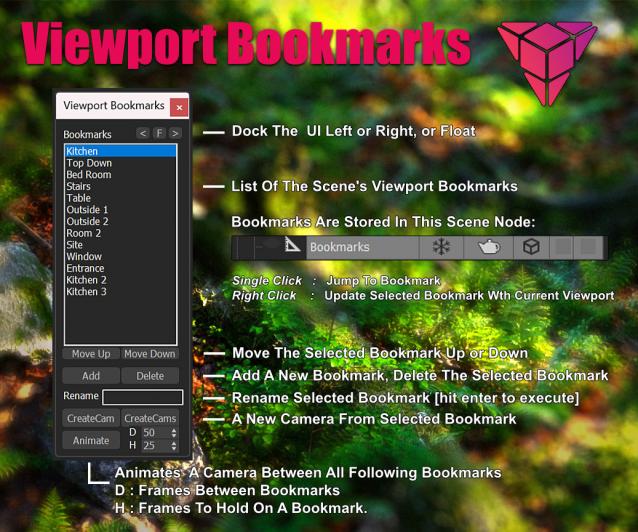
    This is a tool for bookmarking viewport positions. It's especially useful in large scenes.

    Features
    - Add and remove viewport position bookmarks, and name them.
    - Switch between bookmarks by clicking on the bookmark name.
    - The window is dockable
    - Cameras can be created from the bookmark, based on the active renderer (Arnold, Vray, Corona, etc.)
    - The data is stored persistent in a scene node, which can easily be transferred between scenes:

    select open spline knots

    0 votes

    Just sharing some code I already inside of other scripts for someone that asked. This is really basic maxscript that will loop through your selection and select at sub-object vertex level any "open" vertices. No error checking, lots of situations that will break it. (Selecting objects that aren't "editable spline", even a circle primitive will error.) If you have multiple objects selected, it maintains that selection, but if you select just one of them and go into subobject, your verts will be selected. Just a starter for folks to use.

    Create_Point_On_Selected_Object_Surface_with_Attachement_Controller.ms

    6 votes

    Use this script to pick points on the surface of a mesh then place a point on the surface of that mesh - at each picked point - with an attachment controller.

    Syndicate content