3ds Max | All

ParticleshapeUpdate_Script

0 votes

It's a sample max file show how to use PF script update particle shape per frame.
sorry I don't know how to make it as a tool,
So,just open max file and see how it work.

only for 3dsmax 2011 upper.

FaceSelector

9 votes

It tells you how much n-sided poly's you have - and let you select all 3 sided or all 4 sided poly's - or do a subtraction of - let's say - all 3 sided poly's. Works okay - but needs a algoritme - it's slow on big meshes... Based on Bobo's code and LightWave's interface

quickLightIE

7 votes

Let's you quickly add or subtract a selection of objects to a selection of lights. Pick the objects that need to be added or subtracted - hit the first button. Choose to add or subtract - then hit the second button. Objects will be added to existing list - so if it's already got an exclude list - they'll be added to that. If it has an include list - well - they'll be added to that.

Select Opposite

4 votes

Unfortunately Character Studio does not give the user the ability to create shortcuts to some of the most useful tools it has to offer. This script detects which Biped bones are selected and then mirrors the selection i.e. left arm to right arm. This script supports multiple selections of bones and unlike Character Studio - it can be run on combinations of bipedal and regular bones.

Box From Vertices

1 vote

Simple Script to Create Box from Selected Vertices (You can use it as snap reference)
The Box Rotation Depends on the Current Coordinate System :
- local , Parent , Node.Transform .
- other than that it'll use the view system .
- it works with (Poly,Mesh) Objects or Modifiers , and shapes (will be Converted to editable Spline) .
The Created Box Name will be "Box_Helper" placed in Layer Called "Snap_Helpers" .

<removed>

1 vote

DCP Particle Speed

1 vote

bit of a hack to display Particle Speed...where the particles ARE that is...

Extract preset to:

C:\Users\xxx\AppData\Local\Autodesk\3dsMax\2017 - 64bit\ENU\en-US\plugcfg\DataChannelPresets

Then in your DCM (on a Mesher that is, coz DCM needs a mesh to work on, it can't work directly with PF), load it as a Preset.
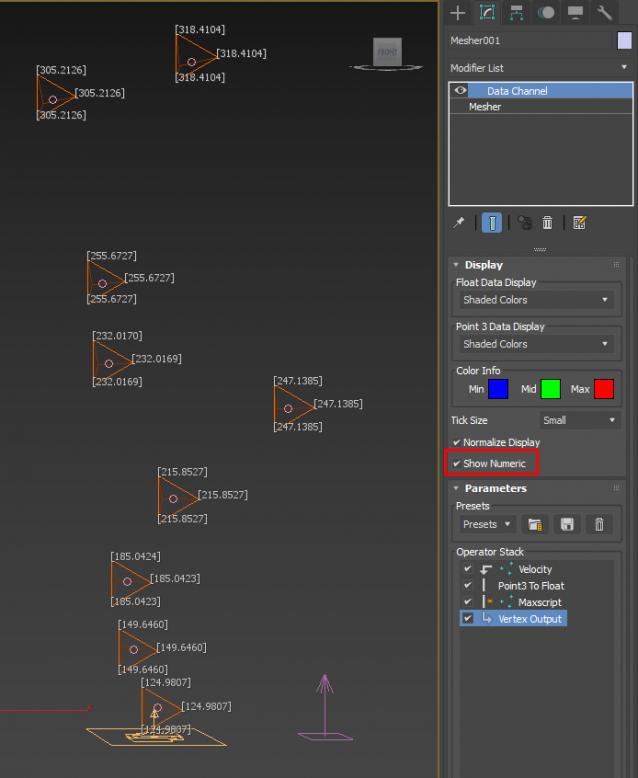
ver 1.01: Maxscript op now will use correct (auto) frame rate

Tile Renderer

3 votes

Renders image sequences to a tiles bitmap. Maily used for fonts in games. NOTE: Don't use safe frame as a render with safe frame on will not come out the right size. I think this is a maxscript bug

RenderLayers

4 votes

Create and Manage Matte/Shadow Layers for later 2D compositing. NEW!: Rendering Passes as LAYER-specific option. Fixed a bug with Target Lights. Started implementing Scene Snapshot options.

keyData recorder

2 votes

Record all keyData in an external file for all selected objects in a scene and then load the keyData whenever necessary. Specify the frame range in which to record key data and also specify the frame in which to begin loading the key data.

Syndicate content