3ds Max | All

3DS Max 2023 And Newer - Snap Working Pivot

0 votes

Sometimes you need your transform gizmo to be oriented in a certain way, other than the typical orientations, to perform operations like Move, Rotate, and Scale. Starting from Max 2023 we have this nice tool called Snap Working Pivot Tool, that allows us to do that, and it comes with multiple options to help us create and manipulate the working pivot point. Also, in addition to that, it gives us the ability to extract a construction plane out of the created working pivot. This tool is useful in many areas, like transforming objects, rigging, animations, Smart Extrude, etc,...

LockUnlock_Position_X_UnLock.ms

0 votes

Disable X Position Locks for the selected objects

ShowNextABC (improved)

2 votes

This is a very simple but handy script for artists working on imported scenes where there is a need to inspect each node one by one.

By pressing the button the list of all scene objects is created and sorted by name. The first object on the list is selected while all the other are hidden. Vieports zoom and focus on selected node. Subsequent clicing on a button enumerates through all nodes on the list.

Script category in interface manager: "MXS Help"

Biped 镜像工具-Biped Mirroring Tool

1 vote

Biped Mirroring Tool Guide

Introduction:

The Biped Mirroring Tool is a powerful utility designed for 3ds Max users to simplify the process of mirroring Biped characters. It enables users to quickly locate and select the Biped's root node by selecting any object within the character's hierarchy and automatically carries out the mirroring operation. Additionally, this tool intelligently handles Bipeds with a parent hierarchy, preserving the structural relationships and executing the mirroring correctly.

How to Run the Script:

3DS Max - Vray Frame Buffer - Real Zoom explained

0 votes

In this tutorial, we will look at the difference between the regular zoom inside the Vray Frame Buffer, and the Real zoom. The benefit of using Real zoom is that it acts as if you're getting closer to the actual geometries in your scene and rendering them, also, in this mode you can check out other parts of your scene, not included in your actual rendering limits, without the need to mess up your camera location, or, if you're in a perspective viewport, messing up your viewpoint.

Inheritance_Rotation_Y_On.ms

3 votes

Enable Y Rotation Inheritance for the selected objects

Bookmarks

0 votes

Bookmarks is a tool to help animators to stay organized.
It is inspired from the bookmarks tool in Maya.

You can quickly create visual bookmarks on scenes or individual objects,
change their color, range, name, comment, link a camera...etc

Then you can use them to navigate your animation, isolate specific time ranges, move/scale keyframes, retime...etc

Webp to jpg

2 votes

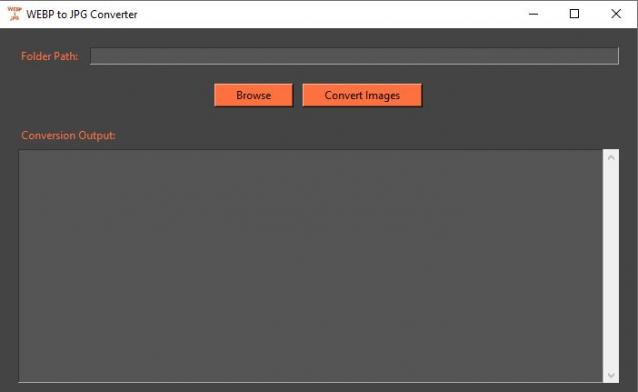
This is not a 3dsmax script but a stand alone application.

Double click the .exe file, browse to the desired folder (you won't see the files while browsing), press convert images.

All webp files in the folder will be converted to jpg

edit: It might be flaged as trojan by your anti virus,it is false positive. I'll try to find a solution to this annoying problem.

BOA Curator

2 votes

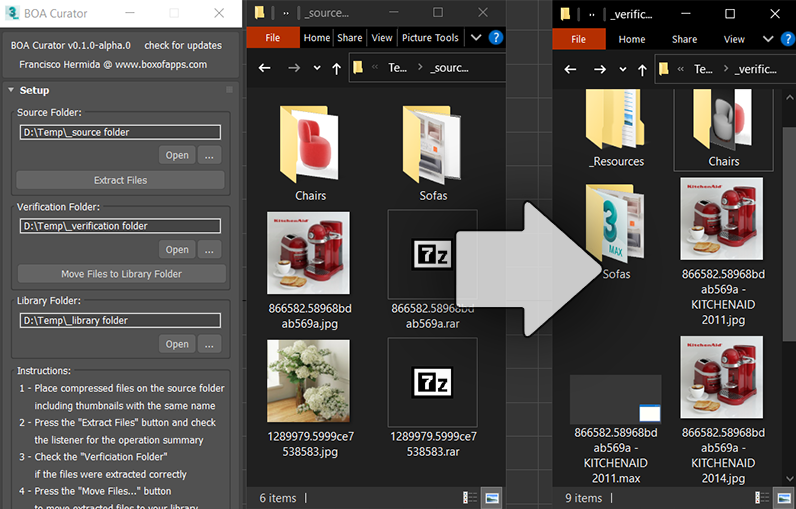
Extract and organize downloaded models and thumbnails with just a few clicks.


BOA Ref Banner

More information on: www.boxofapps.com/boacurator

*Alpha and Beta versions are Free to use on commercial projects.

Skin_Selected_To_Null_At_Pivot.ms

1 vote

Use this script to create a null at the pivot of the selected object(s) then skin the object(s) to the null at its' pivot

Syndicate content