
Batch Camera Render
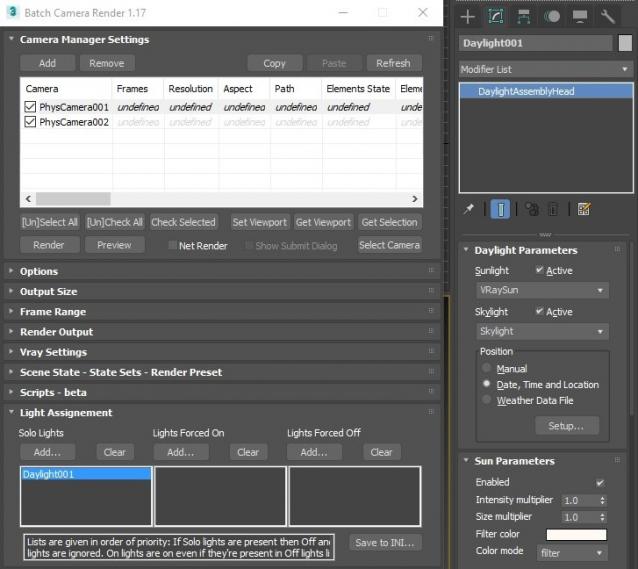
This script aims to replace standard 3dsmax's Batch Render and imitates Houdini Output Node workflow. Using it you can specify rendering parameters - frame size, frame number, output path - directly to camera object, so every camera in scene 'knows' what it intended to render. Additional functionality is Lighting Assignment - you can specify which light will be turn on or off for selected camera during the rendering.
1.19:
- Support 3ds max 2026
1.18:
- Support for 3ds max 2023 Update fixed
1.17:
- Corona and Vray Sun inside Daylight System fixed (thanks to busseynova for reporting)
1.16:
- CoronaSun supported inside Daylight System
1.15:
- Don't Save Render Elements Checkbox (Thanks to antomor)
- Limited support for camera objects in xref scene files (Only root objects in first level xrefs. Cameras in nested xrefs not supported)
1.13 Bugfix:
- Deadline submission should work now
1.12 New Feature:
- Deadline support.
Very basic imlementation, it allows you to submit your jobs on a deadline server. Enter deadline repository address and check "Use Deadline" checkbox. Other checkbox doesn't matter in this case ("Net render", "Show Submit Dialog").
Probably it requires Deadline 3ds max Submitter installed. I didn't have a chance to check it on a clean machine.
1.11 Features and fixes:
- State sets support added
- "projectname" keyword added which resolves to project's folder name
- other fixes and improvements
1.10.3b Fixes:
- Crash when vray ir/lcache maps are set to auto-save
- Region render was not set properly during the rendering
This is major update of the script, so it may not be as stable as before. Backup scenes or cameras at least before running this version. More information can be found here - 1.10b Multiple presets for each camera
Previous updates:
1.10.2b Fixes:
- Problems with render elements paths
- Copy/paste of render region settings
- Properly convert render region values when change resolution
New features:
- Multiple presets for each camera
- New keyword %presetname% to support multiple presets
- Distributed rendering checkbox added to vray common settings
- Bugfix - Net render not starting after cancelling during local rendering.
- Improved performance with scenes with lots of cameras
- Added support of Vray RT as a production renderer
- Added support of using MFRender script to render scenes through BatchCamera script.
- Bugfix - Error was popping up sometimes during drag-n-drop
- Bugfix - Render elements didn't render in certain conditions
- Bugfix - Pre-render/post-render scripts didn't work on network rendering
- Bugfix - Select All and Toggle All buttons didn't work properly
Here are some details: http://usakhelo.github.io/batchcam/batchcam-1.9.20.html
Script's website - http://usakhelo.github.io/batchcam/
Github - https://github.com/usakhelo/batchcam
2015 Updates
- Region render parameter can be specified for each camera
- Set Viewport button sets viewport camera and resolution and aspect as well
- It is possible now to specify backburner servers and server groups for silent rendering submit (code editing required)
- Vray Elements fixed for Vray 3 and Vray output saving with VFB color correction
- Cancelling of rendering of multiple cameras at once,
- Hierarchical ini files
2013 Updates
- Drag-n-drop of cameras in list
- Camera list window size can be changed (script restart required)
- When committing region render it is possible to switch to view render without restarting the render
- Keyword syntax can be used in Scene State names - thanks to Stefan Runevik for suggestion
2011 Updates
- Preview button added - renders only current frame without saving anything - no images, no vray maps, no scripts running, no elements.
- Ortho mode added to Vray rollout - it turns any camera to orthographic, including Vray Physical camera.
- Copy/Paste from one camera to one/several cameras - use new buttons at the top of the window.
- Submit Scripts section - you can assign script files that will run on each render submit. Per Submit script runs once per render submit and Per Camera script runs for each camera before submit. All these scripts run on local machine, not on render server.
- Last Rendered Location field - here is stored last render file location. Very useful for locating last-time rendered images.
Installation:
Run this script with Maxscript -> Run Script command from any folder on your hard drive, then go to the *'Customize User Interface' -> 'Toolbars'*, browse to category 'Sergo Pogosyan' and add 'Render scene cameras...' button to the toolbar or to the menu.
Usage:
When you start this script it iterate over all cameras in scene and list them in the dialog box. To each of these cameras you can assign frame resolution, number of frames to render including nonsequential frames, output file location and lighting setup. All these properties can be changed for one or several selected cameras. Output file location is split to folder path and file name, so you can specify new folder for all selected cameras in scene. 'Lighting assignement' section contains three list: Solo light list contains lights that will be only lights turned on during the rendering, 'Forced On' and 'Forced Off' lights are turned on or off respectively during the rendering. After all these setting will be set up (if some properties is not set value from the Render Setup will be used), check the camera(s) in the list and hit Render button. Check Net Render checkbox to submit network render job.
Supported lights: All bundled 3ds max lights, all Vray Lights
Supported cameras: All bundled 3ds max cameras, Vray PhysicalCamera
| Attachment | Size |
|---|---|
| batchcamerarender_1.19.ms | 246.18 KB |
Comments
thx for the suggestion sergo,
thx for the suggestion sergo, but it doesn't solve the issue, if I send without dialogue. maps are not sent with the scene, even after submitting one with the option checked.
Using Max 2010 64, with VRay 2.20.02 on Win 7 64.
hope there's a fix
thx
I thought that after you
I thought that after you submit one time with Include Maps flag through the Submit Dialog, next time silent submit should consider that flag. Could you try this workaround?
When submitting jobs for net
When submitting jobs for net render, maps are not sent with the scenes unless I check "Show Submit Dialogue" and assign them manually.
Is it possible to automatically include maps.....or am i missing a setting ;) ?
thx
Love the script,gives me
Love the script,gives me great control of scenes. I did find your filename syntax a bit fiddly piddly to set up, I would have preferred check boxes :)
thx
+1
btw is it possible to change the date range format from 2012-07-15 to 15_07_2012 ?
It is a matter of how vray
It is a matter of how vray works not script.
VFB editing
ok. Is version 2 the same way?
Vray frame buffer editing is
Vray frame buffer editing is saved only when you save file manually from the framebuffer (by the save image button).
exposure/curves settings
Sergo,
When I adjust curves and exposure settings in the frame buffer, those settings are not baked into the output files from Batchcam (the changes are visible in frame buffer, though). I want what I'm seeing in the frame buffer to be what's saved to disk.
If I save the file manually, it looks right. Is there a setting I'm missing? I'm using version 1.9.8.1 with vray 2.20.0, 64bit, Windows 7.
Thanks,
Scott
I've just thought that Custom
I've just thought that Custom Keywords may be helpfull when you want to switch the paths based on some criteria.
Here's an example:
var1 variable is set to name of box1.material
var2 is the conditional operation: if box1.material.name == something then var2 will be set to "test1"
So you can use any maxscript properties in Value field and then use variable name in paths.
One more question just poped
One more question just poped out...
How the syntax works with "Custom Keywords and Names" ?
Can I use it in filename?
Example please.
Thanks