
Batch Material Editor
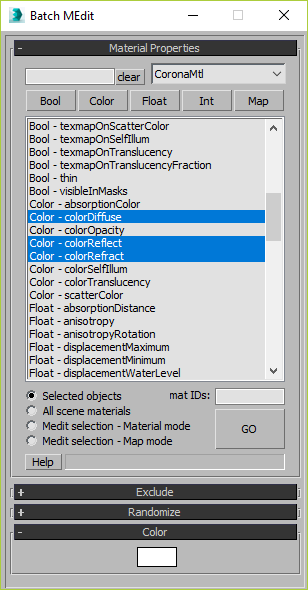
This script allows you batch edit multiple materials and bitmaps.
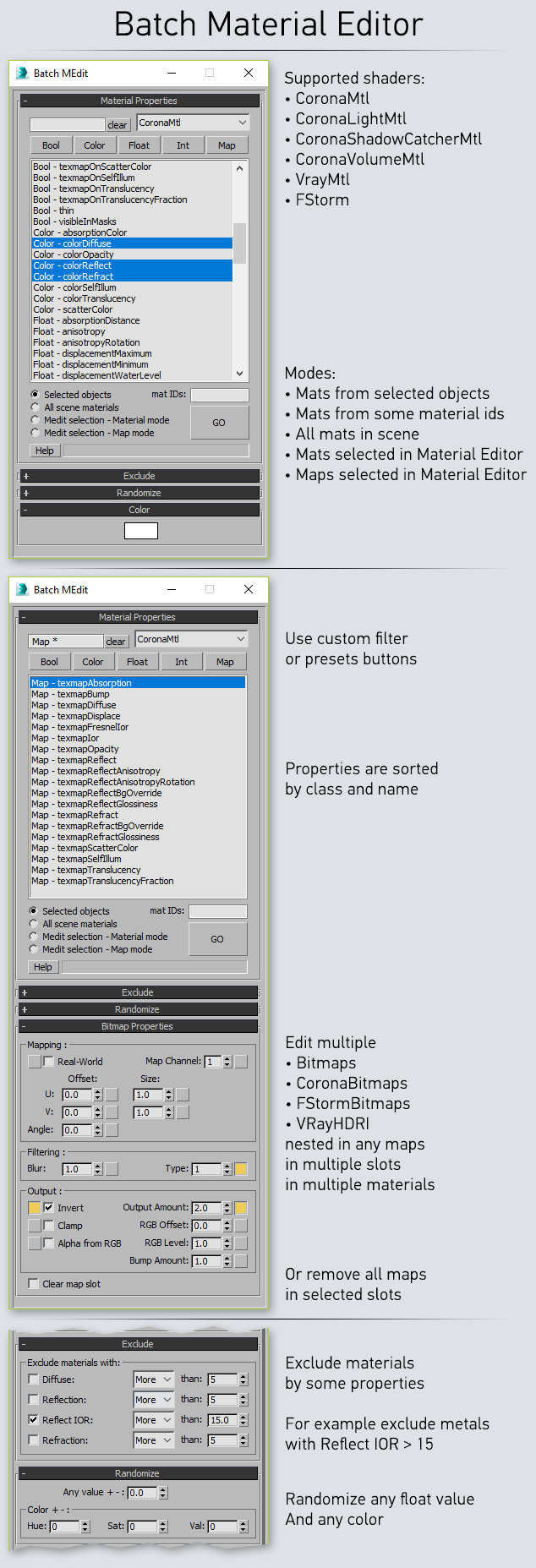
CHANGE LOG:
###################### v1.9.1
- New. RS_Material support.
- New. RS_Bitmap support.
###################### v1.9
- New. CoronaPhysicalMtl support.
###################### v1.8.1
- New. VrayLightMtl support.
- Fix. VrayMtl integer properties names and number limits.
###################### v1.8
- Fix. Corona Layered Material layers didn't work.
- Fix. CoronaMtl mediaMode added.
###################### v1.7.9
- Fix. It was a bad idea to fill list with compatible shaders only. Now list contains all supported shaders if renderer is installed.
- Fix. Error when last operation was "Clear map slot" and checkbox was enabled.
###################### v1.7.8
- New. Script will use shaders and maps that compatible with current renderer. For example VRayHDRI even in Corona.
- Fix. Renderer identification system is removed. All related errors should be fixed.
- Fix. Mode radiobuttons last state was broken.
###################### v1.7.7
- New. Last used settings now saved in .ini file and works between 3dsMax sessions.
- Fix. Exclude by reflect ior FStorm didn't work.
###################### v1.7.6
- Fix. Default X position now 200px instead of 1500px, for people who have small resolution screen.
- Fix. Error when current renderer is not supported.
###################### v1.7.5
- New. Partly VRayHDRI map support.
###################### v1.7.4
- New. FStorm material and bitmaps support.
- New. Shaders list will contain only shaders available in current render engine.
- Changed. Small changes in Exclude rollout.
- Changed. ms file is removed. You can comment first line of script to use it like .ms
- Changed. Script is now called "Batch Material Editor" without "Corona".
- Changed. Script is now only on ScriptSpot.
- Changed. Macro Category was changed to "Nik Scripts".
###################### v1.7.2
- Fix. Maps mode didn't work.
###################### v1.7.1
- Changed. GO button disabling behaviour.
- Changed. UI disabling behaviour.
- Fix. Clear map slot.
- Fix. Previous mode.
###################### v1.7
- New. Medit selection material mode (Read Help)
- New. Medit selection map mode (Read Help)
- New. Help on forum and Help button in UI
- New. Message string for errors and summary info
- New. GO button will be disabled when properties selection is invalid
- New. Dialog will save Position, Mode and Filter in current 3dsMax session
- Changed. Ignore materials renamed to Exclude materials
- Changed. New intuitive UI in Exclude materials
- Changed. Bitmaps UI is not locked by default
- Changed. Bitmaps switches automatically enabled when property is modified
- Changed. Now randomized value can't be more or less than valid value
###################### v1.6
- New. Randomization of any float and color values.
- New. Size, offset, angle parameters for Bitmaps and CoronaBitmaps.
- New. Clear all maps in selected parameters (map slots). You can undo that
###################### v1.5
- New. Ignore materials by some properties. Works with CoronaMtl and VrayMtl.
###################### v1.4
- New. Properties now sorted by class and name. Class is visible in list.
- New. You can filter them via filter class presets buttons or/and by name.
- New. Now you can select multiple properties IF all of them share similar output values.
- New. Bitmap and Coronabitmap properties.
- Changed. Code optimisation.
###################### v1.35
- Changed. "All materials" and "Selected materials" buttons that starts changing property will be disabled when list is empty (if search is invalid).
- Fix. Error caused by invalid search.
- Changed. Code optimisation.
###################### v1.3
- New. Adaptive dialog height.
- Fix. Some bugs.
- Changed. Code optimisation.
###################### before 1.3 changelog is lost
| Attachment | Size |
|---|---|
| ns_batchmtleditor_1.9.1.mcr | 51.71 KB |
Comments
I just purchased the scripts
I just purchased the scripts and its doesnt have those options. Its more of a charged up selection tool than of a material editor.
As far as I understand this
As far as I understand this script can edit any material/map values. Would be better to ask the author ofc.
I dont think you can edit
I dont think you can edit multi-materials as your scripts does. It is more of a selection tool based on a lot of criterias.
I dont think you can edit
I dont think you can edit multi-materials as your scripts does. It is more of a selection tool based on a lot of criterias.
Universal Select By
Hi. Doesn't this script do everything you need?
https://obaidaviz.gumroad.com/l/KimVtV
Any chance to update batchME
Any chance to have batchME 2.0,man I am happy to pay you for that script, I use it everday, Its such a live save one you adapt it in your workflow, do a gumroad listing maybe.
Thank you so much for sharing this script and a lot of other scripts for free.
Much love <3
Corona Clear map slot error
I love your script. its really useful.
Can I also request support of Physical Material and Legacy material - ( we do a lot of export to other software and some only support physical and legacy material.)
Corona
I also like to report that clear map slot for Corona Physical and Legacy shows a runtime error --line number; 668
Vray clear map works but I cannot select multiple map channel slots in at one time. i have to select by batches.
Anyway awesome work and sharing to the community mate!
Version 2.0 is in
Version 2.0 is in development. Every possible material and map will be there.
Release date - when it's done...
UPD. Development was cancelled
Max 2022 Physical Material
Hi Nick,
Any chance you can include editing 3ds Max native Physical Materials?
Cheers
Video Tutorial
Amazing script!! is there any video to see all the settings and know how to take all the advantages of having this script. There are many things I am a bit lost of how to use it. Thanks