ScriptSpot is a diverse online community of artists and developers who come together to find and share scripts that empower their creativity with 3ds Max. Our users come from all parts of the world and work in everything from visual effects to gaming, architecture, students or hobbyists.
This tool manages for you all the boring stuff to achieve a flythrough animation with Max And Vray.
All changes are made in the engine to help you control and render each necessary step.
Finally it can also do all the process in one click !
Submitted by Martin Breidt on Fri, 2006-10-20 20:45
55
votes
Updated to v0.9 - This Render Effect displays additional information such as frame number - file name - render time etc. as overlay onto your rendered image. Useful for previews - previzualisation and other non-final renderings - should work with any 3dsmax-compliant renderer. All parameters animatable.
"Creates copies of an object on every vertex of a distribution object. Possibility to orient the copies regarding to the vertex Normal Possibility to choose the distribution type : copy.instance.reference"
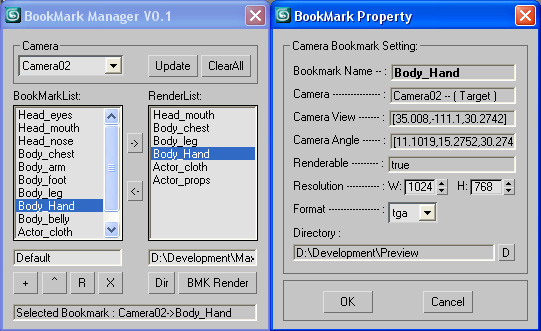
Bookmark Manager allows artist to capture camera position and orientation and store as bookmark in Max. Bookmarks can be added,inserted,renamed,deleted and sent to render. Double click on bookmarks would bring up property page and make changes. Selected bookmarks with renderable turned on can be batch rendered in different file format,resolution to user-defined output directory.
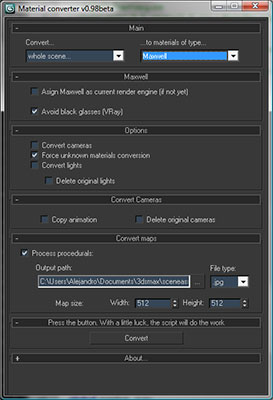
Simple utility to make it easier to move scenes from a rendering engine to another. Some work have to be done in terms of materials or types of engines, but it will progress step by step. In the following table you can appreciate the possibilities of the script at this moment:
Help file explaining the whole process included with script.
"Allows you to attach editable meshes together while preserving any vertex animation within the editable meshes. In order to create an editable mesh with vertex animation - either directly animate the vertices or use John Burnett's 'bake' script"
Freeze and/or zero-out transforms on objects while keeping all existing controllers in-tact. This means any existing constraints, script controllers, expression controllers, noise controllers, etc., will still be there afterwards.
A small server admin tool built on maxscript to automate some of the more annoying tasks needed while managing a small renderfarm. Rebooting/Shutting down remote servers, Viewing with VNC or Remote Desktop, Restart/Stopping/Querying remote services, Listing/Starting or Stopping remote processes
this script add check button to your toolbar so you can simly turn on/off autoback, if is autoback off a warnig will appear so you never forget turn autoback on and loose your progress if max crash
hope you like it
very simple script to shift key based on any object distance will shift key from them with randomizing option very easy very simple i changed the use of qsort fun with much better way i improved the overlapping here with other object baked to identify the range of the animation i attached the ms file to preview the code

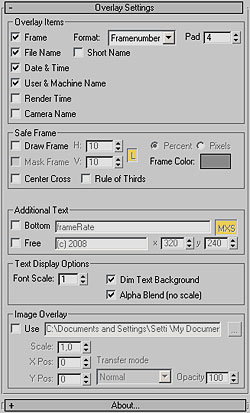 Updated to v0.9 - This Render Effect displays additional information such as frame number - file name - render time etc. as overlay onto your rendered image. Useful for previews - previzualisation and other non-final renderings - should work with any 3dsmax-compliant renderer. All parameters animatable.