
GTVFX_Toolbox
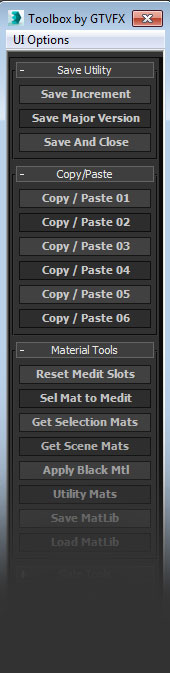
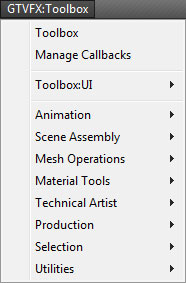
Updates:
===================================================================================
08/16/2014:
v2.34
Some minor bug fixes to the Toolbox. Added additional tools to the system menu.
05/23/2014:
v2.32
Fixed a bug that prevented the system menu from generating.
04/20/2014:
v2.31
Added some new tools to the UI.
Save and Close launches a dialog where you can choose from a selection of options what actions to take after incrementally saving your Max file. (Close Max, Restart Machine, Shutdown Machine)
Select By Nth is a tool to select every Nth object in your selection. You can right-click to launch a gui to choose the Nth amount and some other optiions.
Updated the function for attachiing elements. Had some major slow downs when converting complex Editable_Mesh objects to Editable_Poly. Now the conversoins are minimized and the hole process is leagues faster.
03/05/2014:
Some additional changes to the UI and a few new additions to the tools, both in the rollout and in the floater.
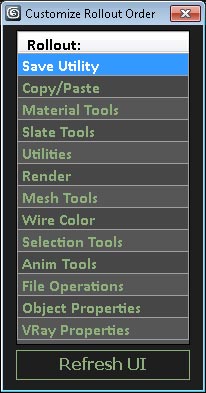
Added a new UI to customize the order of the rollouts on the floater. You can drag-and-drop within the UI to set your preferred order.
02/07/2014:
Minor updates to the Toolbox Floater. Includes the major updates to external tools setOutOfRangeTypes and createAnimStillsCam.
02/01/2014:
First major version to 2.00. I've completely overhauled the UI in this release making use of Dot Net. I'll be putting together tools to allow for the user to customize the interface themselves. (Change Font, Text height, and reorder the rollouts to suite their needs.)
01/07/2014:
Added a UI option so that the user can choose if the main dialog will initialize on Max StartUp. If the user decides not to have this run at StartUp, the dialog can still be launched from the system menus.
This is a large library of tools combined into a single deployable. The install will create a system menu in Max that has a bunch of tools organized by category. It will also give you the main Toolbox floater which is a huge library of functions with a customizeable interface. You can dock this floater or save it's screen position and size, and save which rollouts are opened and closed.
Any Max artist will find use in these tools. There are tools here for handling incremental saves, camera baking, animation caching, copy and paste, geo transform operations, and so much more. Some of these tools were written pretty recently, but most have been tested and put to use on all the vfx projects I've worked on over the past few years.
Everything is set up with tooltips and lots of error checking to help you along the way. Give the tools a go and let me know what you think.
I'm currently working on a wiki page for all these tools to give an overview of their functionality. I'll update the tools with wiki links as they become available.
For now here is a link to a list of the tools and very brief description for each one.
http://www.gtvfx.com/scripts/GTVFX_Toolbox_ToolList.pdf
If you find any bugs with this tool, if it does not install properly, or one of the functions breaks the script for some reason, please message me with a screen shot and brief description of the error.
All the best,
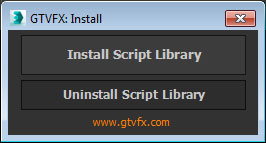
To install just drag the download .MZP file into the 3dsmax interface. You should get an Install dialog.
| Attachment | Size |
|---|---|
| gtvfx_toolbox_pro_2.34.mzp | 115.03 KB |
Comments
Install Errors
The error with the system menu not generating should be resolved in this latest version.
v2.32
Best,
Gavyn
Gavyn Thompson
Install Errors
My only guess is that this is somehow related to updates in the Max 2014 folder structure. We're running 2012 at the studio, and I'm running 2013 at home. I tested everything out on a trial version of 2014 and that all went well, but that trial has long sense expired.
It's hard to fix a bug that I can't reproduce, so until I'm able to test more on 2014 or 2015, I'm afraid there's not much I can do for you guys.
Best,
Gavyn
Gavyn Thompson
same
Same there - GTVFX after new update is gone..
...
Nothing, in temp folder there was only copy paste folder, not GTVX. Btw I delete temp folder and can't install.
Although script say me is correct installed I can't found anywhere
GTVX is fully gone :S
RE: ...
Paste this into your maxscript listener and execute it
shellLaunch ((getDir #temp)) ""
This will launch an explorer window to you 3dsmax Temp folder. If there is a "GTVFX" folder in this path then delete it. This means that something interrupted the installation process before it could perform final cleanup.
With this folder removed try to do a fresh install.
Let me know if that doesn't do the trick and I'll look into what else it could be.
Best,
Gavyn
Gavyn Thompson
...
I installed it sometime ago and work fine, but now I've tried to upload and all gone. I tried unistall-install and nothing. It's like it can't be installed anymore
Can you help me?
Max 2014 design and windows 7
Thanks
RE: No System menu
The MZP was the first thing I tried. The unzipping and manual installation was tried afterwards, also unsuccesfully...
the toolbox does load at startup every time and works great, but no system menu.
Best,
Tim
RE: RE: Shortcuts
Hmm maybe I can help you there. Or at least a start. Thinking about going through and setting up some shortcuts for myself. I'll save it when I'm finished and send it to you.
Thanks for all of your hard work though! Great job!
RE: No System menu
The best way to install the tool is to just drag the MZP file into your 3dsmax interface.
There is an execution on the MZP extraction that copies files to a temp directory and installs the scripts from there. If you unzip the MZP file yourself then you're skipping this step entirely and the tool doesn't know where to find the files to install.
The MZP format was designed as a self extracting deployable and isn't meant to be unzipped manually.
Best,
Gavyn
Gavyn Thompson
No System menu
Hello Gavin,
When I install the script it doesn't create a system menu item.(Max2014 on win7)
Is there a way to add this manually?
I unzipped the mzp and when i execute the install.ms and press install script, I get dialog:
Could not install the tool.
Double check that you have permissions to copy files to the 3ds Max root directory.
I tried setting my permissions on max-folder to full control but without succes.
Any ideas?
Thanks
Tim