3ds Max | Scripts

Shader Utilties Pro

18 votes

Shader Utilities Pro (SU Pro) is a tool to create all kinds of shadings within a scene. Part of the tool is a converter, which converts foreign shadings to A&D material. SU offers the possibility of using parameters like AO and Round Corners globally on all shadings. There are 3 selection criteria for doing this: The latest addition is the Sample Curve Technology used to optimize the Sample-Types, AO, Reflection and Refraction globally for an entire scene or all materials. This has major advantages

Custom Attrubute Animation Copier

8 votes

This script copies the animation on custom attributes and adds it to another object with similar custom attributes.

Usage:

1. Click the copy to button and select the object you want to copy the animation to.
2. Click the copy from button and select the object who's animation you want to copy.
3. Select the custom attributes to copy from the list box.
4a. Hit the do it button
4b. Or you can do an incremental copy which places a key on every frame for a specified range.

Notes:
1. Make sure the custom attribute is applied to an attribute holder modifier.

Install:

Sprite Buffer

20 votes

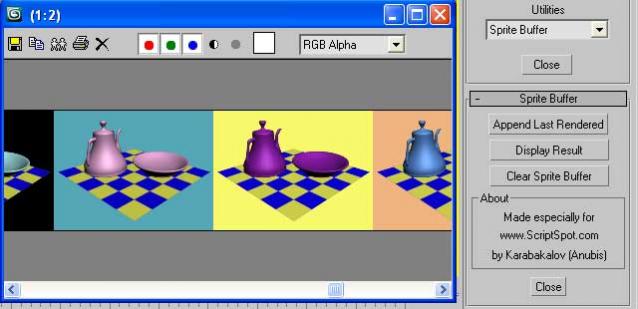
Such a Maya feature to compare rendered images. Result displayed into VFB. Which means that you have ZoomIn/ZoomOut control (which is useful in comparing bitmaps) and also access to all VFB's controls like: Save, Copy, Clone, RGBA, ... etc.

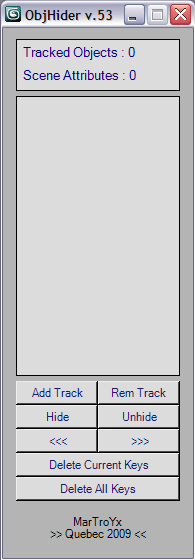
ObjectHider v0.61

19 votes

WallMax

4 votes

A simple script that makes a wall from a number of blocks ,you can set the size of the wall and the size of the blocks.

ParallelPolySelector

11 votes

Script for selecting polygons which normal has the same angle as selcted plus threshold.

Procedural Array

38 votes

Instructions:

This script allows you to create procedural arrays which stay editable
even after you close and reopen the file. The array objects are linked to
a parent helper which you can transform to your liking while still keeping
array qualities. This is great for creating tiles or roofs where you place the array first and still want to tweak the distance between its elements.

pie

11 votes


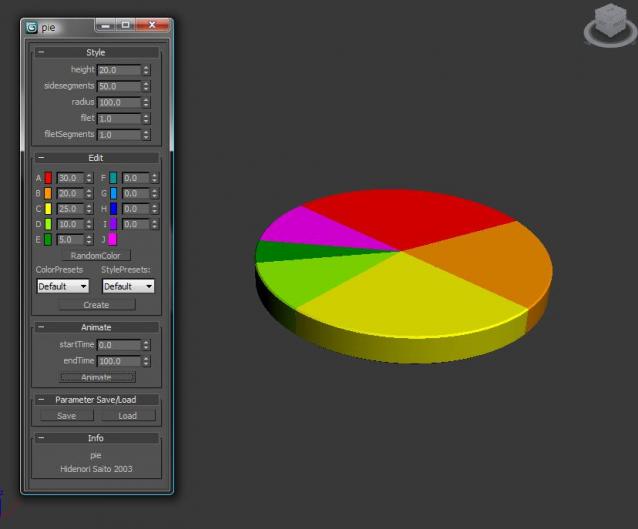
This script easily makes the pie chart.

Installation

  • Download installation file
  • UNZIP •3dsmaxROOT to root folder of 3ds max •Start 3ds max
  • Go to Customize>Customize User Interface>Toolbars> Category "HideScripts">Action "pie"
  • Drop Toolbar

How to use:

Bullet / laser generator

7 votes

This is a little script I wrote for a project I'm currently working on. It adds some extra controls to any maxNode and transforms it to a bullet (or laser beams) generator. The bullets (or laser beams) will come from the local Z-axis of the object.

There's two files attached; a .ms with a Custom Attributes definition, and a simple Max (2010) file with the custom attribute added to a Point Helper. It's very simple to use, the interface is self-explanatory, and tho code is open.

To apply the Custom Attributes to your objects, execute the script (once), select the object you want to transform in the bullet generator, and then type in the listener: custAttributes.add $.baseobject laserGunCA


Enjoy.

FaceGrabO

18 votes

Initially, this a only script to assist making tight cloth for character of with editablepoly.
But perhaps this can assist to make the other model. ^^
Handy to create twin faces from selection of polygons to becoming raw model or maybe final model.

Syndicate content