3ds Max | Scripts

Debris Maker

24 votes

The Debris maker creates several types of debris quickly with user defined levels of detail, irregularity and chaos, and can create a particle flow with the geometry instanced into it.


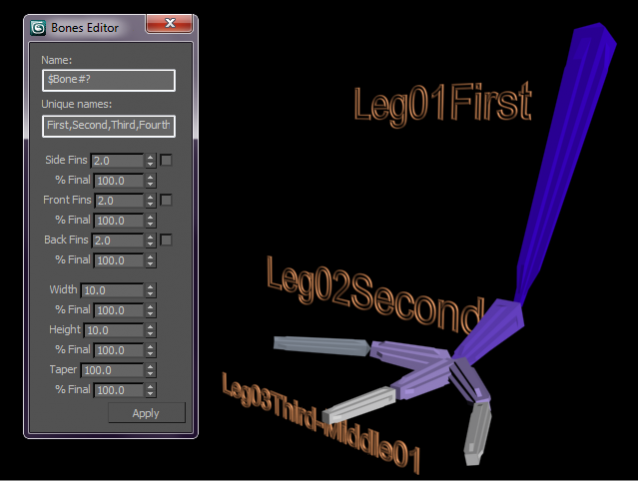
Bones Editor

6 votes

Bones Editor

It's really useful for managing Bones.

Now, it's not necessary to select every bone in the scene for changing Fins sizes and size of the bone. And now it's possible to change the name of a Bone and all of its children with few steps, MUCH FASTER

This is my first script.

Auto Hand Rigger (BETA)

9 votes

This Rigger was made having in mind the difference in hands and fingers. It works on any hand with any number of fingers and any number of finger joints.

Its a little sensitive due to euler rotation but it works mostly OK.

NOTE.- This is my very first script and so it might have lots of newbe mistakes
XD
-------

Este rigger fue hecho teniendo en cuenta la diferencia de manos y dedos. Funciona en cualquier mano con cuelquier numero de dedos y cualquier numero de articulaciones.

Es un poco sensible debido a la rotacion de euler, pero funciona bien.

mbFracture

16 votes

Macroscript for automatically breaking a mesh object into volumetric pieces. Has option for crack width.

showNodeLabels

40 votes

Example for viewport labelsThis macroscript allows you to turn on text labels for specific scene nodes, so you can permanently see the node names in the viewport, even if they currently are not selected. This is for the viewport only (the labels will not render) and the label will follow the bounding box of your nodes, whether you animate them, or change their geometry in any other way.

Find Modifier Type

16 votes

Choose the type of modifier you wish to find in your scene and this tool will return to you a list of every object that has the modifier, the object's name, it's class and the layer it is currently in. You can then select whichever objects you want.

The modifier list includes every modifier that is default to max.

mb_shortcuts

17 votes

Small collections of MacroScripts for 3ds max 6-8 - intended as keyboard shortcuts.

Contains two types of actions:
1.) Toggles - that will open a dialog upon keypress and also close it
2.) MouseOver viewport shortcuts - that work without explicit viewport activation
[Inspired by scripts from Roger Hyde and Martijn van Herk]

pFlow Control

17 votes

v1.08
-Fixed Source treeview height to scroll after 10 sources are added.
-Added Particle View toggle.

v1.09
-Added Render Operator node list.

Enable/Disable multiple PF Sources from one location Select PF Sources Change multiple Display Operator Colors Change multiple Display Operator Types Set viewport particle counts for all or selected PF Sources Set upper particle limits fro all or selected PF Sources Change Integration Steps for viewport and render for all or selected PF Sources. Re-sizable, relocatable.


Auto Non Quads

4 votes

-- With a editable poly object selected you can run this script
-- and it will take you to polygon sub object mode and select the now quads for you.
-- Even works when you are in other sub object modes.
-- A simple script yes, but a time save none the less.
-- It is a simple script to use as a short cut key or as a text button
-- that with one click you can see all non quad polygons.
-- Tested in Max 2011 design.
-- Written by Tom Mitchell
-- Found in the TomMitchell category after starting Max

Simply Cool Uv Tool

22 votes

This is my first script.Made for fun. Actually i needed to move selected uv clusters exactly 1 uv tile in witch direction i choose so i made a script. And added a few things...

Uploaded with ImageShack.us

Syndicate content