3ds Max | Scripts

Align Spline

3 votes

"Move the selected vertices to follow a spline.

  • Snap on shape : just snap each vertex to the closest position on the shape
  • Regular : equally repartition of the vertex on the shape
  • Move on sel center : the shape is moved to the center of the selection
  • This script works with closed or open shapes.
    This script works with polys and meshes"

    ViewportInfo

    4 votes

    With this script you can get useful information that is displayed on viewport. Includes:

    - The time from the last save.

    - Last Render Time. For me is quite comfortable at any moment to know the render time.

    - Render Settings. You can choose which render parameters to visible in viewport to control them without open render setup dialog.

    Tutorial - http://www.vimeo.com/27439275

    For more info - http://www.tepavicharov.com/scripts.html


    Polyvis

    7 votes

    Polyvis is a maxscript utility intended to help artist determin what polygons on certain objects are visable to a particular camera during animation of that camera/objects. The utility is especially intended to determin what polygons are visable on weapons in FPS games...

    YUZKONTROL 2.0 TEST

    26 votes

    Super Dupper Rock Replacer 2000 Elite

    2 votes

    I made this very simple took at work a few days ago to replace dummy rocks that the layout artist has placed with my high rez vray proxies. It does not replace multiple objects at once by design. It is created so that I can hand place my library of Rocks quickly and with some customization.

    What it does:

    move to origin

    1 vote

    the script allows you to move selected object/s to 0,0,0 coordinates.

    useful when moving imported cad files or 3d files to immediately move your objects to 0,0,0

    note: it uses selected objects center for reference

    v.1.1 - now works on group/s
    v.1.0 - initial script

    3ds Max Random Splash Image Loader

    32 votes

    framer

    9 votes

    framer is a mousetool used to very quickly change renderheight and -width. This is great for rendering regions or single objects of your scene, similar to a blowup render, but with variable aspect ratio. When dragging the frame, the aspect ratio changes interactively in the viewport. For further explanation please visit my website. Feedback welcome!

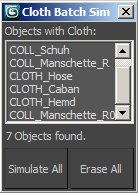
    clothBatchSim

    17 votes

    This is a simple way to simulate multiple cloth simulations in 3ds Max in one go. It will find all cloth modifiers in your current selection of objects and simulate them one after another, thus you don't have to start each manually.

     
    After simulation it will show start and end time, so you can see how long the process took.

    Short explanation video (1min) here:


    selection tools

    12 votes

    Several macros to set coordinates system - toggle window/crossing selection - and to change axis restriction. Put them into your favorite quad menu - and you can ditch the main toolbar away. Good for viewport-space-hungy users.

    Syndicate content