A script that adds some more functionality to the mxs editor.
Script
By haavards · 2011-05-07
A script that adds some more functionality to the mxs editor.
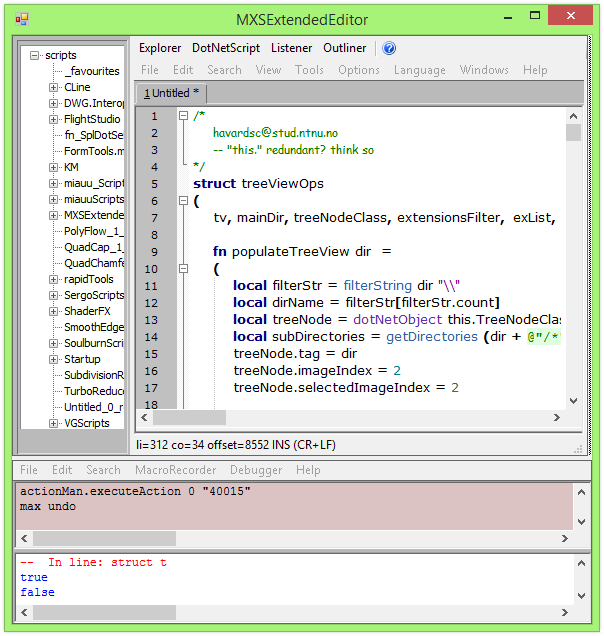
 The next thing I added is a simple outliner which shows a list with all your functions, UI elements, structs and event handlers in the currently opened maxscript. It works the same way as the ctrl + right click functionality in the editor; it will set focus where the selected element is in the script. You can toggle this feature on and off just like with the listener. Default is off.
 The biggest feature of this script is an added scripting window where you can edit and compile c# and VB code. It has not very much functionality added to it, but you don't need an external IDE to compile assemblies to use in Max. You can compile your code to either an executable, an assembly or just straight to memory. There is syntax highlighting for c# only.
 Before you can compile you need to configure the compile settings. If you are creating an executable or an assembly you need to specify the name and the path where you want to save the compiled results. When you are compiling to memory you just need to specify that you want to compile it there. If you need to refer to other .dlls or files add them to their respective text boxes (separated with a ',') See picture:
 If you compile to memory, you can access the compiled results like this (old picture):
 You can toggle this window on and off just like the others. Default is off.
The last feature is a stripped down (UI wise) version of the script explorer. Details can be seen here
Some credits:
http://forums.cgsociety.org/showthread.php?t=899696 Used this as a base to poll updates from the mxs editor.
http://www.mdxinfo.com/resources/scripting.php Used a heavily modified version of this for the new scripting window.
As mentioned, the script is still very unpolished. But do try it and give me some feedback! :)
Download for Max 2010 and above: Click to download
Download for Max 2009: Click to download Thanks to Alexander Kramer for making it work in Max 2009!
Known bugs:
- If the maxscript editor turns all gray, just create a new script from the MAXScript dropdown menu inside max. This will refresh the window back to normal.
- If you have not set the compile options and press the compile button, the compile options are triggered but the script is not compiled. You need to press the compile script button again to compile.
You can toggle this window on and off just like the others. Default is off.
The last feature is a stripped down (UI wise) version of the script explorer. Details can be seen here
Some credits:
http://forums.cgsociety.org/showthread.php?t=899696 Used this as a base to poll updates from the mxs editor.
http://www.mdxinfo.com/resources/scripting.php Used a heavily modified version of this for the new scripting window.
As mentioned, the script is still very unpolished. But do try it and give me some feedback! :)
Download for Max 2010 and above: Click to download
Download for Max 2009: Click to download Thanks to Alexander Kramer for making it work in Max 2009!
Known bugs:
- If the maxscript editor turns all gray, just create a new script from the MAXScript dropdown menu inside max. This will refresh the window back to normal.
- If you have not set the compile options and press the compile button, the compile options are triggered but the script is not compiled. You need to press the compile script button again to compile.kyle108 · 2016-01-04
is this version capable of working in 2016?
Here is a working instrument
 Nik · 2015-12-30
Not lost :)
 mad · 2013-08-09
didnt work :(
-- Error occurred during fileIn in #C:\3dsmax2014\3ds Max 2014\scripts\MXSExtendedEditor\MXSExtendedEditor.ms; line number: 35
-- Error occurred in anonymous codeblock; filename: C:\3dsmax2014\3ds Max 2014\scripts\MXSExtendedEditor\MXSExtendedEditor.ms; position: 1339; line: 35
>> MAXScript FileIn Exception:
-- Syntax error: at ;, expected
-- In line: f <<
max 2013/14
Thanx
Nik · 2014-02-13
Nice Tool
haavards · 2011-09-01
That should be doable, I just have to find time! It looks like I'm going to be buried in school assignments this semester :)
Features
Darholm · 2011-09-01
Nice work! The outliner is very useful!
I just have two wishes for the next version, maybe you've already planned to develop them : the posibility to switch the outliner from right to the left of the editor, and a real treeview behaviour in it (meaning the collapsing of main nodes like Functions or UI Elements).
haavards · 2011-07-08
http://www.scriptspot.com/3ds-max/scripts/mspm-maxscript-project-manager
I think this is what you are looking for script_butler. I've not tried it myself, but is has an automatic creation of mzp-files. The compiler in my script is for c#/vb :)
I rewrote the whole mxs extended editor the other day, I'm going to upload it soon I guess.
 jannyltd · 2011-05-28
Great stuff! Already replacing my normal editor. One issue though - when closed some of the windows stay as separate and should be closed one by one manually.
How can i access the compiler?
Script_Butler · 2011-07-08
I'd like to compile a script of mine to a .mzp and think your script is the answer but I can't find how to use the compiler....
 Jeff Hanna · 2011-07-08
There's no such thing as 'compile to a .mzp file'. Maxscript Package files (.mzp) are just .zip files with their extensions renamed. They're used to distribute files that make up a single tool. MaxScript is a JIT compiled language. Tools are always distributed as source code.
haavards · 2011-05-17
Hei,
don't know what could be the cause of the scrolling issue. Currently I use max2012 64bit on a 3 year old pc, and the scrolling works normal here.
About the embedding, I actually got a script for it that I had implemented in the extended editor.
http://folk.ntnu.no/havardsc/scripts/MXSExtendedEmbedAsViewport.ms
http://bildr.no/view/884488
Open the extended editor first and the run this script.
Unfortunately it has a bug where the dotnet buttons stop working when the script is an extended viewport. The workaround is that you have to drag the explorer, outliner and the dotnet script window manually if you need to use them.
After my exams now in May, i'm going to do a rewrite of the whole extended editor. I got some new features and hopefully some bugs will be squashed.
Scrolling is too slow
pbiswal · 2011-05-09
Hey Haavard,
Great script man.I love the function outliner feature.Thanks for doing this.
I haven't been able to use it to it's full extent because, the script editor window scrolling is too slow.It looks like it's lagging.
I am using 3dsmax 2012 64 bit on a windows xp 64 bit machine.I am guessing it's a problem in my system as i haven't seen anyone else posting about it.Anyways, i will keep checking.
Thanks
Keep up the good work :)
 kilad · 2011-05-16
Very cool, but as mentioned here a bit laggy scrollwise.
Do you know some way to register the editor as a viewwindow? (registerViewWindow())
It would be super nice to have the editor and the listener as an extended viewport.
Adios on the toilet
haavards · 2011-05-08
Weird Miauu, have not been able to reproduce that one. I just tested it in max2008 64bit and it seems to running kinda poorly there. The script organizer acted up a bit on few of its features and the outliner stopped working after Max lost focus. If i remember correctly Max versions prior to 2010 are running an older version of the dot net framework, maybe that is the cause.
DeadClown: That looks like a cool thing to try an implement as an exercise! I will look at it when I'm done with my exams at the end of the month :)
 miauu · 2011-05-08
The "Outliner" work very strange on my max2009 32bit. When I double click on function's/UI element's/struct's/event handler's name the script go to top(0 line) and all code from start to the selected function's/UI element's/struct,s/event handlers name become highlighted(selected) and I have to manualy roll to find where the highlighted code end.
 DeadClown · 2011-05-08
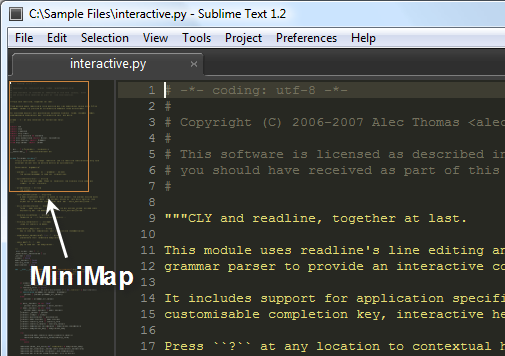
wow! Great Idea, very useful! A thing I would love to see is a minimap like in "sublime text" editor.
Another nice-to-have feature would be customizable colors, white is a bit too bright for my color scheme ;)
lucpet59 · 2011-05-07
Very nice, what a great idea!
Thanks for the feedback!
haavards · 2011-05-07
Thanks for the update Track, added an additional download link now : )
 Kstudio · 2011-05-07
It looks very interesting and cool!
I sent e-mail with the description how to make that the script can be run in 3ds max 2009.
Thanks.
P.S. Yes - it is really cool!
I love outliner!
oh damn.
MaVCArt · 2011-05-07
I just opened this, and i'm already completely thrilled by it. thanks man for sharing :D
 Graph · 2011-05-07
i didnt test it yet
but from what i read you just made my day :=)
 real08121985 · 2011-05-07
The same what tassel said. This is very cool!
Nice :)it's a shame that
 tassel · 2011-05-07
Nice :)
it's a shame that Autodesk has not done anything with this or prioritized this, so that a "common" maxuser in the community do this is quite amazing.
Cheerz!