
Pivot & Align Tools
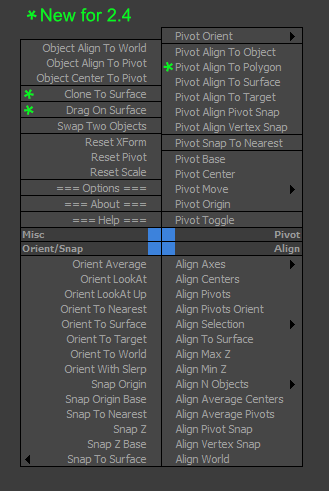
Pivot & Align Tools (PAT) are a set of macros bundled into a quad menu that allow you to perform various object alignment, pivot alignment and object snapping functions... among others. Most of the functions can operate on a selection of multiple objects at once, including grouped objects as part of the selection (open or closed).
NOTE: This script now handles quad setup for both 3dsmax 2025 and above, as well as previous versions of Max.
See online guide in links section.
The "LBTools - PAT Quad" menu can be found under the Quads tab in Customize. Assign hotkey to access it.
Latest Updates:
Version 2.5;
- Quad menu now works with 3dsmax version 2025 and above for the new menu system that replaced the old one. Previous versions are still supported.
Version 2.41;
- Fixed quad submenus from creating duplicates after each 3dsmax shutdown, due to not unregistering existing submenus before creating which caused config file bloat.
Version 2.4;
- Added "Pivot Align To Polygon" which aligns the selected object's pivot to the center of a single polygon selection and orients it to the surface normal.
- Added "Clone To Surface" which allows creating of new selected object instances onto a picked surface for each mouse click, with optional dragging via the options menu.
- Added "Drag On Surface" which allows a selection of objects to be tagged as draggable. It will use each of the selected object's negative local Z-axis to find any surface intersection point in the scene and continuously snap to its surface normal. The quad menu toggle will display a tick to indicate status.
The "LBTools - PAT Quad" menu can be found under the Quads tab in Customize. Assign hotkey to access it.
Installation:
Drag the MZP file into your Max viewport. A restart will be required to initialize the quad-menu.
Files will be copied to...
C:\Users\<userName>\AppData\Local\Autodesk\3dsMax\<maxVersion>\ENU\scripts\startup
| Attachment | Size |
|---|---|
| old_lbtools_pivotaligntools_2-41.mzp | 21.59 KB |
| lbtools_pivotaligntools.mzp | 26.75 KB |
Comments
Re: not show as quads menu
Hi,
This should be fixed now in version 1.1. The quad items are now clickable even when nothing is selected.
Lorne Brooks
not show as quads menu
fix please
https://www.youtube.com/watch?v=qqFg8NQPcsw&feature=youtu.be