3ds Max | Scripts

RadiosityParam

5 votes

"This script exports the radiosity parameters of a scene to a text file. It just works for a logarithmic exposure coontrol solutionThe script can be useful for anyone how is lost on a radiosity render and wants some help from the 3ds VIZ newsgroup."

RadiositySettingsManager

2 votes

Allows you to quickly save and restore the 3ds max 5 radiosity settings.

Radius

11 votes


buy it on  : http://hocuspocus-studio.fr/tools/product/radius/


Radius is the version 2.0 of my previous tool radius Influence : vimeo.com/35854355

It's really a tool for motion graphics artists.

It comes with a lot of updates and new features :

Radius Scale

1 vote

Radius Scale sets the working pivot to the intersection of 2 coplanar lines, then selects the loop between the initial selection and switches to the scale tool. Useful for changing the radius of rounded corners. Right now the script references the Smart Loop feature of Miauu's Script Pack 2. I'm using it to loop between the 2 selected edges, but if you don't have his script you can delete the following lines and select manually instead,or come up with something else that does the job, or buy his script :)

macros.run "miauusScriptPack_vol2" "macroSP_vol2_SmartLoopDotSelection_UI"

radolomeo car park

5 votes

I am working now on a script that will help with car parks. It is supposed to create randomise cars over even huge car parks. with one click solution you can generate cars parking spots and set colour scheme, probability and even angle of cars. you have control on number of spots in length and width, size of a parking spot and angle of parking spots.

quick overview: select cars - add selected cars models to library(models have to have preffix: "pix_"

create parking - create parking plane on ground geometry

car pro - car probability (% of cars on parking spots)

radolomeo copymat

2 votes

A WIP script for copy/paste materials between max sessions and local network.
A network script is being developed and tested in the meantime.

Similar UI as Copitor script.

5 slots you can save or copy materials to.

All works as far as selecting the same folder for any other session of max, or any other workstation within local network

right mouse click, then select object to copy material.
left mouse click, then selec object to paste the material.

RADOLOMEO extrude

3 votes

Uploaded version 0.9 of the script. Much more tools to be checked.
Not optimized too much.

Tools:
- prepare - converts model to editable poly
- extrude to - extrudes selected face to the point of mouse click
- bridge to - bridge tool
- make open - make an opening on selected face, no need to select opposite face
- make hole - make opening with inset not to have overlapping faces
- smart extrude - finds the nearest face and select it for extruding
- make simple window - makes simple window on selected face. no need to select opposite face

RagDoll Utility Launcher

16 votes

RagDoll Utility Launcher. Simple macroScript for launching the RagDoll utility shipping with 3dsmax 6.0.

RailClone 2 File

0 votes

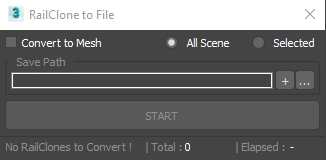
3dsMax Script for Saving RailClone Objects to External Files .

NOTE : The Total Number Contains 2 Numbers the First is the total railclone objects , Second is railclones that will be saved .

UPDATE 1 :

  • The Script Now Will Ignore RailClone Objects with the Same Segments (Only 1 RailClone will be Saved) .

RAL to RGB Converter (+Hex)

0 votes

--RAL to RGB Converter--

Little tool for quick converting your RAL color to RGB and/or hexidecimal values.

--Installation--

Put the RALtoRGB folder in your .\scripts\Startup\ folder and restart 3dsmax.

In most cases this will be something like this:

C:\Program Files\Autodesk\3ds Max 20xx\scripts\Startup\

where 20xx is your 3ds max version.

Find the category named RALtoRGB in your Customize User Interface Dialog and then drag it on toolbar or assign a shortkey to it.

==Usage--

In the UI of the script fill in your 4 digit RAL code in the RAL field and click CONVERT.

Syndicate content