3ds Max | Scripts

.mov Preview Maker

33 votes

.mov Preview Maker

version b2

 written by Mayec Rancel

(macroScript)

Description:
Creates a preview .MOV, even in x64 max (by default it's impossible in x64 max).

You need to have Quicktime installed for this to work.
You also need to have the companion "qtSeq2mov.js" script (included in package) in your
default scripts folder (e.g. "C:\Program Files\Autodesk\3ds Max 2009\Scripts").


.Net main menu in one line

2 votes

dotNet,menu,main

.ply file importer

9 votes

Here is a maxscript that reads a .ply file and creates a mesh for it (note that for big meshes this is very. very slow).

.timo - Project Manager

0 votes

This time, i’m creating script for my final project in my university :D

Based on Asset manager created by Stephen Putra in my previous company during my internship, i tried to recreate it in 3dsmax since there we are using maya.

By using this tools i hope to achieve good, clean and effective project management for my final project.

Project Manager for 3DS Max

.timo - Renamer

1 vote


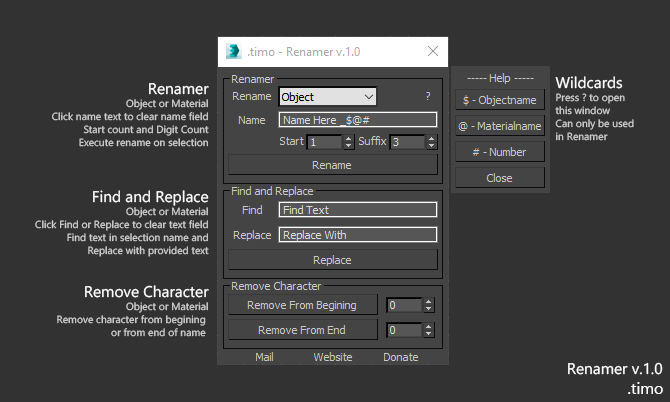
Renamer for 3dsMax

Renamer allow you to quick Rename one or multiple object using custom settings that is provided

How to use:

1. Select Object\s

2. Fill in requred text

3. Execute

Installation: Drop The file in max viewport and go to Customize ==> Customize User Interface ==> Category: .timo ==> .timo Renamer

Tested on 3ds Max 2015

.timo - Selection Tools

0 votes

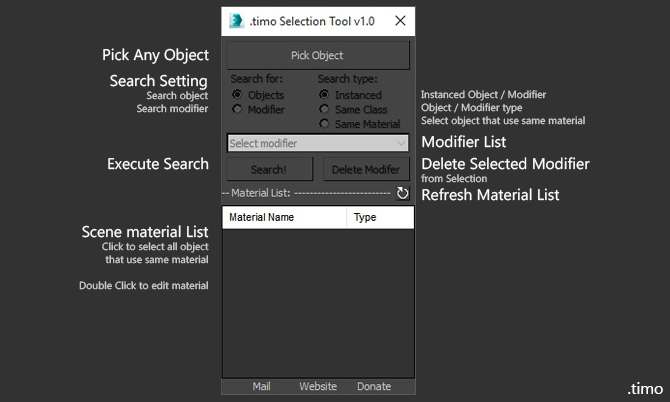
Selection tools for 3dsMax
Selection tools allow you to quick Select one or multiple object using custom settings that is provided

How to use:

0-255 to % Converter

11 votes

Calculator for converting percentage values to 0-255 values and back. Includes a color swatch that updates with the grayscale value equivalent.

1 Click AO Render

3 votes

111_cameraMatch

12 votes

This is a script that creates camera according to perspective lines on your image. It is sort of a beta version and has no error handling yet, so be warned:).

1 - get an image for which you want a camera being created.
2 - run the script (it is ordinary maxscript).
3 - press first button in UI and select the image
4 - an image plane and helper curve will be created
5 - modify helper curve (subcurves) so that they follow perspective lines, the vanishing points with three pairs of subcurves

111_ImagesAsPlanes

0 votes

The script creates a plane for an image file specified and assigns a standard material to it, visible in viewport. Nitrous driver is pushed to 2048 texture size.

Syndicate content