3ds Max | Scripts

Group Manager

1 vote


This is a tool for listing and managing groups.

Features

- Group in local space, and world space.

- Group by Point Helper, in local space, and world space.

- Toogle between regular groups and Point Helper Groups

- Toggle selected Group open/close

- Select the groups in the list

- Double click a group name to zoom to the extents of the group/helper

Webp to jpg

2 votes

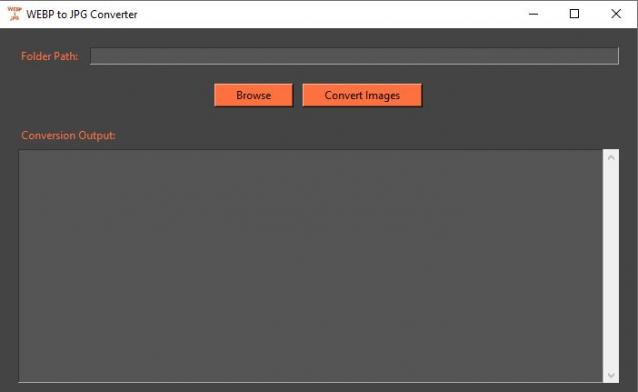
This is not a 3dsmax script but a stand alone application.

Double click the .exe file, browse to the desired folder (you won't see the files while browsing), press convert images.

All webp files in the folder will be converted to jpg

edit: It might be flaged as trojan by your anti virus,it is false positive. I'll try to find a solution to this annoying problem.

EasyIncludeExclude

1 vote

This Script will simplify the process of including or excluding objects from lights.
Instead of choosing objects from the list as usual, you just need to select both objects and lights and click the corresponding button (include or exclude), for each action you can either add to the current list or replace it completely or even remove selected objects from the list.
No more endless scrolling to find the objects you need to include or exclude!
Also works on multiple lights selected.
Tested With Standard,Vray and Corona Lights, might work with other renderers...

Viewport Bookmarks

5 votes


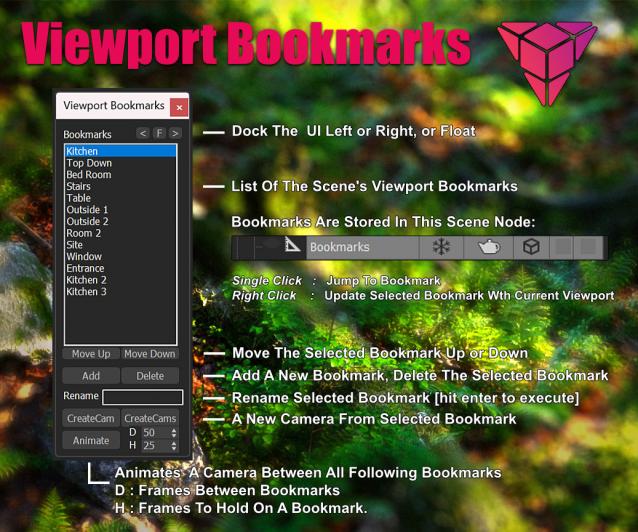
This is a tool for bookmarking viewport positions. It's especially useful in large scenes.

Features
- Add and remove viewport position bookmarks, and name them.
- Switch between bookmarks by clicking on the bookmark name.
- The window is dockable
- Cameras can be created from the bookmark, based on the active renderer (Arnold, Vray, Corona, etc.)
- The data is stored persistent in a scene node, which can easily be transferred between scenes:

PivotAlignTool V2.0

1 vote

https://www.youtube.com/watch?v=9JdOjsukmuk
show case video

A handy tool to help Align pivot point to object selection cage

Batch Retopo

2 votes

This Script is intended to retopo multiple objects at once, it has a symmetry option and a density based on surface area option to get the same mesh density across multiple objects.

If you check "Keep Modifiers Stack" and you have symmetry on, you will see that there is a subdivide and a vertex weld modifier added to the modifiers stack, it was needed to avoid gaps between symmetry seams, the built-in"Preprocess Mesh" wasn't working well on open surfaces.

Multimaterial from Files

0 votes

The script lets you pick multiple image files from your drive and creates one material per file, with the image assigned as diffuse texture, and builds a multimaterial with all of them. Then assigns the multimaterial to the selected objects.

Interactive Retopo

1 vote

This script assigns the Retopology Modifier and interactively updates it.
Works well up to 10.000 polygons, depending on your machine.

Features
- Interactive Retopology based on percentage of the original polygon count.

Install: Drag and Drop to the Viewport
Tested in Max 2024, 2025


Max-选择集简易工具 Selection Set Editor

0 votes

ASvoe Tools 2.0

0 votes

ASvoe Tools 2.0. (kickHotBox 2.0 / ViewHotBox 2.0) - Script for 3DsMAX.

A script for quick access to modeling functions, also access to material and much more.

Скрипт для быстрого доступа к функциям моделирования, также доступ к материала и многое другое.

Syndicate content