3ds Max | Scripts

Curtain-wall Wizard

14 votes

Update : URL link updated as the old link was wrong. Apologies for any frustration caused!

The Curtainwall Wizard allows you to take any polygonal object and
convert it into a curtainwall system; complete with glass, mullions,
and silicon joints. The resulting curtainwall is parametric so you can
make changes to the base mesh and it will update model in realtime.

Please see the page on my website for more information on this script .


SketchXtrude 0.95 beta

14 votes

SketchXtrude 0.95 beta allows for freehand face extrusions within 3dsmax much like modo's sketchXtrude. You can twist and taper extrusions using keyboard combinations and the onscreen rollout.

many thanks again to Bobo, that align face function you posted is quite a gem ;).
ImageHost.org

aerender

14 votes

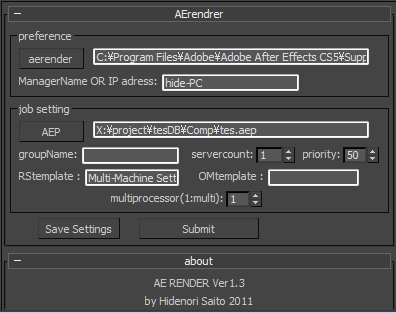
aerender is a script which sends AE job from 3dsmax.

Installation

  • Download installation file
  • UNZIP " 3dsmaxROOT to root folder of 3ds max " Start 3ds max
  • Go to Customize>Customize User Interface>Toolbars> Category "HideScripts">Action "aerender"
  • Drop Toolbar

Before a rendering

ConStructOr

14 votes

This is a WIP function collection to make the working with structs in maxScript easier.
It's kinda inspired by: 1.Garp's Primitive maker in that you can quickly reDefine structs and 2.the lack of functions provided by maxScript.

The only functions in it so far are:

  • addVar - add a property to a struct
  • gotProperty - the equivalent of hasProperty or isProperty functions for a struct

Let me know what kind of functions you'd like to see in here

Rate It !

14 votes

Rate It banner

What's new in 1.1 :

- Added annotation Mode : click on your object, add annotation !
- Snapshot mode : create multiple snapshots of an object (including annotations)

Rate It! allows to review objects of a scene in order to evaluate (validate or reject) and rate them. It features a light interface, a comment box to add comments to your objects, a snapshot function and the publication of a review HTML file.

FreeSceneBitmaps

14 votes

A Macroscript that just executes the FreeSceneBitmaps() function in MAXScript. Very useful for freeing up memory after a render.

Incremental Transform

14 votes

A script to move or rotate an object set of ObjName[_###] Will work on multiple ObjNames, but provides confirmation request for mis-matched object base names. Objects are sorted in alphanumeric name order for incremental transformation, i.e., obj_001 +10 deg., obj_002 +20 deg, obj_003 +30 deg...

Axis-space selectable. Not very elegant, but seems to work OK.

Connect Always

14 votes

By default, Max has two separate commands for Connecting Edges and Connecting Vertices. You had to have two menus for both of them.With Connect Always, you just have to select the vertices/edges and hit "Connect Always"

Here is the code if you dont want to download:-

macroscript Connect_always
Category: "Butt tools" buttonText: "Connect Always"
(
$.EditablePoly.ConnectVertices ()
$.EditablePoly.ConnectEdges ()
)

The category and buttontext is needed if you want to put it in a menu or quad.

[CREDIT}

Sort Render Elements

14 votes

This script will place your Render Element files in named subfolders according to where the main pass is stored and what the name of the Render Element is.

Example:

Main pass is set to render to:
C:\myProject\renderoutput

Rendered Elements like Alpha, Specular, Diffuse etc. will be placed at:
C:\myProject\renderoutput\Alpha
C:\myProject\renderoutput\Specular
C:\myProject\renderoutput\Diffuse
etc.

Enable this script as a Pre-Render script:
Render Setup Dialog -> Common Tab -> Scripts -> Pre-Render -> browse for the script file

ScriptSpot Search

14 votes

 Like 3ds Max InfoCenter but then you need to search for help in scriptspot.com

Syndicate content