3ds Max | Scripts

InsetFix Modifier

16 votes

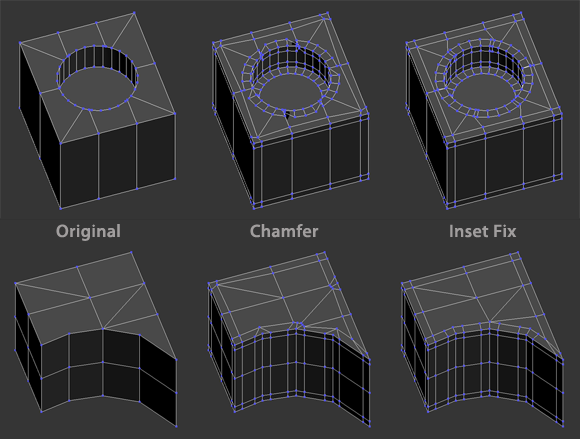
An inset-by-SG type modifier that works similar to Chamfer modifier when set to zero tension. However, the max chamfer modifier is highly topology dependent and doesn't work well with diagonal and unconnected edges. This modifier fixes that behavior:

The insetFixChamferStack scripted modifier automates the process of using the InsetSGFix modifier with a Chamfer modifier for a quick and clean rounded edges effect.

Select By Diffuse

2 votes

A script that selects all objects in the scene based on their diffuse color. This is most helpful for imported PDB files in which all the elements have unique materials, but share a diffuse.

Color can be chosen from object or by color picker.

Vray -> Redshift material converter

2 votes

Hey everyone,

Happy to share a script I've been working on recently. It lets you to convert your Vray-prepared models and scenes to the up and coming Redshift in one click.

Quadro buttons - hotkeys on four buttons

1 vote

Allows 4 buttons to add many features. If you are tired of running around the keyboard as a pianist and assigning a bunch of combinations, you have the opportunity to put a script and use 4 buttons for modeling (the main functions are assigned).

It works like this: Functions for Editable Polygon, Edit Poly, And some modifiers, are assigned to 4 buttons, which work in different modes in different ways, depending on which sub category you are in (or which modifier is currently selected.)
Sory for my English

Cleaning Menu Duplicates

0 votes

Cleaning Menu Duplicates
(清除重複的 menu 項目 ,累積太多 會嚴重影響效能)
check your menu file : shelllaunch (menuMan.getMenuFile()) ""
(可以用上面指令開啟你的menu檔,檢查檔案大小, my MaxStartUI.mnux : 392K)

1. place in .........\scripts\startup\
(把 Cleaning Menu Duplicates.ms 放到startup 內)

2. start 3dsmax
(開啟 3dsmax)

3. close 3dsmax
(關掉 3dsmax ,此時就會自動清理)

4. start 3dsmax
(再開啟 3dsmax )

5. save CUI
(存 CUI 檔)
OK

Refresh Icons

0 votes

Macroscript for making a button that refreshes button icons using colorMan.reinitIcons(). That's basically the entire script right there. :)

SnapSwap

2 votes

A tool for replacing the currently selected geometry with a same named snapshot (old model is deleted). Can be used for dealing with corrupt geometry.

To use: Run the macroscript, and add SnapSwap to a toolbar from the category "# SP_MeshScripts".

WorldViz R4 Lightmap to R5

1 vote

This script is for users of WorldViz software to aid in the conversion of scenes using R4 materials to R5 materials. Specifically, this swaps baked maps from their old slot in Standard materials (self-illumination) to their new slot (ambient).

Sanitize Object Names

2 votes

Removes special characters from object names which can cause issues with network rendering. These often appear when bringing in a model from Revit.

- Inch and feet characters (" and ') are replaced with in and ft.
- Both 's and s' are replaced with s.
- Most other common special characters are currently replaced with underscores.

ShellBake: Set Up Shells for Baking VRay Lightmaps

2 votes

To transfer maps from one type of material to another after a bake for game exporters that primarily look for Standard materials.

This is currently limited to just the diffuse map.

To use: Run the Macroscript and add ShellBake to a toolbar from the category: #_SP_BakeScripts

Syndicate content