3ds Max | All

Selection Palette

0 votes

Selection Palette is an easy-to-use customizable tool for creating and editing visual selection sets on the fly. It is a great way to speed up your work as an animator, since you can create your own way in minutes to handle controls. It is also useful for riggers or anyone who needs a quick visual way to create selection sets.
Feel free to contact me if you have any questions about the tool. Enjoy using it!

Selection Toolbox

1 vote


Quick Select

Objects In View
– Selects all objects visible in the current viewport

Objects Not In View
– Selects all objects not visible in the current viewport

selection tools

12 votes

Several macros to set coordinates system - toggle window/crossing selection - and to change axis restriction. Put them into your favorite quad menu - and you can ditch the main toolbar away. Good for viewport-space-hungy users.

Selection-Switch

1 vote

Switches quickly between two selections (objects or sets).

Useful for any type of jumping back and forth between two objects - like in alignments.

selectioncommander

8 votes

"Many new selectioncommander-commands are available now. the commands.txt is in v6.2 and there are ca 140command-presets available. the selectioncommander is a script which manage and interpretates simple maxscript-like commands from the commands.txt. the command will be executed (if possible) for all selected objects...but you can also define commands which run without selected objects.

selectionHighlighter

9 votes

This script simulates the Selection Highlighting mode from Silo in max. The idea is if you hover over an object, the object is selected, if you hover over a vertex, it selects the vertex, if you hover over an edge, the edge is selected, etc. No need for extra mouseclicks. Autodesk has half added this feature, this script goes all the way to adding full silo style selection highlighting. Note: This only works in max 2008.

SelectionMan

7 votes

Miscellaneous selection tools (randomly select a set of objects - save/load sub-object selection).

selectionRandomizer

5 votes

Will randomly select objects based on a value provided.

Selectionset Manager

4 votes

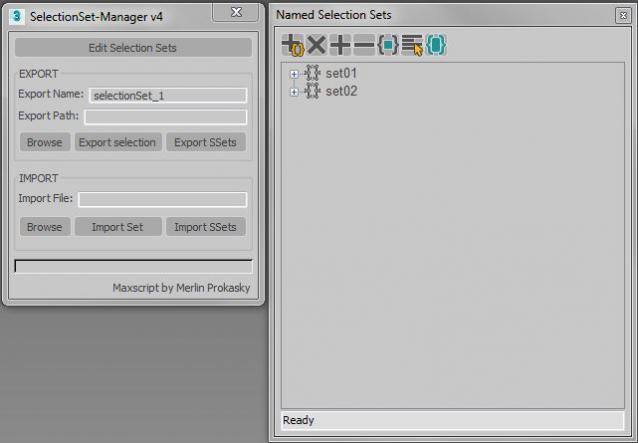
Tool for exporting and importing selection sets

Simple tool to transfer selection set between Max files.
Selection sets depend on the naming of scene objects.

Functions:

*export of actual selected objects as selection set
*export of all selection sets in scene
*import of exported SelectionSet files (.txt)
*import several files (.txt)

Manual:
Export:
*set name of export file
*paste or browse export path, otherwise it will choose the actual Max folder

SelectionSet Tools

3 votes

This script allows you to export and import of Selection Sets as XML file. By selecting name in list, you can select the Selection Sets in scene.

How to use:

・Save SelSets / Load SelSets Button:
Export and Import selection sets in 3dsmax. In Load Selection Set Window, you can select any sets to import.

・update list Button:
synchronize selection sets list in scene and Selection Set List below.

・Selection Set List:
select set name in list, then the objects are selected in scene.

Syndicate content