3ds Max | All

3DS Max - V Ray - VRayRenderID + Photoshop

0 votes

In this tutorial, we will learn about the VRayRenderID render element, where you can create a separate file for the rendered image, and this file will contain a distinct matte color for each object in the scene. This is useful when doing a post-production in software like Photoshop, for example, because you can isolate every single object, and work on it separately.

UI_Align_Rotation_XYZ.ms

2 votes

Align Position Rotation and Scale of selection to target from Center to Center

Envelope_OuterRadius_Decrease_Point_1.ms

2 votes

This Script will decrease the outer radius of the currently selected envelope in skin

Dark Mode Listener

1 vote

Dark listener

A plugin to auto start 3ds Max with dark / night mode for the listener.

image

Installation

- download the repo
- move the dark-listener folder to a plugin path. See official instructions: https://help.autodesk.com/view/MAXDEV/2023/ENU/?guid=packaging_plugins on package paths
- restart max, should auto load on startup.

LockUnlock_Position_Lock_X_Toggle.ms

1 vote

Toggle X Position Locks for the selected objects

LockUnlock_Scale_Z_UnLock.ms

3 votes

Disable Z Scale Lock for the selected objects

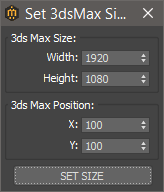
Set 3ds Max window Size & Position

0 votes

With this script you can set the position and size(in pixels) of 3ds Max window.


How to install:

drag and drop the miauuSet3dsMaxSizeAndPos.ms onto any 3ds max viewport.

Go to Customize -> Customize User Interface -> miauu category and you will find the "Set 3ds Max Size and Pos" script.

RandomFaceRemover

0 votes

Takes any mesh object - converts it to an editable mesh - then rendomly removes faces based on a weight or percentage faces removed. Made to remove random faces from a particle emitter object - hence randomizing where particles tend to be emitted.

Parkalot

1 vote

Parkalot is a quick-merging tool I've been personally using for ages within 3Ds Max.

Parkalot lets you 'park' your object in a quick and user-friendly way. Simply name the project and file, and 'unpark' the scene where you need it!

Perfect for keeping your scene merging or object sharing between artists quickly and easily.

Make sure to set up a 'parking' directory for use between different max versions(or artists).

Any feedback is much appreciated. Enjoy!

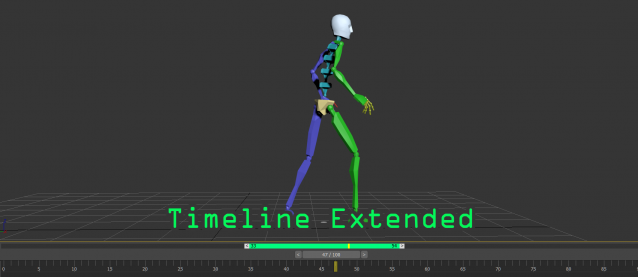
Timeline Extended

0 votes

A timeline extended tools for easily playback on specific range, this tool was created by the ideas of pro animator.
This tool is very useful for those who are doing animation and want to have extra control to focus on specific time range.
Here is the main features:
- allow to playback sub-range of animation without changing the timing configuration
- drag the range panel(green bar) to quickly adjust the position
- quickly adjust the sub-range duration by dragging the start/end handles

Syndicate content