3ds Max | All

Auto mesh Skinning

13 votes


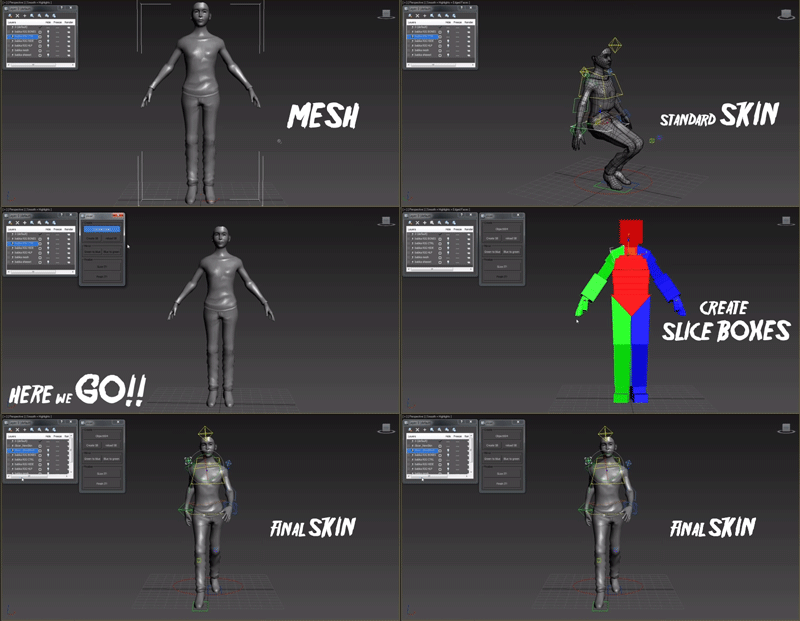
This script is for fast and accurate mesh skinning, but it won't generate skin for production ready. There will by always something to correct weights.

It's very simple all You have to do to set slice boxes. Just watch video and everything should be clear.

In version 0.6 there is simple automatic mirroring made. The rigg should be set in x=0 position.

All comments and suggestions are welcome.

------------ version 0.7 -----------

- Script didn't work with bones which had space in names - Not any more :]

Polyline Pro

19 votes

TeaCup

100 votes


+WHAT IS IT?

VP | Walls & Tiles

10 votes

Walls & Tiles Header Image

DarkScintilla: Maxscript Editor dark scheme

43 votes

A dark color scheme for the Maxscript Editor, inspired by dark schemes available for other IDEs

As i was doing more and more max scripting lately, the urge to do something with the eye hurting Maxscript Editor colors escalated. So i sat down today and had a walkthrough on the various options Scintilla (Maxscript Editors core) provides.


WallBuilder

13 votes

A new tool quickly made on my spare time for walls creation.
special options : offset to put different walls together ; you can create a wall following a spline ; random fonctions to randomise bricks ; random colors in a multisubobject.
you can keep all the bricks separate (for exemple to simulate physics destructions) or collapse your wall in one mesh.
You also can use boolean to create holes or windows.

Ultimate Painter

20 votes

Quick updates :
1 : Add a selection of objects in the list instead of having to pick them one by one.
2 : You can undo (Ctrl+Z) what you just have painted after exit the painting tool (right click or escape).

The result of two days of experiments around MouseTools.

You can use it to paint and distribute objects (copy or instances) on the grid or on surfaces. With Random controls, collisions detection, attachment surface...
You can paint all the max objects (geometries, helpers, proxies...)

RTTassist

538 votes


About:

3DS Max File Version

2 votes

This VB-compiled tool serves just to test which version of Max was used to create the saved Max file. Since 3DSMax doesn't do a good job at writing its version in the file's properties - I use this tool to find out what version it was created in so I can go back to the proper 3DSMax to edit the file.

If you have multiple versions of Max installed and want to know what version you used on an old project - use this tool to find out.

[ 3dsMax <> UVLayout ] UVPipe mod by miauu

11 votes

This script will allow you to send the selected objects to UVLayout and get them back.

This is useful when you wants to have more than one object in the same UV square.

All editable poly objects from the selection(selected objects or groups) will be sent to UVlayout.

Syndicate content