3ds Max | Scripts

MultiChamfer

6 votes

Update:
Now values entered with enter are accepted - and bug fix concerning loop check.

KeepVrayLightIntensity

2 votes

Works only (for now) with VrayLight Type:Plane.
Set the Vraylight half-length and half-width of the plane and the multiplier will be set automaticly to preserve the VrayLight intensity.

Edges From Vert To Vert

11 votes

Tool for edge selection from vertex to vertex(point to point)
Has interactive update so when you move the mouse over the selected object you can see what would be the edge selection. By clicking you add the current vertex. By clicking + ALT over selected vertex you deselect it. The red vertices are the selected ones - the blue is the currently selected vertex. When you click RMB the tool stops and the edge selection from the SELECTED vertices stays - if you click the RMB with ALT you clear the selection.

VrayExposureTool

17 votes

A tool for tuning the color mapping in V-ray. The script renders only once. After that it works like post effect so you have interactive update of the scene without need to render again. Works ONLY with linear color mapping, exponential and reinhard (not 100% correct)

1.43 Update:

  • Added "render" button, the script won't render at startup
  • Added option "show vfb"
  • Added option "Optimize render"

Bake

24 votes

Bake various properties of objects (ie. procedurally animated object into animated meshes - procedural animation into simple keys - etc).

AutoMorpherController

1 vote

It helps the user to quickly create controllers for character's facial animation. It creates them and links with morpher channels.

Just 4 steps:
1) Pick Character.
2) Set the morph you want in each slot.
3) Choose controller type
4) Name Controller, Press Create.

Additionally, you can use "Reset Channels" button if you want to reset your morph modifier channels after creating controllers to erase expressions.

Feedback will be appreciated.

Done in 3ds Max 2012

turboTools - Making your workflow that much faster

83 votes

tuboTools V2

Auto Chamfer

11 votes

Edge chamfer script. Similar but much simpler than EdgeChEx ... and no plugin :)

select object / objects (primitive, poly, mesh) and CHAMFER
(output is Editable Mesh)

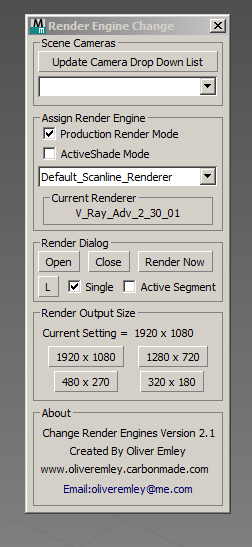
Change Render Engines

4 votes

Change Render Enging ScreenshotV2.1 

Change Render Engines V2.1

The script allows you to do the following:

 - Select any cameras that are in the scene and automatically switch to that view

 - Update the camera list at the touch of a button

 - Assign Production or ActiveShade rendering mode

 - Assign a Render Engine to the Render mode that you are in

Move with Keyboard

26 votes

Macroscripts for moving polygons and objects with keyboard.

UPDATE 02 June 2011

Syndicate content