3ds Max | Scripts

Select Similar Objects

50 votes

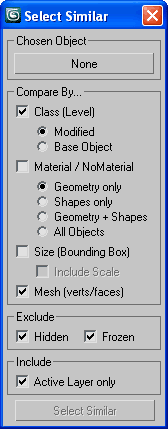
Select similar (to chosen) nodes by assembly of similarities.

SSObj

Time Step

20 votes

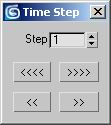
A Time control tool: For animators who are too lazy to calculate time intervals. Just set the number of frames you want to skip then use the buttons to jump forward and backward in time. You can also use the lower buttons to move one frame in time when you are using "Key mode toggle".

Legolizer

13 votes

Converts an object into a lego like structure.

View an example lego teapot image created by Arne 'Arnage' Bezuijen or another example lego apple image created by Shane 'Percy' Purcell.

WkXmlLibrary

66 votes


The purpose of this script is to give an easy and full access to XML files: creation, reading and modifications
It is intented to be used with the same flexibility as a library: instanciate the structure where you need it
in your code and use the member functions to manipulate the XML files.

WkXmlLibrary - A WerwacK script at www.werwackfx.com

This script strongly relies on the DotNet interface.

Video Capture Select Viewport

33 votes

This is a Script that allows to recording and Grab the active viewport during the work. You can select any viewport during recording. Veersion 1.1

Based on 'Create a Quick Preview' by Borislav 'Bobo' Petrov (www.scriptspot.com/bobo).

New in release version 1.1:
Revision code (work in progress)
Revision the Interface
Add save path button image "Output Save Path Image"
Add save path button video "Output Save Path Video"
Add checkbox uniquename file image "Uniquename File Image"

Cleaning PhysX Menu Duplicates

13 votes

If you customize your UI a bit and have installed the "3dsMax 2011 Subscription Advantage Pack" or the NVidia PhysX utility for 3dsMax, you should notice that it adds menus to the Customize Dialog every time you run 3dsMax. In a month or so, you will probably have to scroll over a thousand duplicates in the Customize Menus Dialog.

I had a quick look in the PhysX MaxScript files, but I don't want to mess with it. Instead, I made this simple script, that will remove all PhysX menus when 3dsMax shuts down. Don't worry, they'll be added again next time you start.

autoVP - MouseOver Viewport Switcher

50 votes

autoVP automatically switches the active viewport to the viewport the mouse is hovering over. This allows you to interact much faster with manipulators in that viewport, select objects, get properties, etc.

Script can be used 'as is' as well as be accessed by scripters (e.g. the function to get the viewport under the mouse is exposed).

Pin Tool

61 votes

This script allow you quickly pin lot of objects to deformable geometry. For example – buttons on clothes or spikes on hedgehog or anything else.
I will be happy if you find it usefull and show me your way to use it. =)

FlyWiz - Vray Flythrough animation wizard 1.1

57 votes

This tool manages for you all the boring stuff to achieve a flythrough animation with Max And Vray.
All changes are made in the engine to help you control and render each necessary step.

Finally it can also do all the process in one click ! 

infoOverlay

55 votes

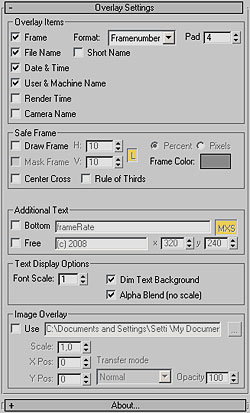
infoOverlay UI screenshotUpdated to v0.9 - This Render Effect displays additional information such as frame number - file name - render time etc. as overlay onto your rendered image. Useful for previews - previzualisation and other non-final renderings - should work with any 3dsmax-compliant renderer. All parameters animatable. 

Syndicate content