3ds Max | Scripts

Skin Or Die

30 votes

The SkinOrDie Script is a set of tools which will improve your workflow for skinning enormously. It's intention is to completly replace the interface of the standard max skin modifier and give you a more intuitive one.

Racer DOF Importer

0 votes

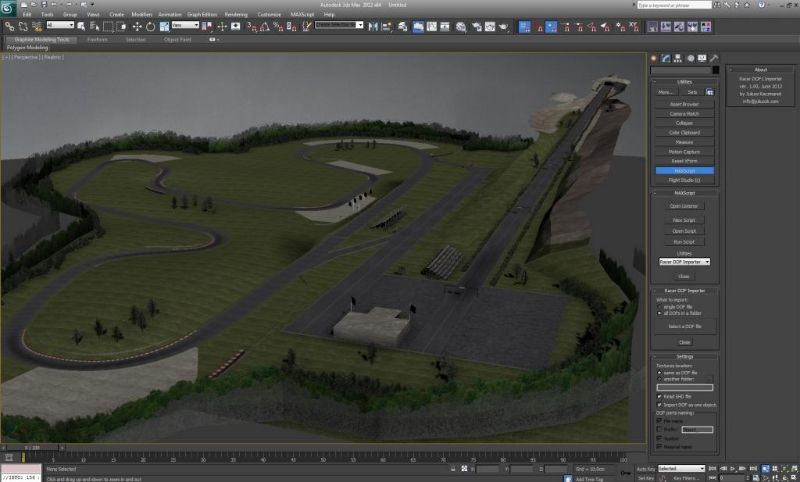
This scripted Utility will import geometry and materials from the DOF files, used in Racer game. It also reads accompanying SHD files for detailed shader information. Allows cars and tracks models import for further examination or editing.

A sample track imported into Max:


Installation and detailed information in the ReadMe file zipped with the script.


Hide|Unhide Skeleton

1 vote

Simple tool for hide or unhide different "skeleton" objects like BoneGeometry, BipedObject, CATBone, HubObject from your character models.
Requested by titane357
Forum topic Hide / Show bones

2-Tangents circle

2 votes

This script allows to create a circle relative to two tangent segments selected in a spline shape. 

New : Another version of the script that allows to create a 3-tangents circle has been added.

Lumberman

5 votes

"Chop away the wood" :)
Delete overlaped objects/proxies.

Plain script with straightforward idea behind
that partially fill user request.

No big choice for testing overlaped proxies.
Max Intersects function test bounding boxes overlap.

This is very quick and dirty solution.
Some extra control on overlaped amount can be done
using boxes to represent objects bounding boxes.
This is not done here. It's not difficult and

Material view

13 votes

Quick display model to slate Editor.

Background tiled and angle.

Support HDR to slate view.

Reduce Test rendering time.

PhotobucketEmbarassed

Select By Size / Volume

16 votes

This script allows you to select objects by their size or volume, by checking their
- bounding box size (= bounding box volume) or
- the actual volume of the mesh (the calculation function for this is taken from the MAXScript manual, I think Bobo is the genius behind it ! :-) )

Zero

2 votes

A simple Script for moving the selected object to 0,0,0 at the touch of a single button.

To install simply copy the downloaded macroscript file to
C:\Users\(Username...)\AppData\Local\Autodesk\3dsMaxDesign\2013\ENU\usermacros

You may need to enable show hidden files to access the folder.

After that you open 3ds max, go to customize> Customize User Interface> Toolbars. Under category find Oliver Emley and then drag Zero to an existing toolbar or create a new one.

Load Material Library from path

12 votes

Select a path where all you material files are. Click the pull-down menu and select a material library, it will automatically load in the material browser. This is a macroscript, after running the script you will find it in the "3idee Tools" category.

La Ola

14 votes

Lo Ola creates wavelike delay motion. You define one master object and its slave objects. La Ola then links all the properties and modifiers you want via expression controllers. It does not create or copy any keyframes. Once set up you get direct feedback when you animate.

Syndicate content