3ds Max | Scripts

Layer Tools - Multi Move to Layer

2 votes

This Script Consists of 3 Small Scripts for Moving Objects Between Layers and The Fourth for Adding Toolbar Button.

Installing :

Drop the file to Max Viewport or Run it from Scripting Menu/Run Script - after Droping you can Find it in  .

- from Customize Menu/Custom User Interface /Toolbar/Category _Layer Tools_


- Drag the One with Icon to Any Toolbar .

How it Works :

iToo Forest Edge-Mode Boundray

3 votes

This Script will Solve the problem of Activating Edge Mode in iToo Forest Plugins .

- WORK WITH V-RAY AND CORONA ONLY (UPDATE 1.02 Support All Materials) .

How to Install :

- Drag and Drop the File or Run it from Scripting Menu\Run Script

UPDATE v1.01 :

- The 2 New Items are shown in QuadMenu  when no object is Selected , Fixed .

- Drag and Drop the File or Run it from Scripting Menu\Run Script , it will Remove the Old QuadMenu Items and Add New Ones .

Spline Trim Extend

2 votes

3DSMax Script for Moving Selected Shapes Vertices , Similar to Trim-Extend Behavior .

UPDATE 1.1 :

  • Keep Shape Pivot in its Original Position .
  • Make each Vertex Move on its Segment Direction .

UPDATE 1.2 :

  • Tangents are not Moving with the Vertices , Fixed .

NOTE : the Script still not Perfect on curved splines , (the result not like real Trim or Extend) .

Show\Hide User Interface

2 votes

By default in 3ds Max you can hide with shortcut: main toolbar, command panel, ribbon, but other things like status bar, menu bar, layer toolbar, snaps toolbar and other you cant hide or show easy. So i create simply script with 7 buttons for hiding all parts of interface. You can just put this buttons on quick access bar. Hope it will be helpful for somebody.

Many Thanks Pete Addington(Lonerobot) for idea with keyboard pressed buttons and denisT from cgsociety for realization of fullscreen mode.

Visibility Assistant

26 votes

A simple script to facilitate setting visibilty keys on individual objects, or collections of objects. There's a few pieces of interest about the the code - the script uses a mapped function, something that is usually overlooked in maxscript but is very useful. There is also a custom trackbar filter to only show visibilty keys. Finally, it is boxed into a struct which is a nice neat way of packaging the whole UI and methods into a single variable.  

FDK - Fast Drawing Kitchen

2 votes

Script for 3ds Max to creating kitchen elements end slider closet with different types of fronts and cabinet, with basic V-ray materials.

Reindeer Free

4 votes

Reindeer the node based render manager for 3dsMax is FREE to use during 2022 and probably longer.

Reindeer has been used for many years on lots of projects. It's a flexible tool not just for rendering. Use it for automating rendering or simulations or storing scene specific scripts in the scene file. Check out videos at the following link:

https://vimeo.com/channels/1054454/videos

It is free for the time being (possibly forever), due to the costs of making it commercial being higher than the revenue (classic lose-lose).

Render Node Manager

17 votes

.
- NEW - monitor node status: on/off, CPU, Memory and DR status
- NEW - connect with nodes by - RNM Server
- much simpler to setup (RNM Server works without Remote Desktop)
.
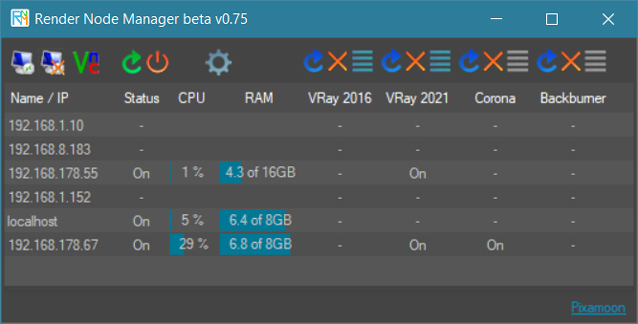
 
Render Nodes Manager is a network tool. It allows to remotely start / restart / stop DR (VRaySpawner, Corona DrServer, Octane Daemon) on selected servers / nodes.

It helps to solve typical problem when user cancel distributed rendering and render nodes don't pick up for some time...

It can also monitor status of the nodes: on/off, CPU, Memory ussage and DR statuses (if they run or now)


Object's Normal Fix

2 votes

Small Scripts to fix the Normal of selected shapes (Exrtude Direction)  .

- Select Shapes to Fix .

- Run the Script .

- One LeftClick on any Surface to get the Normal from it , then RightClick to Exit .

Another Script Added to Auto Fix Shapes Orientation .

* If you have 3d Curved Shape its better to use the First Script to do Manual Fix .

- UPDATE 1 :

  • Make the Macros Visible/Enabled When the Selection Contain Shapes .

- UPDATE 2 :

Dirtizer 2

5 votes

A very helpful plugin which can make your materials dirty in one click!
- You can control the level of dirtiness.
- You can make it dry or wet.
- Dirtizer supports Multi-materials (you can set random dirt to all materials at once)
- You can add your own textures of dirt. (Organize your textures in "Dirtizer" folder as you want)

Most render systems are supported now! Tested with V-Ray, Mental Ray, Scanline, Corona, Redshift.

Syndicate content