ScriptSpot

Script

CoronaColorCorrection-Auto

By SimonBourgeois · 2023-05-25

Version
1.7
Version requirement
tested on 3dsmax 2023 corona 9 and 3dsmax 2024 corona 10
Other software required
Corona Render
Date updated
2024-10-20
Votes
1
Download
Download
Description


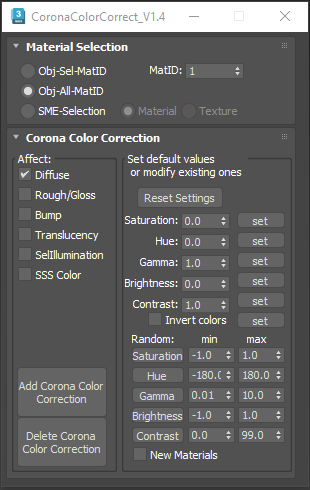
This script is intended to add and tweak settings of Corona Color correct nodes.

You can add some Corona Color correct with any specified values on any selected material slot (Diffuse, Bump, Roughness, Translucency, Self Illumination),the existing bitmaps will be kept inside the color correct.

you can also change any parameter afterward.

i've added some randomization to each parameter.

For example you can add some corona color correct on diffuse and bump with default value, then select only diffuse and choose a random  hue , then you select the bump and roughness and set saturation at -1 and adjust contrast or gamma to your needs. The randomize part will set a random value to the existing material so all objects with the assigned material will get a new color or new bump value, if you need to get each object to have a random color then you can use  "new material" (in the bottom part of the script), then the random values will be scattered across selected object materials, creating a new material for each selected object.

Installation as any other script, drag and drop in the viewport, then go to customize, customize user interface, tool bar, category "SimonScripts"

This Script is also part of this script : http://www.scriptspot.com/3ds-max/scripts/corona-material-automator

Tags: Scripts 3dsmax materials scripts plugins corona render color correction

Comments (8)

bug

yaochuxiongjiay · 2024-10-19

HI, this will be wrong in max2025, why is that? thank you

Hi,

SimonBourgeois · 2024-10-20

Can you explain what's the bug like or if you have any error message, I've tried version 1.6 in 3ds max 2025 with corona 12 and it seems to work fine at least in a simple test setup. I've just updated with the latest version that was included in this script: http://www.scriptspot.com/3ds-max/scripts/corona-material-automator, you can try version 1.7 maybe it will fix your problem.

doesn't work

fede4383 · 2023-08-19

Tried on 3dsmax 2023 Corona 9 and when I hit the button no color correct is add... pity

SimonBourgeois · 2023-08-21

Hi Federico,

Did you try on a Corona physical material ? because it is not compatible with legacy materials

i've been doing some updates to this script but it is now included in an other script, you can find it here https://www.scriptspot.com/3ds-max/scripts/corona-material-automator
maybe it will fix your problem, though it is still not compatible with legacy.

let me know if it doesn't work either.

without UI

llp103ping · 2024-04-04

Can you change the color correction to a script without UI? I want to use shortcut keys. thank you very much!

Hi

SimonBourgeois · 2024-05-19

I can make a script without UI to add a Corona color correction to the selected nodes in the slate material editor, but you won't have any other options, is that what you need?