3ds Max | Scripts

Frames-2-Milliseconds (Frames2MS)

1 vote

A quick converter from Frames to Milliseconds and vice versa

randofier

17 votes

hi there this is a new script i have done to collect the whole parameters in one place at my floater also i have added a new random to my script to make cool shapes crowd things with it so enjoy and have fun with it

installing
 after u run the script go to
Customize User Interface > Toolbars tab > under the category : polypic`s Tools > collect modifiers
just drag it to the main tool bar or whatever
enjoy

tested on max 32/64 2011 also watch the demo

EdgeSmooth

14 votes


EdgeSmooth is a free, open source plugin that makes smoothing in 3dsmax a lot easier. It allows you to smooth an editable poly by setting edges to "hard" or "soft". A "hard edge" means that the faces using the edge share no smoothing groups, a "soft edge" is the opposite. This will probably feel familiar to Maya users!

Remarks:
-The plugin uses smoothing groups, so you can mix it with using traditional smoothing. It may however change the smoothing groups on all faces in the object!

UV to MESH

5 votes

- quickly detach mesh elements from UV seams.
- Flatten the Mesh following the UV.
- go from your mesh to the flatten one with a morpher

Updates :
– faster algorithm
– better edge separation, avoid separate triangle faces

Wirecolor Toolbox

40 votes

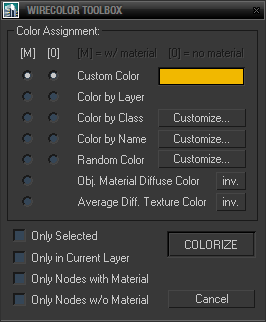
Simple toolbox for working with wirecolors based on various criteria including material diffuse color, average texture color and filters for node names and classes (for nodes wildcards and hierarchies are supported and encouraged).

Maxscript extended editor

46 votes

A script that adds some more functionality to the mxs editor.

SmartScripts Attach/Detach

1 vote

I am releasing these two small macroscripts i wrote to simplify my own workflow in 3dsmax.

they are inspired by the universal attach/detach macros made by Nik and feature much of the same functionality in addition to some extra ones. but code-wise they are complete rewrites.

SmartAttach MacroScript:
With single object selected does this:
-Disable any Turbosmooth/MeshSmooth/OpenSubDiv modifier(s) that are on top of the topmost "Edit modifier"
-Start attach mode

Step Gap Vert/Edge/Poly Ring (like modo selection)

73 votes

Modo selections style in 3ds max. Assign a hotkey(or button), select 2 verts/edges/faces woth desired gap between them and start pressing your hotkey. :)

Instalation: Drag-n-drop StepGapVEPRingLR.mzp and StepGapVEPRingLR.mzp in 3ds max. Go to Customize - Customize User Interface. Under "miauu" category you will find "Step Gap VEP Ring Left-Right" and "Step Gap VEP Ring Right-Left"

Big thanks to Anubis for his help.

CheckMate tools by POPA_3D - Turbosquid Contest Winner

8 votes

 # Script Features: 

the script is composed from 4 sub scripts:

  • Models Checker:

Check For Scenes and Objects Problems (flipped faces, Ngons Faces, Overlapping Vertices, Isolated Vertices, scaled objects, overlapping UVs, default Names, Hidden Objects, not grouped Objects, objects without materials, Missings Textures, defaults Materials names).

Batch check Files is supported.

lengthCalculator

38 votes

With length calculator you can easily calculate the length of the selected edges. Very usefull for arch modeling. In the next release it will also support shapes.

***I have uploaded a 2009 compatible version.

Syndicate content